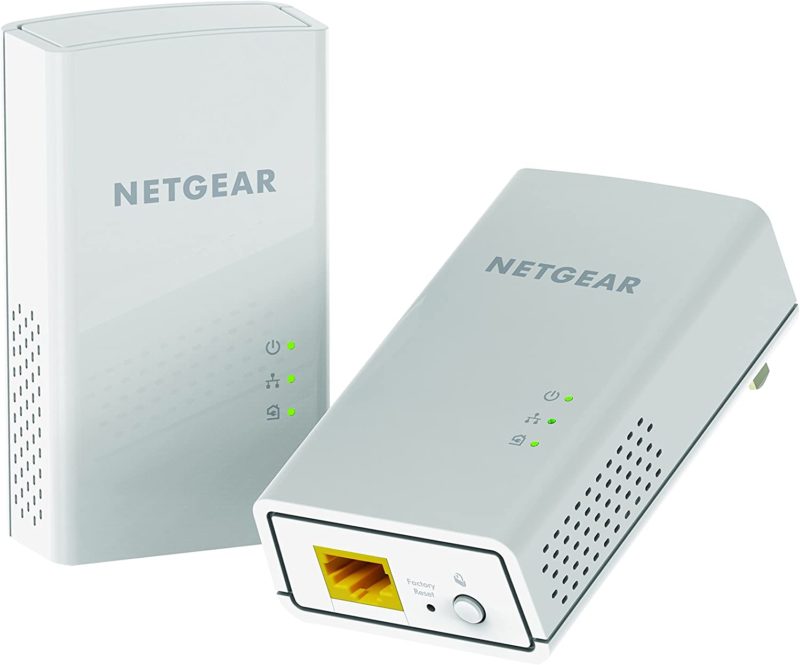
If your WiFi doesn’t reach certain rooms in your home — especially in older European buildings with thick stone or concrete walls — powerline adapters are one of the best solutions available. They use your home’s existing electrical wiring to carry a network signal, giving you a wired or WiFi connection in rooms where your router’s signal can’t reach.
I’ve been using powerline adapters for years and have tested several brands. Here’s what I’ve learned.
How Powerline Adapters Work
You plug one adapter into a power outlet near your router and connect it with an Ethernet cable. You plug the second adapter into any other power outlet in your home. The two adapters communicate through your electrical wiring, effectively extending your network without running cables through walls.
Most modern adapters also include a built-in WiFi access point, so you get both a wired Ethernet port and a WiFi signal at the remote location.
The Brands I’ve Tested
I’ve tried the top-of-the-line models from three major brands:
Netgear — My Top Pick
Netgear’s powerline adapters consistently outperformed the competition in my testing. Even when the advertised speeds were lower than competitors on paper, real-world performance was noticeably better — particularly download speeds.
Their current lineup includes models supporting speeds up to 2000 Mbps (theoretical) with pass-through power outlets, which is convenient since you don’t lose the use of a wall socket.
Devolo
Devolo is a German brand that’s very popular in Europe and often well-reviewed. In my testing, the upload speeds matched Netgear, but download speeds were roughly half. Devolo’s software and mesh-like features (dLAN) are polished, but raw throughput is what matters most to me.
TP-Link
TP-Link offers the most affordable options and they work reasonably well. A solid budget choice if you don’t need maximum performance, but in my experience they fell short of Netgear on both speed and reliability.
What to Look For When Buying
- Speed rating: Look for AV2 adapters rated at 1000 Mbps or higher. The advertised speeds are theoretical maximums — real-world performance is typically 30-50% of the rated speed, depending on your electrical wiring quality and distance.
- Pass-through outlet: Some adapters have a built-in power socket so you don’t lose the use of the wall outlet. Worth paying a bit more for.
- Built-in WiFi: If you want wireless coverage at the remote location, get a model with a built-in WiFi access point. Otherwise you’ll need a separate access point or connect devices via Ethernet only.
- Gigabit Ethernet ports: Make sure the Ethernet ports are Gigabit (1000 Mbps), not Fast Ethernet (100 Mbps). Cheaper models sometimes cut costs here.
- Number of Ethernet ports: Some adapters offer 2-3 Ethernet ports, useful if you want to connect a desktop, smart TV, and gaming console at the remote location.
Important Limitations
- Electrical wiring quality matters. Powerline adapters work best in homes with modern, well-maintained wiring. Very old wiring, or circuits on different breaker phases, can reduce performance significantly.
- Don’t use power strips or surge protectors. Plug adapters directly into wall outlets. Power strips filter the signal and dramatically reduce speeds.
- Performance varies by outlet. You may need to experiment with different outlets to find the best combination. Outlets on the same electrical circuit as your router generally perform best.
- Not a replacement for Ethernet. If you can run an actual Ethernet cable, that will always be faster and more reliable. Powerline is the next best thing when cable routing isn’t practical.
Powerline vs. Mesh WiFi vs. Ethernet
People sometimes ask whether mesh WiFi systems (like Eero, TP-Link Deco, or Google Nest WiFi) are a better solution. The answer depends on your situation:
- Mesh WiFi works well in open-plan homes or buildings with thin walls, but struggles with thick stone, concrete, or multiple floors — exactly the situations where powerline adapters excel.
- Powerline adapters are better when walls block WiFi signals. They’re also useful for devices that benefit from a wired connection (gaming consoles, desktop PCs, smart TVs).
- Ethernet is always the best option if you can run cables. Nothing beats a direct wired connection for speed and reliability.
In many homes, the best setup is a combination: Ethernet where possible, powerline adapters for hard-to-reach rooms, and WiFi for mobile devices.
My Current Setup
I use Netgear powerline adapters to extend my fibre optic connection to rooms where the WiFi signal is weak. The upload speed improvement was particularly dramatic — WiFi upload speeds were consistently poor, while the powerline connection delivers speeds much closer to the full fibre capacity.
If you’re dealing with patchy WiFi at home, a good pair of powerline adapters is one of the most cost-effective upgrades you can make — typically €60-100 for a quality kit that will last years.



Leave a Reply