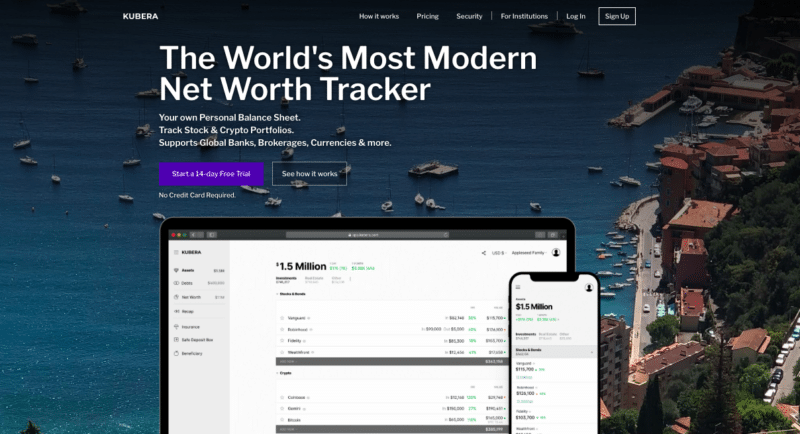
If you’re anything like me, your investments are scattered across a dozen different platforms. A brokerage account here, some crypto on two exchanges, a staking position there, a bank account in another country, maybe some P2P lending — and you’re supposed to track all of this in a spreadsheet?
That works for a while. Then the spreadsheet grows, the manual updates slip, and you realize you haven’t had an accurate picture of your net worth in months.
Kubera exists to solve exactly this problem. It’s a modern portfolio tracker that pulls together traditional and alternative assets into one clean dashboard — and it does it without trying to sell you financial products or mine your data for ads.
What Is Kubera?
Kubera is the brainchild of 3 friends who had earlier founded Webyog (database tools) and Newton (a popular email app), after which they had moved on along separate paths, only to come back together to develop this new platform.
In developing Kubera, Rohit Nadhani, Manoj Marathayil and Umesh Gopinath took off from the basic spreadsheets which they used to track their own personal investment portfolios and by combining solid tech with sensible design, transformed them into a modern portfolio tracking platform, which they named Kubera — the lord of wealth, according to Indian mythology.
As of 2026, users are tracking over $47 billion in assets through the platform — up from $13.5 billion when I first wrote this review. That growth says something about the product’s staying power.
How Does Kubera Work?
- Connect your bank and brokerage accounts — Kubera connects to over 20,000 banks and fintechs worldwide through multiple aggregators (Plaid, Yodlee, Flinks, and Salt Edge). You get real-time values of your bank accounts, credit cards, loans, retirement accounts, and holdings automatically. If your brokerage didn’t connect, you can simply look up stock ticker symbols and add them. Kubera supports all major stock exchanges in the US, Canada, UK, Europe, Asia, Australia, and NZ.

- Connect crypto wallets and exchanges to get your latest values and holdings. Kubera supports DeFi assets on multiple chains including Ethereum, Bitcoin, Solana, Polygon, Avalanche, and Cosmos. NFT values are tracked through OpenSea integrations, and DeFi protocol balances from platforms like Aave and Compound are pulled automatically.

- Enter any currency from around the world in the value field and it will convert to your portfolio currency using the latest exchange rates.
- Enter the address of your real estate or the Zillow URL to get the latest estimated market price of your property (US only). For non-US properties, just insert a new row and enter the value manually.
- Enter the VIN number to get the latest estimated market price of your vehicles (US and Canada only). For non-US/Canada, insert a new row and enter the estimated value manually.
- Enter your internet domains to get their latest estimated market value.

- Enter the metals you’ve invested in — Kubera tracks gold, silver, platinum, and palladium spot prices.
- Enter all the assets that can’t be “connected” as manual entries. If possible, enter the cost of your assets as well.
- AI Import (new) — Drop a CSV, PDF, or screenshot into Kubera and its AI will scan the document, extract asset data, and add it to your portfolio automatically. This works great for bank statements, brokerage summaries, or any document with a list of assets and values.


Once you’ve populated all your investments, Kubera lets you rename or rearrange the sheets and create sections within them. The interface feels like a supercharged spreadsheet — familiar enough that there’s almost no learning curve.
Analytics and Reporting
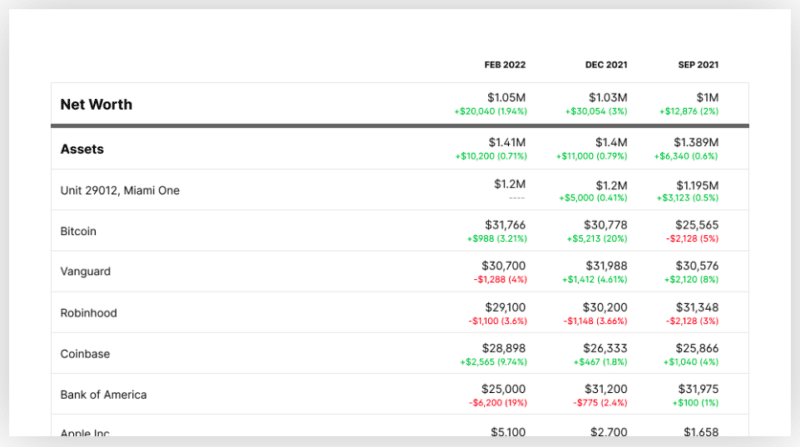
Kubera provides charts showing how your net worth and investments changed over time. Every update to your asset values is kept in history, so you can go back and see how you fared at any point.
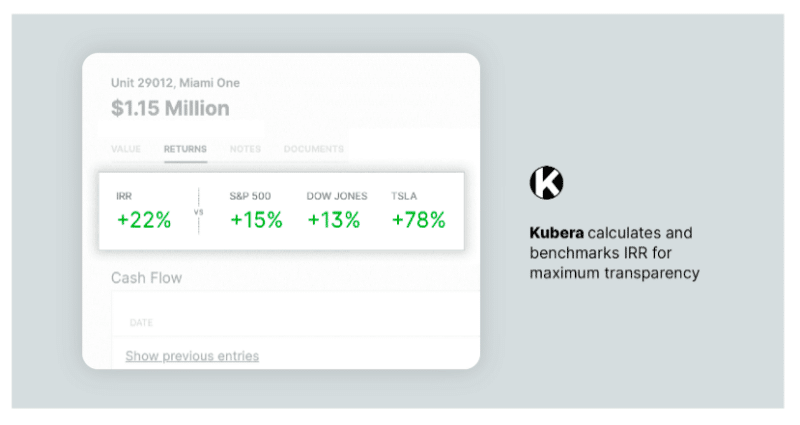
The platform calculates accurate internal rate of return (IRR) for all your investments based on multiple contributions, withdrawals, and time invested. It also benchmarks your IRR against popular indices and tickers (S&P 500, Dow Jones, AAPL, BTC, etc.) — which is genuinely useful for understanding whether your active management is actually beating a simple index fund.
Fast Forward is a newer feature that lets you project your future net worth in today’s dollars, accounting for inflation and estimated tax rates on your income streams. It’s a simple but powerful way to stress-test your financial plans.
AI Features
Kubera has leaned into AI in a way that actually adds value rather than being a gimmick:
AI Import: Upload a PDF, CSV, or screenshot and Kubera’s AI extracts asset data and adds it to your portfolio. Drag and drop a brokerage statement, and it reads the document and creates entries automatically.
AI Advisor integration: You can connect your Kubera data to ChatGPT, Claude, or Gemini through Kubera’s API. This lets you ask questions about your portfolio using AI — things like “what percentage of my net worth is in crypto?” or “how has my real estate allocation changed over the past year?”
These aren’t features I’d base a purchase decision on, but they’re nice additions to an already solid platform.
Sharing and Estate Planning
You can share a read-only link of your portfolio with others — your investment advisor, CPA, estate planner, or household members. This is particularly useful when applying for loans or doing financial planning.
Kubera’s “Life Beat” feature handles the morbid but important question: what happens to your financial information if something happens to you? You can designate a beneficiary who will automatically gain read-only access to your portfolio after extended periods of inactivity. Before Kubera grants access, you’ll receive multiple prompts that you can dismiss with a single click to reset the timer.
There’s also a fallback plan — in addition to your primary beneficiary, you can set a contingent beneficiary (“Trusted Angel”) who receives access only if your main beneficiary can’t access the account. It’s a thoughtful feature that most wealth trackers completely ignore.
How Safe Is Kubera?
Your data in Kubera is encrypted at-rest and in-transit. All databases and files are stored on Amazon (AWS) servers with full encryption. It’s not end-to-end encrypted (that would prevent features like background syncing and beneficiary data transfer), but the encryption in place is solid.
Kubera is SOC 2 Type II certified, which is a significant security credential — it means an independent auditor has verified their security controls.
Importantly, Kubera never holds your banking or crypto credentials. It uses third-party aggregators (Plaid, Yodlee, Flinks, and Salt Edge) to connect to your accounts. Your credentials go directly to these services from your browser — Kubera’s servers never see them. For crypto, Kubera only requires read-only API permissions or blockchain addresses. It cannot make transactions on your behalf.
Subscription Pricing
Kubera’s pricing has changed since I originally wrote this review. It now offers two tiers:
Kubera Essentials — $249/year
This is the plan most individual investors will want. It includes all the core features: multi-account aggregation, crypto/DeFi tracking, analytics, IRR calculations, AI Import, Fast Forward projections, document vault, sharing, and the Life Beat estate planning feature.
Kubera Black — $2,499/year
The premium tier adds nested portfolios (for mapping trusts, LLCs, and family ownership structures), granular access control for collaboration, concierge onboarding, and VIP support with 1:1 Zoom calls. This is aimed at high-net-worth individuals and family offices.
There’s also a White Label option starting at $299/month for wealth advisors who want to offer Kubera to their clients.
A 14-day trial is available so you can test the platform before committing.
At $249/year, it’s more expensive than the $150/year it used to be. But the platform has also added meaningfully more features since then — AI Import, Fast Forward, AI advisor integrations, broader DeFi/NFT coverage, and SOC 2 certification. For anyone managing a diversified portfolio across multiple asset classes, it’s still reasonable given there’s no free alternative that covers the same breadth.
How Kubera Compares
vs. Empower (formerly Personal Capital): Empower is free but exists to funnel you into their wealth management services. It also has limited crypto support and no international bank integrations. Kubera is ad-free, doesn’t sell your data, and supports a much wider range of asset types.
vs. Sharesight: Sharesight is excellent for stock portfolio tracking and tax reporting, especially in Australia, NZ, and the UK. But it’s focused on securities — it won’t track your crypto, real estate, vehicles, or bank accounts the way Kubera does.
vs. a spreadsheet: A spreadsheet gives you full control and costs nothing. But the moment you want automatic price updates, multi-currency conversion, IRR calculations, and DeFi wallet tracking, you’ll spend more time maintaining the spreadsheet than it’s worth.
Kubera’s edge is breadth. No other single platform handles traditional bank accounts, brokerages, crypto wallets, DeFi positions, NFTs, real estate, vehicles, domains, and precious metals in one dashboard.
Customer Support
Kubera offers 100% human customer support via email (no chatbots). Their website has an extensive help center, and the platform is available on desktop, iOS, and Android.

The blog on Kubera’s website is regularly updated with investment-related articles, which shows the team is invested in educating their users — not just collecting subscription fees.
Verdict
Kubera has grown significantly since I first reviewed it. From $13.5 billion to over $47 billion in tracked assets, a price increase from $150 to $249/year, and meaningful feature additions like AI Import, Fast Forward, and AI advisor integrations.
The core value proposition hasn’t changed: if your wealth is spread across traditional and non-traditional assets in multiple countries and currencies, Kubera gives you a single, honest view of where you stand. No ads, no upsells, no data selling.
Is $249/year worth it? If you’re managing a portfolio that spans bank accounts, brokerages, crypto exchanges, DeFi positions, and physical assets — yes. The alternative is a spreadsheet that’s perpetually out of date, or a free tool that’s trying to sell you something.
For investors with simpler portfolios (just a bank account and a brokerage), it’s probably overkill. But if the phrase “I need to check five different apps to know my net worth” sounds familiar, Kubera is built for you.
Frequently Asked Questions
Is Kubera safe? Can it access my money?
Kubera never sees your banking or crypto credentials. It uses third-party aggregators (Plaid, Yodlee, Flinks, Salt Edge) that only provide read-only access. For crypto, it only needs read-only API keys or blockchain addresses. Kubera is SOC 2 Type II certified, and all data is encrypted at rest and in transit on AWS servers. It cannot make transactions on your behalf.
How much does Kubera cost?
Kubera Essentials costs $249/year for individual investors. Kubera Black costs $2,499/year and is designed for high-net-worth individuals and family offices who need nested portfolios and dedicated support. A 14-day trial is available.
Does Kubera work outside the US?
Yes. Kubera connects to over 20,000 banks and fintechs worldwide through multiple aggregators. It supports all major stock exchanges globally and handles multi-currency conversion automatically. Some features like Zillow property valuations and VIN-based vehicle values are US/Canada only, but you can always enter these values manually.
Does Kubera support crypto and DeFi?
Yes, and this is one of Kubera’s strongest areas. It supports major blockchains including Ethereum, Bitcoin, Solana, Polygon, Avalanche, and Cosmos. DeFi protocol balances (Aave, Compound, etc.) and NFT values (via OpenSea) are tracked automatically. You can connect via wallet address or exchange API.
What happens to my data if something happens to me?
Kubera’s “Life Beat” feature lets you designate a beneficiary who automatically gains read-only access to your portfolio after extended inactivity. You’ll receive multiple prompts before access is granted, and you can set a backup beneficiary (“Trusted Angel”) as a fallback. It’s a genuine estate planning tool, not just a marketing feature.
Is Kubera worth it compared to free alternatives like Empower?
It depends on your portfolio complexity. Free tools like Empower are fine for US-only investors with standard brokerage accounts. But if you have international investments, crypto/DeFi positions, physical assets, or just want a platform that doesn’t monetize your data with ads and product recommendations, Kubera is worth the $249/year. The breadth of asset types it supports is unmatched.
Summary
Kubera is a comprehensive portfolio tracker that handles crypto, traditional assets, and alternative investments in one place. The USD 150/year fee is justified by its breadth of integrations.
Pros
- Tracks traditional, crypto, and alternative assets in one dashboard
- Connects to 20,000+ banks and fintechs worldwide
- DeFi and multi-chain crypto support
- Beneficiary access feature for estate planning
- Ad-free with no data selling
Cons
- USD 150/year subscription may feel expensive
- No end-to-end encryption
- Property and vehicle valuations limited to US/Canada
Related








Do you have a referral code for Kubera? I know they have this program for referrals and I’d love to participate in this program and need a referral. Thank you!
https://www.kubera.com/referral