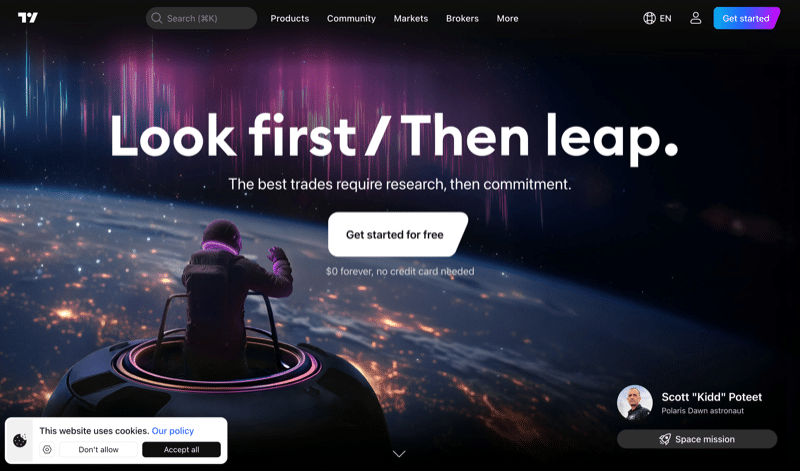
If you spend any amount of time analyzing financial markets, you have almost certainly come across TradingView. It is the dominant charting and analysis platform on the web, used by over 100 million traders worldwide. Whether you are charting stocks, crypto, forex, or commodities, TradingView covers it all under one roof.
The platform has grown well beyond its origins as a charting tool. It now functions as an all-in-one trading workspace with built-in screeners, alerts, paper trading, a social network for sharing trade ideas, and direct broker integrations that let you execute trades without leaving the platform.
In this review, I cover everything you need to know about TradingView — features, pricing, what it does well, where it falls short, and whether it is worth paying for.
TradingView at a Glance
| Founded | 2011 |
| Headquarters | New York, USA |
| Founders | Denis Globa (CEO), Stan Bokov (COO), Konstantin Ivanov (CTO) |
| Users | 100 million+ |
| Markets Covered | Stocks, ETFs, forex, crypto, futures, bonds, options, indices, commodities |
| Data Sources | 150+ exchanges across 50+ countries, 3.5 million+ instruments |
| Free Plan | Yes (limited features) |
| Paid Plans | Essential ($14.95/mo), Plus ($29.95/mo), Premium ($59.95/mo), Ultimate ($239.95/mo) |
| Free Trial | 30 days (Essential, Plus, Premium); 14 days (Ultimate) |
| Mobile App | iOS (4.8 stars) and Android (4.7 stars) |
| Broker Integrations | 100+ verified brokers |
What is TradingView?
TradingView is a web-based charting and social trading platform founded in 2011 by Denis Globa, Stan Bokov, and Konstantin Ivanov. The company is headquartered in New York, with offices across multiple continents and a team of around 2,500 employees.
At its core, TradingView provides interactive financial charts with a depth and quality that rivals — and in many ways surpasses — what professional Bloomberg terminals offer, but at a fraction of the cost. The platform covers stocks, forex, crypto, commodities, bonds, indices, and essentially any tradable instrument you can think of, pulling data from over 150 exchanges worldwide.
What sets TradingView apart from other charting tools is the combination of power and accessibility. You can run it in any browser, on the desktop app, or on your phone, and everything stays synced. There is no software to install and no broker account required just to view charts and analyze markets. You can open a free account and start charting within minutes.
As of 2025, TradingView reached the number one ranking for investing websites globally, overtaking established competitors with over 200 million monthly visits.
Charting and Technical Analysis
This is where TradingView truly earns its reputation. The charting engine is fast, responsive, and packed with tools that will satisfy everyone from casual investors checking weekly trends to professional day traders running multi-screen setups.
The numbers speak for themselves:
- 400+ built-in technical indicators covering everything from moving averages and RSI to more advanced tools like Volume Profile and Market Profile
- 100,000+ community-created indicators built with Pine Script, TradingView’s proprietary scripting language
- 110+ drawing tools across categories including trend lines, Fibonacci tools, Gann tools, geometric shapes, and annotation tools
- 21+ chart types from standard candlestick and bar charts to Renko, Kagi, Line Break, Point & Figure, and the newer Volume Footprint charts
You can overlay multiple indicators, compare symbols side by side, and set up multi-chart layouts with up to 16 charts per tab on the highest plan. The charts themselves are highly customizable — you can adjust colors, styles, time intervals (down to tick-level on paid plans), and save your layouts for quick access.
One feature I particularly appreciate is Bar Replay, which lets you replay historical price action bar by bar. This is invaluable for backtesting strategies or studying how a stock behaved during a specific event. The latest version supports 1-second intervals and works across synchronized multi-chart layouts.
Pine Script
Pine Script is TradingView’s built-in programming language for creating custom indicators, strategies, and alerts. It is specifically designed for financial analysis and is far more approachable than general-purpose languages like Python.
Even if you have no coding background, the basics are learnable in a few hours. There is extensive documentation, a community forum full of examples, and over 150,000 published scripts you can study and modify.
Pine Script v6, released in late 2024, added significant improvements including dynamic requests, enums, strict boolean handling, and access to footprint data. For anyone building custom strategies or automated alerts, it remains one of the best tools available on any platform.
Stock Screener
TradingView offers powerful screening tools that go well beyond basic price filters. The stock screener covers over 8,000 US stocks and includes fundamental data (P/E ratios, EPS growth, dividend yield, revenue growth), technical indicators, and analyst ratings — all filterable in real time.
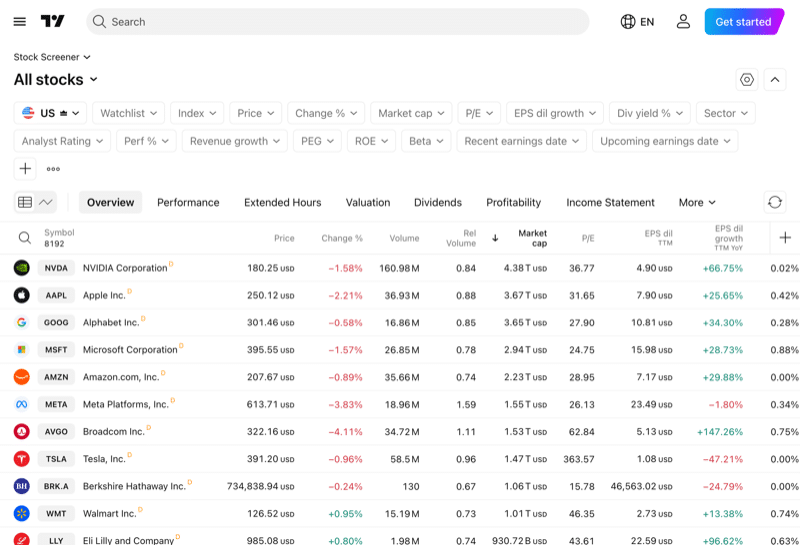
There are separate screeners for stocks, crypto, forex, and ETFs, each tailored with relevant filters. Paid plans unlock additional timeframes, data export, and auto-refresh functionality.
For crypto specifically, TradingView also offers a CEX (centralized exchange) screener that enables cross-exchange price comparison — useful for spotting arbitrage opportunities.
Alerts
The alert system is one of TradingView’s most practical features. You can set alerts based on price levels, technical indicator conditions, or drawing tools. When triggered, notifications are delivered via the app, email, SMS, or webhook — the last option being particularly valuable for automated trading setups.
The number of active alerts depends on your plan:
- Free: 5 price alerts
- Essential: 20 price alerts, 20 technical alerts
- Plus: 100 price alerts, 100 technical alerts
- Premium: 400 price alerts, 400 technical alerts
- Ultimate: 1,000 price alerts, 1,000 technical alerts, 15 watchlist alerts
Alert duration also varies — free alerts expire after one month, while Premium and Ultimate alerts never expire. This is one of those features that quietly forces an upgrade for active traders who rely on alerts as part of their workflow.
Paper Trading
TradingView includes a built-in paper trading account preloaded with $100,000 in virtual capital. You can simulate trades directly on the chart — placing market orders, limit orders, and stop losses exactly as you would with a real broker.
This is a genuinely useful feature for testing strategies before committing real money, and it requires no broker account or additional setup. The paper trading engine runs alongside the live charts, so you get a realistic sense of how your trades would have performed.
Social Network and Ideas
TradingView has a social layer that is unlike anything else in the trading tool space. Users can publish trade ideas with annotated charts, and the community can follow, comment, and engage. It functions somewhere between Twitter and a trading forum, with the added benefit that every idea is backed by an actual chart.
The quality varies — you will find everything from well-reasoned institutional-level analysis to noise — but the best contributors have built genuine followings and provide real value. You can filter by asset class, timeframe, and analyst rating to find content that matches your level.
Video ideas, a feature called Minds (short-form posts), and the ability to publish custom Pine Script indicators add further depth to the social experience.
Broker Integrations
TradingView is not a broker — it does not hold your money or execute trades itself. Instead, it integrates with over 100 verified brokers, allowing you to connect your existing brokerage account and trade directly from TradingView’s charts.
The list includes major names like Interactive Brokers, OANDA, Saxo Bank, IG, FXCM, Pepperstone, TradeStation, Capital.com, Webull, Moomoo, eToro, and many more. For crypto, you can trade through Binance, Bybit, Coinbase, OKX, Gate.io, and over a dozen other exchanges.
This is a significant advantage over competing platforms that lock you into a single broker’s charting tools. With TradingView, you get best-in-class charts regardless of which broker you use for execution.
TradingView for Crypto
TradingView’s crypto coverage is extensive. The platform tracks thousands of cryptocurrency pairs across all major exchanges, with real-time data and full access to the same charting, screening, and alert tools available for traditional markets.
Crypto-specific features include:
- Direct exchange trading: Connect accounts from Binance, Bybit, Coinbase, OKX, Gate.io, and others to trade directly on TradingView
- Crypto screeners: Filter by market cap, volume, technicals, and more across all major exchanges
- Crypto heat maps: Visual overview of the crypto market by market cap and performance
- On-chain data: Selected blockchain metrics integrated into charts
- Community indicators: Thousands of crypto-specific indicators and strategies built by the Pine Script community
If you are already using TradingView for stocks or forex and also trade crypto, the unified experience across all asset classes is one of its strongest selling points. You do not need a separate crypto charting tool. For more on crypto trading, see my reviews of Deribit and Bitstamp.
TradingView Plans and Pricing
TradingView operates on a freemium model. The free plan is genuinely functional — you get basic charts, two indicators per chart, limited alerts, and access to the social network. For casual market watching, it may be all you need.
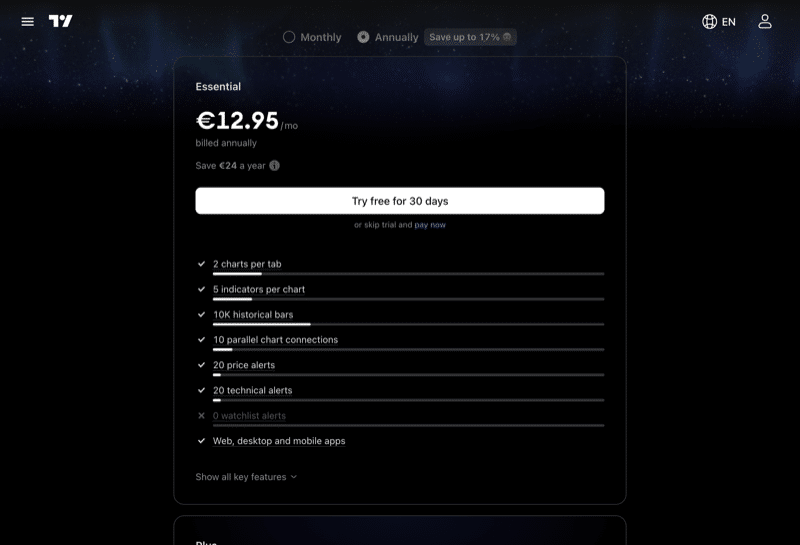
Here is how the paid plans break down (monthly prices, with annual billing discounts of up to 17%):
| Feature | Free | Essential | Plus | Premium | Ultimate |
| Monthly Price | $0 | $14.95 | $29.95 | $59.95 | $239.95 |
| Annual (per month) | — | $12.95 | $24.95 | $49.95 | $199.95 |
| Charts per Tab | 1 | 2 | 4 | 8 | 16 |
| Indicators per Chart | 2 | 5 | 10 | 25 | 50 |
| Price Alerts | 5 | 20 | 100 | 400 | 1,000 |
| Historical Bars | 5K | 10K | 10K | 20K | 40K |
| Saved Layouts | 1 | 5 | 10 | Unlimited | Unlimited |
| Ad-Free | No | Yes | Yes | Yes | Yes |
All paid plans come with a free trial — 30 days for Essential, Plus, and Premium; 14 days for Ultimate. I would recommend starting with the free trial on the Plus plan if you are an active trader, as the jump from 2 to 10 indicators per chart makes a significant difference to any serious technical analysis workflow.
One important note: the prices above cover platform access only. Real-time market data from certain exchanges requires additional subscriptions, typically ranging from $2 to $25+ per month per exchange. Delayed data (usually 15 minutes) is free.
TradingView Mobile App
TradingView offers native apps for both iOS and Android, and they are among the best mobile charting apps available.
The iOS app holds a 4.8-star rating from over 367,000 reviews on the App Store. The Android app has a 4.7-star rating with 830,000+ reviews and over 49 million downloads on Google Play. Those numbers reflect genuine user satisfaction, not inflated ratings.
The mobile apps support the full range of charting tools, alerts, watchlists, and paper trading. Everything syncs seamlessly with the web and desktop versions — a chart layout you build on your desktop shows up identically on your phone. For on-the-go market monitoring and quick trade management, the mobile experience is polished and responsive.
The app is available in 19 languages and requires iOS 17.0+ or Android equivalent.
Pros and Cons
Pros
- Best-in-class charting with 400+ indicators and 110+ drawing tools
- Massive market coverage — 3.5 million instruments across 150+ exchanges
- Powerful free plan that is genuinely usable
- Pine Script allows deep customization without needing external tools
- 100+ broker integrations for direct trading from charts
- Active social community with trade ideas and published indicators
- Excellent mobile apps with full sync across all devices
- Paper trading included at no cost
- Bar Replay for strategy backtesting
- Works in any browser — no software to install
Cons
- Aggressive upselling on the free plan — frequent nudges to upgrade
- Key features like additional indicators and alerts are heavily paywalled
- Customer support is chatbot-first and can be difficult to reach for complex issues
- Real-time data from certain exchanges costs extra on top of the subscription
- Trustpilot reviews are notably poor (1.5/5) due to billing and cancellation complaints
- The Ultimate plan at $239.95/month is expensive for non-professional traders
- Learning curve for advanced features like Pine Script and multi-chart setups
Who Should Use TradingView?
TradingView is broad enough to serve almost any type of market participant, but it excels in specific use cases:
Best for:
- Technical analysts who need deep charting tools and a wide indicator library
- Multi-asset traders who want stocks, crypto, forex, and commodities in one platform
- Self-directed investors looking for a powerful free or low-cost charting tool
- Pine Script users who want to build and share custom indicators
- Social traders who value community ideas and published strategies
Less ideal for:
- Pure fundamental analysts — while financial data is available, dedicated fundamental research platforms like Koyfin or Tikr offer more depth
- Algorithmic traders who need full backtesting frameworks — tools like QuantConnect or Zipline offer more control
- Budget-conscious traders who need many alerts or indicators — the free plan’s limits force upgrades quickly
Frequently Asked Questions
Is TradingView free?
Yes. TradingView offers a permanent free plan with basic charting (1 chart per tab, 2 indicators per chart, 5 price alerts). It includes delayed data, access to the social network, and paper trading. For casual market analysis, the free plan is genuinely usable. Paid plans start at $14.95 per month and unlock additional charts, indicators, alerts, and features.
Is TradingView good for beginners?
TradingView is one of the best platforms for beginners because you can start with a free account and gradually learn the tools. The interface is intuitive, the community publishes educational content, and the paper trading feature lets you practice without risking real money. The learning curve increases significantly if you get into Pine Script or advanced technical analysis, but the basics are accessible from day one.
Can you trade directly on TradingView?
Yes. TradingView integrates with over 100 brokers including Interactive Brokers, OANDA, Binance, Coinbase, and many others. You connect your existing brokerage account and can place trades directly from TradingView’s charts. TradingView itself is not a broker — it does not hold your funds.
Is TradingView worth paying for?
For active traders who use technical analysis regularly, yes. The free plan is limited to 2 indicators per chart and 5 alerts, which most serious traders will outgrow quickly. The Plus plan ($29.95/month) offers the best value for most active traders with 10 indicators per chart and 100 alerts. Annual billing brings prices down by up to 17%.
Does TradingView support cryptocurrency?
TradingView offers comprehensive crypto coverage with data from all major exchanges. You can chart, screen, and set alerts on thousands of crypto pairs. Direct trading is available through integrations with Binance, Bybit, Coinbase, OKX, Gate.io, and other exchanges.
How does TradingView compare to MetaTrader?
TradingView is browser-based with broader market coverage and a better user interface. MetaTrader (MT4/MT5) is stronger for forex algorithmic trading through its MQL language and is free through brokers. TradingView is generally preferred for charting and multi-asset analysis, while MetaTrader is favored by forex algo traders who need broker-specific execution.
TradingView Review — The Verdict
TradingView is the best web-based charting platform available today. The breadth of its market coverage, the depth of its technical analysis tools, and the quality of its user experience are unmatched by any direct competitor. The fact that over 100 million people use it is not an accident — it genuinely is that good at what it does.
The free plan is a legitimate product, not just a teaser. You can monitor markets, build watchlists, use paper trading, and access the social community without spending anything. When you are ready for more, the paid plans offer meaningful upgrades at each tier.
The weak points are real but manageable. The upselling can be annoying, customer support is not great, and the Trustpilot reviews paint a grim picture of billing practices. Make sure you set a reminder before any free trial ends, and cancel through the website rather than relying on app-based cancellation.
For anyone serious about technical analysis across any asset class, TradingView is the first tool I would recommend. Start with the free plan, try a 30-day trial on Plus or Premium, and decide from there whether the paid features justify the cost for your workflow.
This article contains affiliate links. If you sign up through my link, I may earn a commission at no extra cost to you. I only recommend platforms I have personally researched or used. This is not financial advice.
Related







Leave a Reply