
When opening a company one of the first things you should do is choose an email provider. My favorite is Google Apps for Work. You can also use Zoho Apps if you are a small business and want a totally free solution.
Once you’ve got your mail set up you want to set up individual email accounts.
Personal Email Accounts
Each person in the company should, of course, have their own personal email address that they can use on a daily basis for internal and external communication. This is the email address that they can put on their business cards and also use for logging into the various tools that the company uses.
Tools like Slack are now aiming at killing email for internal communication, and they’re having a great of success. However, email is not going away anytime soon as there are many more uses for it apart from internal communication.
For personal email accounts I recommend using this format:
In my case, for example, I would use [email protected]. If the person has a really long name or surname you can use the shortened version or even set up an alias to that account. For example, you can have the mailbox named [email protected] but then also set up an alias for [email protected] and emails sent to that alias will also end up in the person’s inbox. This also applies to people who have a name that’s hard to spell.
Read more: How to start a blog
Need hosting? I recommend Bluehost for starting out with your website. You can read my article on how to create your first website and sign up to Bluehost; it’s a reliable and cheap hosting service that won’t let you down.
Some companies prefer to just use the firstname@ option and omit the last name. This works for very small companies but you will soon run into problems when the second Joe joins your team. You’ll soon end up with a mess, with some people using their first name only and others having to use their first and second names or something unsightly like joe2@.
My recommendation is, therefore, to start right away with the firstname.lastname@ combination. If you get two people with the same first and last names, you can use introduce the initial for their middle name or something similar. For example if you have two people named Joe Smith in your company, the second one can use [email protected].
Generic Email Accounts
Next, you will want to set up a few email accounts to be used for mostly administrative, support, billing and as a first point of contact with your company. Make sure you cover all the business functions of your company.
Here are a few essential ones to start off:
- admin@ for administrative purposes such as being a Google Apps admin
- support@ for your helpdesk
- billing@ for billing and payments
- hello@ as a general point of contact
- careers@ for job applications
- domains@ for domain management
Depending on your line of business, there are others you might need to use such as:
- partners@ or affiliates@
- press@ or media@
Many companies use info@ as their point of contact, however, I advise against that for a number of reasons:
- Info@ email addresses are not very friendly or personable.
- Some service websites don’t allow you to use info@ email addresses (Facebook is one of those).
- You’re more likely to be flagged as spam with an info@ email address.
- Info@ email addresses are more easily targeted to receive spam.
An email address such as hello@, hi@, hey@, howdy@ or even yourfriends@ (the latter is what Medium use) makes that first contact with your company much warmer and friendlier. Of course you will need to follow up with a friendly and casual reply to ensure a great start to relationships.
Whenever someone from your organization makes a personal connection with someone outside the company, they should almost always use their personal email address rather than dishing out generic email addresses like info@ or sales@. Research has shown that people very much prefer sending emails to personal email addresses and knowing for sure who is going to get their email and hence who is responsible for getting back to them.

You will have noticed that many companies use noreply@ or donotreply@ as one of their email addresses. This is mostly used for sending out notifications and I’ve also occasionally seen it used for newsletters.
That brings us to the topic of email newsletters and marketing communication that your company sends out. What email should be used for sending out these newsletters? I would recommend using the hello@ email address if you’re following the format set above. You want to remain accessible to people who receive your newsletter and so if they reply asking further questions about what you sent out to them or maybe giving you constructive criticism, you should be able to read that.
See also: How to migrate email accounts
With a noreply@ address that goes nowhere, you won’t be able to do that and you’ll inevitably alienate those subscribers. Sure, you will get a few out of office replies and such, but you can easily filter those out. Besides, if they have auto-replies set up notifying you of email changes, you need to take action on those changes. The typical case would be a person moving on to a new job and hence no longer using his previous email address, which means you will need to strike them off your newsletter list.


You might also want to set up a bounced@ email address to process bounced emails. You will have to set your mailer software to make use of the Return-Path address, so that all your outgoing email messages that generate (hard) bounces are forwarded to a specific email account (e.g. [email protected]), and not to the “FROM” address.
Bonus tip: Don’t use generic friendly “From” names like “Customer Service”, “Account Verification”, “Monday Newsletter”. Always include your brand name: “WP Mayor Support”, “WP Mayor Account Verification”, “WP Mayor Monday Newsletter”. A “From” name without your brand is automatically suspicious.
So there goes my take on company email addresses. As always your comments and opinions are much appreciated.
One of the other important steps when opening a company is that of opening bank accounts. My favorite bank accounts for companies are Wise Borderless, Revolut and N26.
The 3 Main Options for Email Hosting
When shopping for email hosting, the first decision you need to make is how you’ll host your email. You have three main options:
- Shared Web and Email Hosting: Most web hosting providers also offer email hosting. For example, if you host your website through a provider like InMotion, you can host your email there as well. Often, email hosting is included with your web hosting subscription for free.
- Self-Hosted Email: If you have your own servers, you can host your own email instead of going through a third-party provider. While self-hosting provides more control and customizability, it has its disadvantages. The added costs of servers and systems admins to maintain them, along with the challenge of keeping your email from being marked as spam, often makes third-party hosting the better option.
- Third-Party Email Hosting: If you need more features than what your web host provides, look into hosted email providers. A third-party email host lets you avoid the costs of self-hosting. Plus, a subscription to a hosted email service often comes with other tools you need to run your business: shared contacts and calendars, built-in video conferencing, team chat, and more.
Finally, it’s important to understand the difference between an email hosting provider and an email client. An email host is what lets you send and receive email across networks. An email client (or email app) is the application you use to write and read emails. Your email host and client do not have to be the same. For example, you can send and receive emails hosted through G Suite on a desktop or mobile Microsoft Outlook app.

For a completely free solution for your website and email, you can use Strkingly for both your website and email.
Best Hosted Email Services
What about Non-Business Personal Email Addresses?
While we’re on the subject, we can also talk about how to pick a good personal email address.
Gmail is the preferred (and free) email address solution for individuals using email in a personal capacity. Everyone should have a personal email address, even if they have additional professional email addresses they use in their business dealings. It’s always better to keep things separate. If your name is Joe Bloggs any of the combinations are great:
If you have a very common name (a la “Joe Bloggs”) you will probably find that the obvious combinations mentioned above will be taken. In that case, you might want to add a number, for example, your year of birth. This is up to you, some people don’t want to make that public so that would not be a good choice for their email address. A favorite number might also be another option to go for.
You might also have a name that is not easy to pronounce, very long or that can be misinterpreted (e.g. Ella Marija Lani Yelich-O’Connor). In such cases, I would suggest you go for something simpler than your name. Here’s when things might go south. The first rule you have to keep in mind is that you might very well be keeping the same email address for the rest of your life, and it’s not that straightforward to change the address at a later stage.
To give you an idea of bad choices people do, [email protected] might be OK for a teenage girl, but chances are she will be regretting the choice when she is applying for a job a few years later.
If you want to use your own domain name with a free Gmail account, I suggest the forwarding service Improv.mx as a solution.
Email Delivery Services
An email delivery service is pretty much a must-have for businesses who want to make sure that their email gets delivered to their customers and that no one can impersonate them by fake email addresses.
From a personal email perspective, however, it might also be a good idea to use an email delivery service. This is especially true if you have a newsletter service or run a blog, for example.
My favorite service is Mailgun. They offer 10,000 free email sends per month, which is more than enough for personal use.
The Best Email Management Clients for Gmail
I love Gmail.
With every new online endeavour I’m involved in, there is invariably a new email account I need to keep tabs on. Till now all I did was create a new Google for Business account and redirect all mail to my main @gmail account. Lately however, I have embarked on a mission to better organise my way of doing business, as well as to separate work related matters from personal ones. Email is of course one of the main things that comes into play when doing such an exercise.
To expand on the background for this exercise, here are some notes:
I have around 12 email accounts to manage, 3 of them which are very active daily.
- Since I’m very familiar with the way Gmail works, I wanted to keep all the functionality I use in Gmail.
- I prefer to have an online interface rather than having an app on my Mac. Two reasons for that, one to save space on my Macbook air’s smallish drive, and secondly for security purposes in case the laptop ever gets stolen.
- Most but not all email accounts are managed through Google Apps for Business. The ones that are were created in the good times when Apps for Business were still free. I had to create another two email accounts for new domains after Apps became a paid service, and I chose Zoho Mail instead, as the volume of emails for these new accounts didn’t justify paying Google for the email service. I also prefer an email hosting service rather than use the server’s mail capability, I trust Google’s or Zoho’s backup services more than I trust the ones of shared hosting providers I guess.
Starting off with research, I found that the online interface goal wouldn’t be reachable, unless I was content with switching accounts with the Gmail interface itself, which isn’t so comfortable.
I therefore started looking at the most popular mail apps for Mac. Some conventional apps use folders for organising emails, while Gmail uses the labels system, which leads to some complications. I tried to find something more native to Gmail and came up with the following two options:
- Mailplane 3
- AirMail
Mailplane 3 is basically just a wrapper around Gmail accounts, in essence a browser dedicated to Gmail accounts. Each tab hosts a Gmail account. This was very convenient for me since I could retain all the functionality from Gmail itself, but have more convenience.
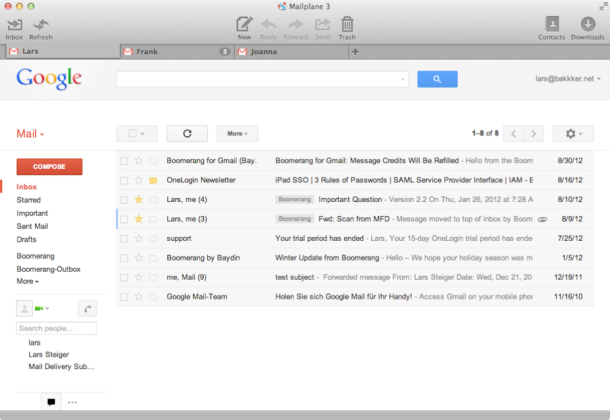
It has a good notifier system and also integrates with Gmail plugins such as Boomerang and RightInbox. Google Calendar is a perfect match for Gmail and Mailplane combines them in one app. The disadvantage is that I cannot use my Zoho hosted email with this app.
AirMail has the advantage of being usable not only with Gmail accounts, but also with others such as Zoho Mail or Office 365. The downside is that it still is a beta version and not quite something you could rely on totally. It has a very nice minimal interface though and I’ll definitely want to keep tabs on it going forward.
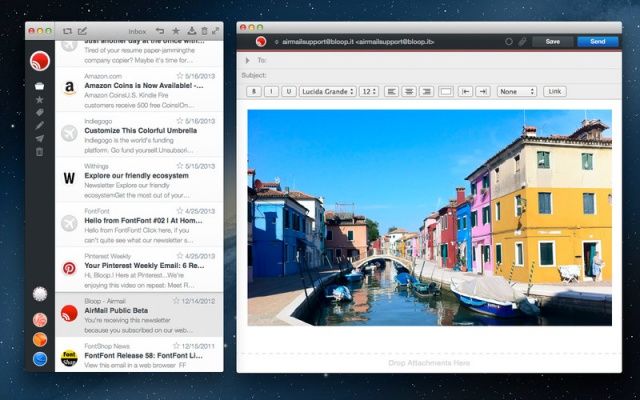
I decided to go for Mailplane to handle all my Gmail accounts, while using AirMail for the Zoho hosted accounts. In this way, I retained all Gmail functionality for my main accounts, while I can keep tabs on AirMail while also having a good and handy interface for my Zoho accounts.
Do you have a similar or totally different setup? Let me know in the comments section.
Related







Thank you! Just what I was looking for and a little bit (an important little bit) more. The Bonus Tip answered my NEXT question.
Good Job
Good idea
Is the a link to gSuite on how to set up [email protected] so that these emails go to several different people’s inboxes?
What a wonderful post, it was really helpful, thank you
A Google search for “email alias to consider for a company” landed me here. Really helpful article, Jean. Your site and content looks solid. I’m looking forward to following you.
Cheers!
I picked up something best for my company, Thanks jean
Hi! Nice to meet you! love this article. I’m doing a new web page for a new brand and I want to create an email for open the accounts of Instagram & facebook etc. Which generic email do you suggest to me?
Thanks in advance,
Karen Indriago.
While admin@, support@ and info@ does not seem very friendly , remember that most of the people tend to directly email at these address when the need arises.
Reply
I have always used Hotmail and Gmail for most of my daily activities, and they have always given me what I wanted. although I prefer Gmail, Hotmail is still great. thanks for the details your site gave by the way.
Should we redirect [email protected] to [email protected] so if we reply it comes from [email protected]?
Or do people think it’s OK to receive an email reply from [email protected]?
If someone sends an email to [email protected], and we reply to it, who should it come from?
E.g.:
[email protected]
[email protected]
[email protected]
?
Thanks
Great article @JeanGalea, I really enjoyed reading this article.
I just had one question for you.
Which email should we set up for government documentation for legal work and doing compliances?
Hope I get a positive response.
Thanks for the article & have a nice day!
Thank you for not only improving my thoughts for a business email name but also an introduction to the sport padel. I had no clue about it, but it looks very interesting; new sport almost every couple of years, heh.
You’re welcome Nick 🙂
How does my email sound? I am concerned now.
Hi Jean, this is a great article and I keep sending clients to it.
I’d like to know your thought on having contact@ rather than info@ but instead of hello@.
Many Thanks
Contact@ feels more modern than info@ but I have no particular preference.
Thank you for sharing Jean.
This post is something that starters would love to learn from it. And it will surely help them.
Creating an email address with the first name and last name gives more weightage than the generic ones.
We are using editors@ and scholarship@ for separating the team as per the email name.
I hope this can add something good to the post.
Hi Dear Jean,
I enjoyed reading this article and thanks for sharing your experiences and researches. I read it twice because I’m dealing with 23 emails and 12 of them are very active. reading this article was like you talking about my problems and questions. Thank You. you are a lifesaver.
Now, I would like to share my experience and if you found it useful you can update your article.
With regard to personal email addresses, you mentioned how people choosing a favorite number or birth year. please consider some people choosing the year digits that they currently in. for example, they choose [email protected]. unfortunately, most of the mail providers suggest the year digits if the requested username was taken. all the above story was to say most of the hackers use this number as a small piece of information to use for social engineering or bypassing the security questions. recently all the security policies changed and became stronger but the hackers usually try only 12 times to bypass the year and month of your birthday.
Stay Safe and Healthy
Nice article Jean! Other common free alternatives for domain emails include postale.io, and Yandex.
Compared to Zoho:
– postale.io is not limited to webmail only,
– Yandex is not limited to 5 mailboxes per domain only (but has ads).
Hope this helps!
Thanks Pierre.
I have basically this exact conversation with all my new customers. I will probably just send them this post in the future, you put it together really well. Thanks!
First name and last name is what I used and I also set-up generic emails for different department of the company. Sales, admin, info, careers, etc. works perfectly for me, although you can’t do anything about it if these generic email addresses can be misused by most of your website visitors when sending enquiries.
It is a unique identifier for an email account. It is used to both send and receives email messages over the Internet.
What address would you use for signup on different services example mailtrap, mailgun, mailchimp, dropbox etc… services that you may need/use for your company?
I have had this same concern. What did you choose ?
I prefer enquiry@ instead of hello@
It’s really important to get appropriately the e-mails from audience.
Padel, I believe you may have a fairly significant typo affecting users most in need of your guidance. In the paragraph directly above your Bonus Tip, you mention a “FORM” address when I believe it should be the “FROM” address. This is particularly important since you are arguably discussing “form letters” and could make things more confusing.
My name is not padel 🙂 But you’re right, fixed now.
Hahaha, someone just read that you’re a Padel player and took that to be your first name.
Good one 🙂
I also use “[email protected]” which suggests that the emails will be promptly answered.
Good one.
Instead of [email protected], I use [email protected] since it looks like it makes more sense and it’s much more of a professional way to say.. I’ll reply to all emails..
That‘s very helpful for me!
Glad it’s helpful!
Hi Jean,
I want to know how professional email address like contact, hello, and no-reply work once you set up them?
Regards,
Shishir
From personal experience:
While admin@, support@ and info@ does not seem very friendly , remember that most of the people tend to directly email at these address when the need arises.
For Gtricks, what I have done is step up email forwarding from these (admin, support, hello) to yourfriends@ and when we reply, it gives a better personal touch.
I like that, thanks for sharing your set up.