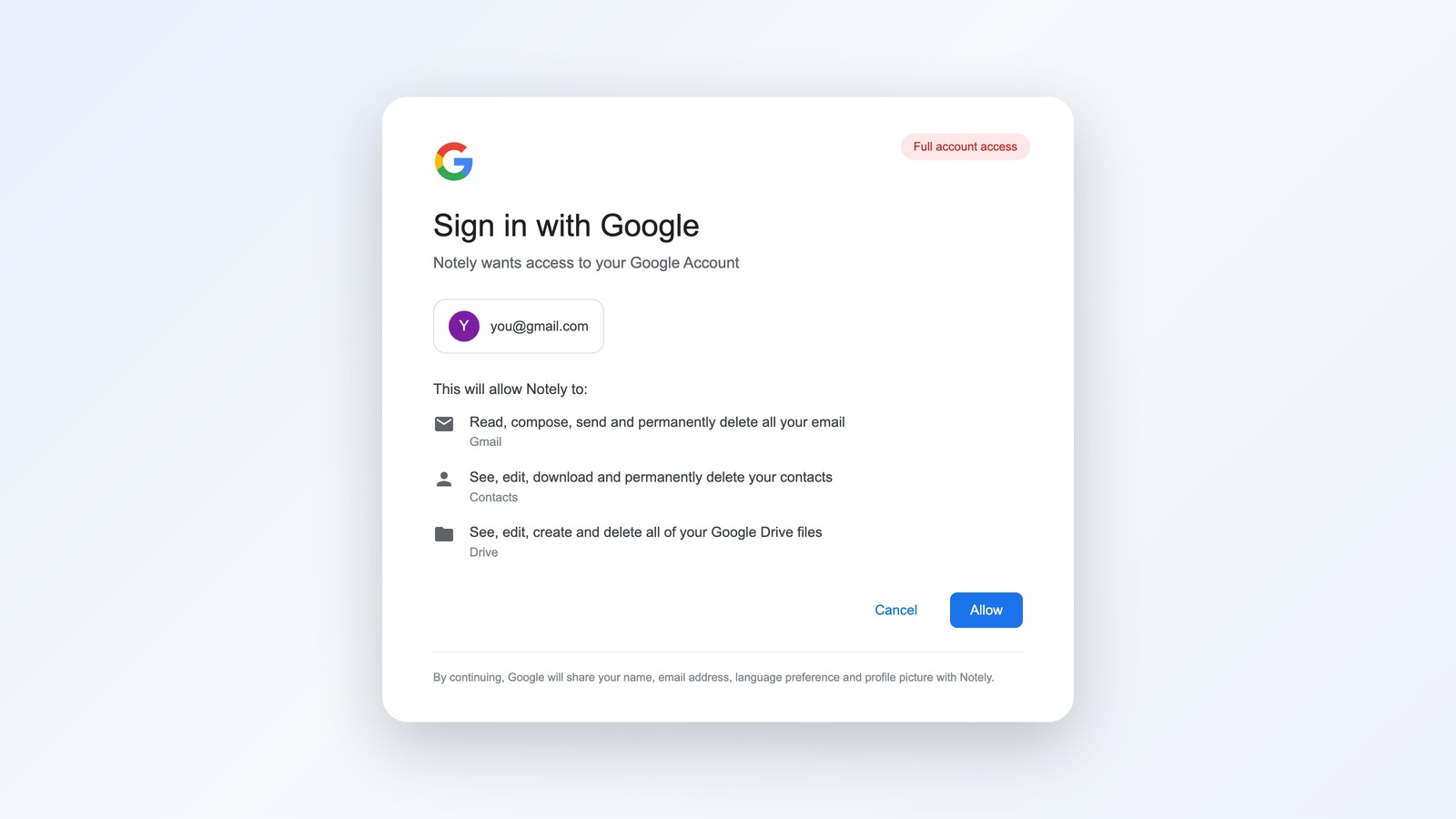
The Hidden Cost of “Sign in with Google”
Every time you click “Sign in with Google” or “Continue with Apple”, you’re handing one company the keys to a piece of your digital life. It feels like convenience. It is, mostly. But it’s also a quiet form of lock-in that most people don’t notice until something goes wrong.
I want to walk through what SSO actually is, why the convenience has a real cost, and what the better setup looks like.
What SSO actually does
When you create a Notion account using “Sign in with Google”, here’s what happens behind the scenes:
- Notion redirects you to Google.
- Google asks “are you really [email protected]?” and verifies you’re logged in.
- Google tells Notion “yes, this person is who they say they are. Here’s their email and profile.”
- Notion creates an account linked to that Google identity.
You never set a Notion password. Google holds the keys. Every future login follows the same pattern: click “Sign in with Google”, Google verifies you, Notion lets you in.
That’s the trade. You skip the password creation step. In exchange, Google becomes the gatekeeper.
The three risks people don’t think about
1. Lock-in
Every service you create with “Sign in with Google” is now dependent on your Google account. Lose Google, lose all of them at once.
This sounds theoretical until it isn’t. Google has been known to suspend accounts unexpectedly, sometimes due to automated abuse detection that flags legitimate users, sometimes due to billing disputes, sometimes due to mistakes. The recovery process is opaque, slow, and often involves no human on the other end. People have lost years of email, photos, and work because of a single suspension.
If your account is the gateway to twenty other services, that suspension cascades into twenty problems.
2. Blast radius
A password manager with strong unique passwords means if one service gets breached, that breach stops at that service. Your other accounts are untouched.
SSO inverts this. If your Google account is compromised, the attacker now has a path into every service you log into via Google. They don’t need to crack each one. They just need the master key.
Yes, 2FA helps. Yes, Google has good security. But the principle of minimizing blast radius means treating SSO as a high-stakes choice, not a default.
3. Migration tax
The day you decide to leave Google, or move to a different identity provider, you discover that every SSO-linked account needs individual untangling. Most services do let you set a password and detach the Google login, but you have to do it one at a time. Some don’t let you detach at all without contacting support.
If you’ve used Google SSO across thirty services for five years, that’s thirty separate procedures to extricate yourself.
The convenience of one click at signup compounds into hours of cleanup at exit.
Apple Sign In is a step better
Apple Sign In has one feature Google doesn’t: “Hide My Email”. When
you use it, Apple generates a unique relay address for each service. The
service sees something like
[email protected], which forwards to your
real email. You can disable any individual relay without breaking the
others.
This is meaningfully better for privacy. The service doesn’t get your real email. If they leak the relay address, you turn it off and they can’t email you anymore. Different services see different addresses, so they can’t cross-reference you in data brokers.
The lock-in to Apple is still there. You’re still trusting a single company with the keys. But the per-service isolation is a real upgrade.
For low-stakes signups (newsletters, free trials, tools you might never use again), Apple Sign In with Hide My Email is genuinely useful.
The mental model
I think of SSO as a credit card you can’t cancel.
A real credit card is convenient because one payment instrument works at every merchant. If it gets compromised, you call the bank, they freeze it, and you eventually get a new one and update everything. Painful but contained.
SSO is similar at signup, similar at daily use, but very different at exit. There’s no “cancel and reissue” path. If something goes wrong with your identity provider, every account anchored to it is in limbo until you sort it out one by one.
Knowing that, the question becomes: which accounts are you willing to anchor to a provider you can’t cancel?
The framework I use now
I split services into three buckets.
High-stakes: anything I would be in real trouble without. Banking, payment processors, my domain registrar, my email host, AWS or whatever cloud I use, GitHub, my password manager itself. These get unique passwords from a password manager, with 2FA. Never SSO. The blast radius of losing access is too large to outsource to anyone else.
Medium-stakes: tools I use regularly and would want to keep through a Google migration. Notion, Linear, Slack, Figma, Canva, the SaaS I depend on for work. These get a password at signup, even if “Sign in with Google” is the default option. Spend the extra 30 seconds creating a password. Future-you will thank present-you when you’re moving providers.
Low-stakes: random tools, free trials, services I may never log into again. These get Apple Sign In with Hide My Email when offered, otherwise a throwaway alias from my email host. SSO is fine here because the cost of losing access is roughly zero.
The general rule: the more important an account is, the more independent it should be from any single identity provider.
What to actually do this week
If you’ve been clicking “Sign in with Google” by default for years, untangling is a slow process. Here’s the practical starting point.
- Sign up for a real password manager if you don’t have one. 1Password, Bitwarden, anything reputable. Stop letting your browser be the password store.
- Turn on 2FA everywhere it’s offered. Use an authenticator app or a hardware key, not SMS where possible.
- Audit your high-stakes accounts. For each one currently behind Google or Apple SSO, set a password and remove the SSO connection. This is the most important step.
- From now on, default to passwords for new signups unless the service is genuinely throwaway. If you must use SSO, prefer Apple with Hide My Email.
- Keep one or two Google SSO logins for things you genuinely don’t care about. The point isn’t zero. The point is being deliberate.
The whole shift takes maybe a weekend if you do it in one push, or you can spread it across a few months by tackling a handful of accounts at a time.
The deeper point
SSO is the kind of decision that feels free in the moment and expensive in aggregate. One click at signup, no password to remember, the small dopamine of frictionless onboarding. Multiplied across decades and dozens of services, it compounds into a fragile dependency you didn’t know you were building.
The fix isn’t to swear off SSO entirely. It’s to use it the way a sensible person uses a credit card: deliberately, for specific purposes, with a clear picture of what happens if it gets cancelled.
Convenience is a feature. So is portability. The trick is buying both, not trading one for the other.
Related






Leave a Reply