VAT Right decides which VAT treatment each WooCommerce order gets and records why. It checks the customer’s VAT number against the official registry, takes VAT off for valid business customers in other EU countries, charges consumers your VAT until your cross-border sales pass EUR 10,000 and their own country’s VAT after that, and saves each decision with its inputs on the order. I built it for EU stores that sell across borders and want every VAT decision explained on the order itself. It’s free, it has no Pro version, and it shows no branding in your store.
Download VAT Right free on WordPress.org.
What VAT Right Does
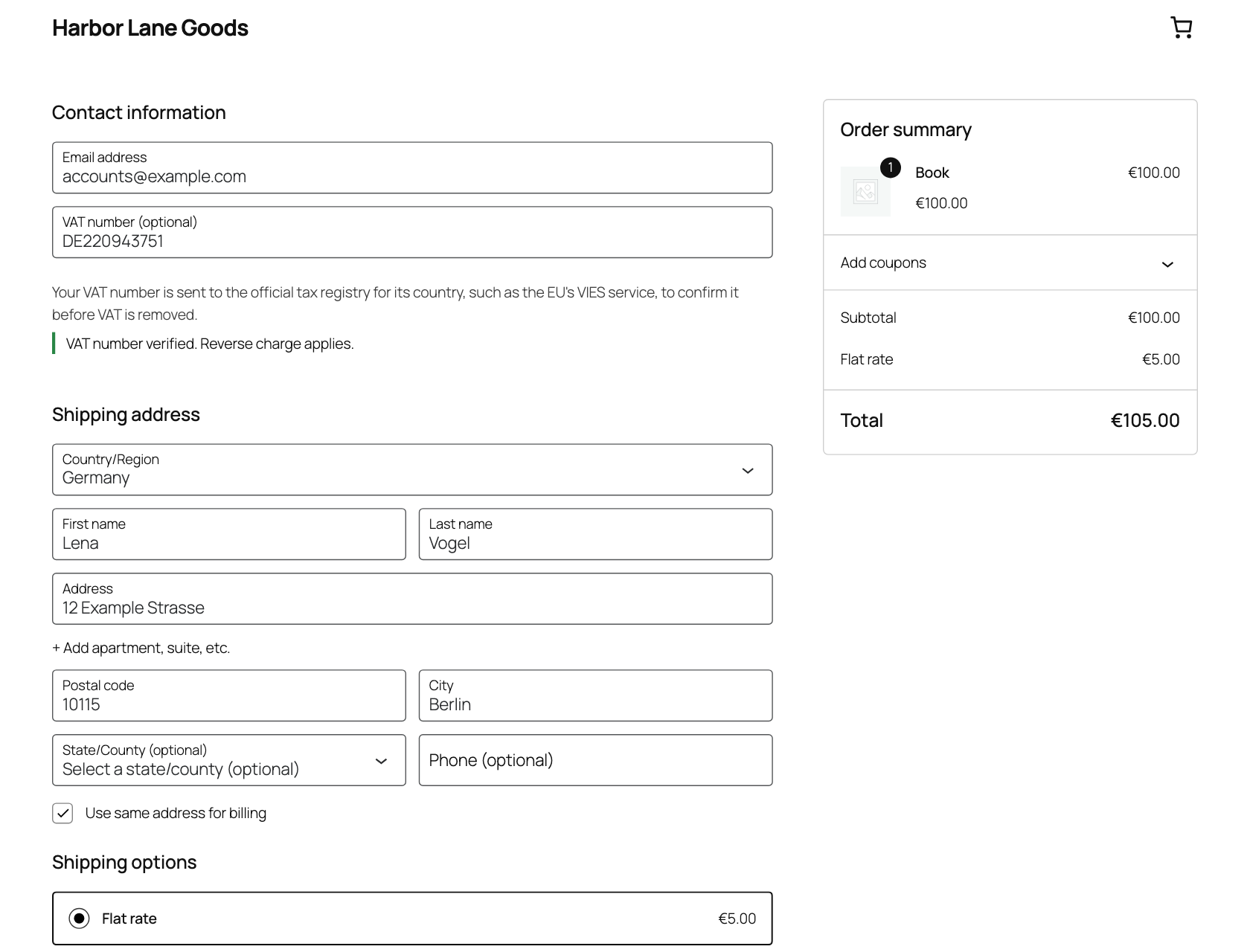
- Adds a VAT number field to the block checkout, the classic checkout, My Account and the admin order screen, and checks the number’s format before it asks a registry
- Validates numbers against VIES for the EU, HMRC for the UK, the UID register for Switzerland and the Brønnøysund register for Norway
- Applies reverse charge to business customers with a valid number, with the legal wording on the order and in emails
- Charges consumers in other EU countries your VAT below the EUR 10,000 OSS threshold and the destination country’s VAT above it, and switches on its own
- Uses billing country, shipping country and geolocation as evidence for digital products, and can ask the customer to confirm their country when they disagree
- Imports standard and reduced rates from the EU’s TEDB into your WooCommerce tax classes, with a diff you approve first
- Records the number, the registry’s answer, the location evidence and the rule that applied on every order, with a log of changes
- Re-checks numbers that couldn’t be validated at checkout and emails you when the answer changes what’s owed
- Produces a quarterly OSS return and an EC Sales List as screens, CSV files and REST endpoints
- Works with HPOS and registers WordPress personal data exporters and erasers
VAT Right is a tool, not tax advice. Rates and registry answers come from third parties, so check your setup with an accountant.
Installation
- Make sure WooCommerce is active. In WordPress, go to Plugins > Add New Plugin, search for VAT Right, install and activate it. You can also download it from WordPress.org and upload the zip.
- Go to WooCommerce > Settings > General and tick Enable tax rates and calculations. WooCommerce hides the Tax tab until you do.
- Go to WooCommerce > Settings > Tax > VAT Right and read the setup check.
- Enter your store VAT number.
- Apply the EU rates in the rates table at the bottom of the screen, or map your tax classes first.
It needs WordPress 6.6 or later, PHP 7.4 or later and WooCommerce.
Documentation
Settings live under WooCommerce > Settings > Tax > VAT Right. The reports are under WooCommerce > EU VAT reports, and each order has an EU VAT box.
Read the setup check
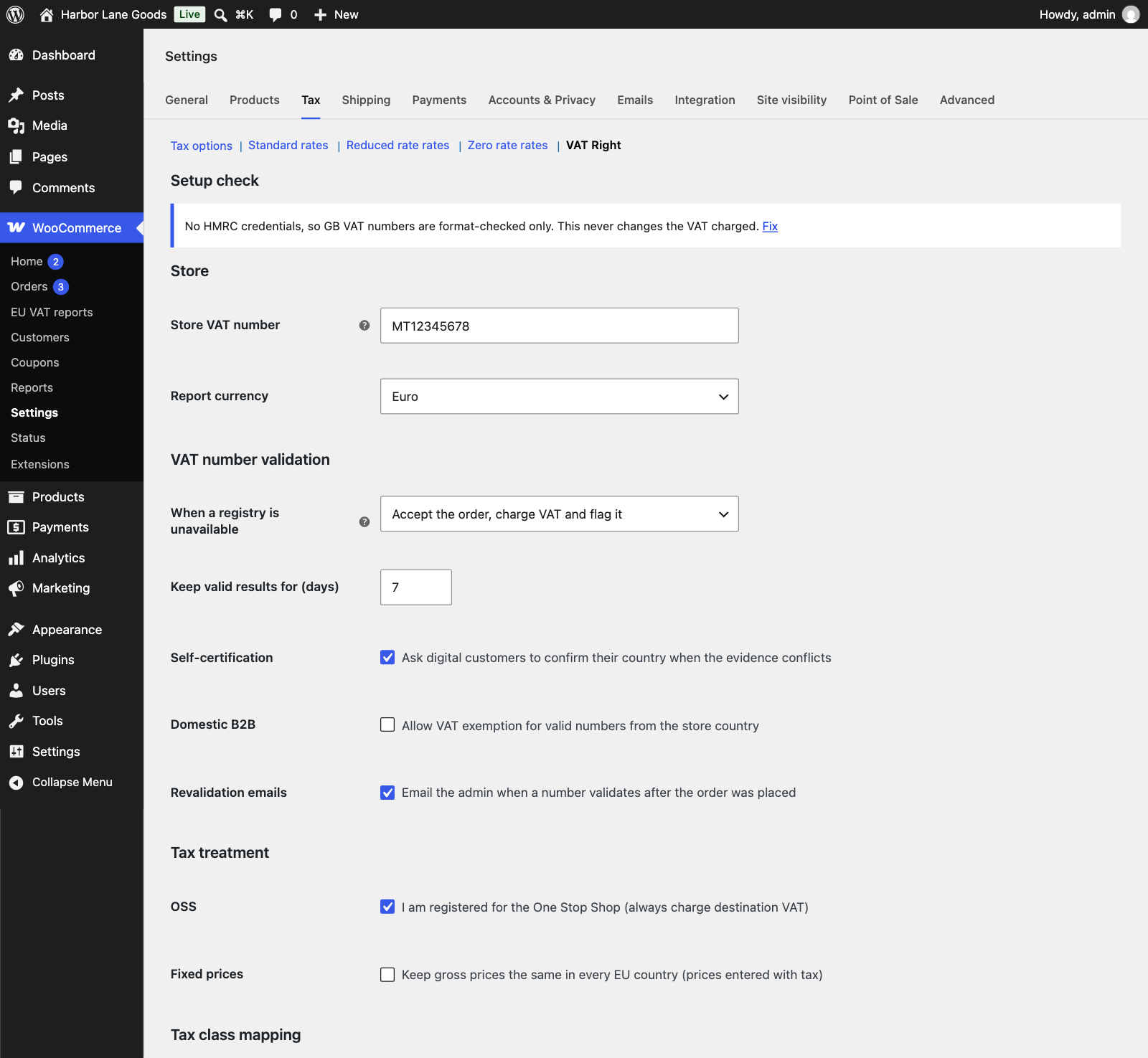
The setup check sits at the top of the VAT Right screen and lists what’s missing, with a Fix link on each item. It flags these:
- Taxes are turned off in WooCommerce
- Tax is calculated on the shop base address instead of the customer’s address
- The store base country is outside the EU, since this version is built for EU-established stores
- Your store VAT number comes from a different country than the store’s base country, which can mean the EUR 10,000 threshold doesn’t apply to you
- Prices include tax but you haven’t chosen the fixed prices setting
- A standard-rate row is missing for an EU country, or an order needed a rate your tax tables don’t have
- A tax rate applies to every country, which would charge VAT on sales outside the EU
- Your store VAT number isn’t set, or geolocation is off
- VIES reports member states as unavailable right now
- No HMRC credentials, so UK numbers get a format check only
A problem that blocks VAT from working, such as taxes being off, also shows as a dismissible notice on other WooCommerce settings screens.
Add your store VAT number
Enter it under Store. VAT Right checks the format before it saves, and when VIES covers the number it tells you what VIES answered. The number goes to VIES as the requester on every check, and VIES returns a consultation number as proof of each one. Report currency sets the currency of the OSS return and defaults to euro.
Validate VAT numbers at checkout
The block checkout shows a VAT number field under Contact information. The block checkout shows the field only when the billing country is an EU member state, the UK, Switzerland or Norway. The classic checkout shows it as a billing field for every country, with a line telling the customer the number goes to the official registry. Customers can also save a number on the Account details page in My Account.
Customers can type the number with spaces, dots or dashes, with or without the country prefix. Greece accepts EL or GR, Swiss numbers accept the MWST, TVA or IVA suffix and Norwegian numbers accept MVA.
A format check runs first: the prefix, the digit pattern for the country and, for Germany, Italy, Spain, the Netherlands, Belgium, Poland, Portugal, the UK, Norway and Switzerland, the check digit. A number that fails shows an error under the field. A number the registry rejects stops the order with a message that tells the customer to correct it or leave the field empty and pay with VAT.
Results are cached. A valid answer is kept for seven days by default, and you can set between 1 and 90 under Keep valid results for. An invalid answer is kept for an hour and an unreachable registry for five minutes. A single visitor can trigger ten lookups in ten minutes, and the store as a whole 300 an hour, so a bot can’t use your checkout to hammer VIES.
Check numbers in the UK, Switzerland and Norway
Which registry answers depends on the number’s prefix:
- EU numbers go to VIES. Northern Ireland numbers starting XI go there too
- GB numbers go to HMRC, which needs your own free credentials
- CHE numbers go to the Swiss UID register
- NO numbers go to the Brønnøysund register, which also confirms the organization is VAT-registered
HMRC only answers requests from a registered application. Create an account at the HMRC Developer Hub, register an application, subscribe it to the VAT Registered Companies API, then paste the client ID and client secret under WooCommerce > Settings > Tax > VAT Right > HMRC. VAT Right never shows the saved secret again, and clearing the client ID removes both. Without credentials a GB number gets the format check only, and a UK business customer is treated as a consumer.
Reverse charge for business customers
When a business customer in another EU country enters a valid number, VAT comes off the order. The rule depends on what’s in the cart:
- Goods to a business in another EU country are an exempt intra-Community supply under Article 138
- Services to a business in another EU country are reverse charged under Article 196
The order, its emails and the customer’s order view show the customer’s VAT number, a VAT note with that wording and the consultation reference. You can change the wording with the vatright_legal_text filter, and the strings are translatable.
VAT Right only removes VAT when the number’s country matches the billing country. A German number on a French billing address is charged VAT and flagged with a prefix mismatch. A number that fails validation is charged VAT too.
Domestic business customers
A valid number from your own country doesn’t remove VAT, because a domestic sale always carries it. If your situation allows an exemption, tick Domestic B2B to allow it.
Charge consumers the right VAT
For a consumer in another EU country, the rule depends on the OSS threshold. Below EUR 10,000 of cross-border consumer sales of goods and digital products, the order carries your country’s VAT. Above it, the order carries the destination country’s VAT. VAT Right adds up the net value of those sales for the calendar year, and the threshold counts as passed when either this year’s or last year’s total is over EUR 10,000. The order that crosses the line already gets destination VAT. The vatright_threshold_eur filter changes the figure.
If you’re registered for the One Stop Shop, tick OSS under Tax treatment. VAT Right then always charges destination VAT. The setup check suggests this when your store VAT number comes from a different country than your base country.
Other rules apply before these:
- Local pickup gets your country’s VAT
- Delivery to a territory outside the EU VAT area, such as the Canary Islands, gets no EU VAT
- A customer outside the EU gets no EU VAT, with the number recorded if they entered one
- Services to consumers get your country’s VAT
- Northern Ireland, with a BT postcode, counts as inside the EU VAT area for goods
Each cart line gets its own place of supply and rule. The customer is only exempt from VAT when every taxable line is, so a mixed cart keeps VAT on the lines that need it.
Digital products and location evidence
For digital products VAT Right collects three pieces of evidence: the billing country, the shipping country and the country of the visitor’s IP address. When two of them agree, that country decides. Otherwise the billing country does, and the order is flagged. With Self-certification ticked, which is the default, a customer whose evidence conflicts is asked to confirm their country with a checkbox, and that answer decides.
The setup check warns you when geolocation is off, since you’d have one piece of evidence fewer.
Set the supply type per product
Each product has an EU VAT supply type field under Product data > General: Automatic, Goods, Digital service or Other service. Automatic treats physical products as goods and virtual products as digital services. Variations follow their parent. The vatright_supply_type filter sets it in code.
Keep EU VAT rates current
The rates table at the bottom of the VAT Right screen shows each country and tax class with its current rate, the EU’s rate and a status. VAT Right checks TEDB, the European Commission’s tax database, once a week, the Fetch latest from EU TEDB button checks on demand. A change never takes effect until you tick its row and click Apply selected rates. A rate you edited by hand stays as it is unless you also tick Also overwrite rates I edited.
The Tax class mapping section decides which EU rate each class follows. The standard class follows the standard rate. A class mapped to reduced rates gets the rate you pick for each country from the EU’s list, and a class can also be mapped to zero. VAT Right adds a Northern Ireland row at 20 percent for the BT postcode range.
Keep gross prices fixed
If you enter prices with tax, tick Fixed prices under Tax treatment and customers pay the same price in every EU country. VAT Right then stops WooCommerce from adjusting prices for the customer’s location. The setup check asks you to choose when prices include tax and you haven’t.
Decide what happens when a registry is down
When a registry can’t answer, the When a registry is unavailable setting decides:
- Accept the order, charge VAT and flag it. This is the default, and you can refund the VAT once the number validates
- Accept the order, exempt VAT and re-check later. A made-up number passes while the registry is down, and the VAT is yours to recover if the re-check fails
- Do not accept the order, with a message that asks the customer to try again or pay with VAT
Registry requests time out after five seconds at most. The exempt option only covers a registry that was tried and failed, so a number that was never checked is charged VAT. When VIES refuses a request because of load, VAT Right charges VAT and checks the number later, whatever you’ve chosen.
A flagged order gets re-checked in the background after 15 minutes, 1 hour, 6 hours, 1 day and 3 days. When the answer changes what’s owed, the order gets a note and, with Revalidation emails ticked, you get an email. If the number validates after VAT was charged, the customer may be due a refund. If it’s invalid after VAT was removed, VAT may be due. After the last attempt the order gets a note asking you to check by hand.
Read the VAT decision on an order
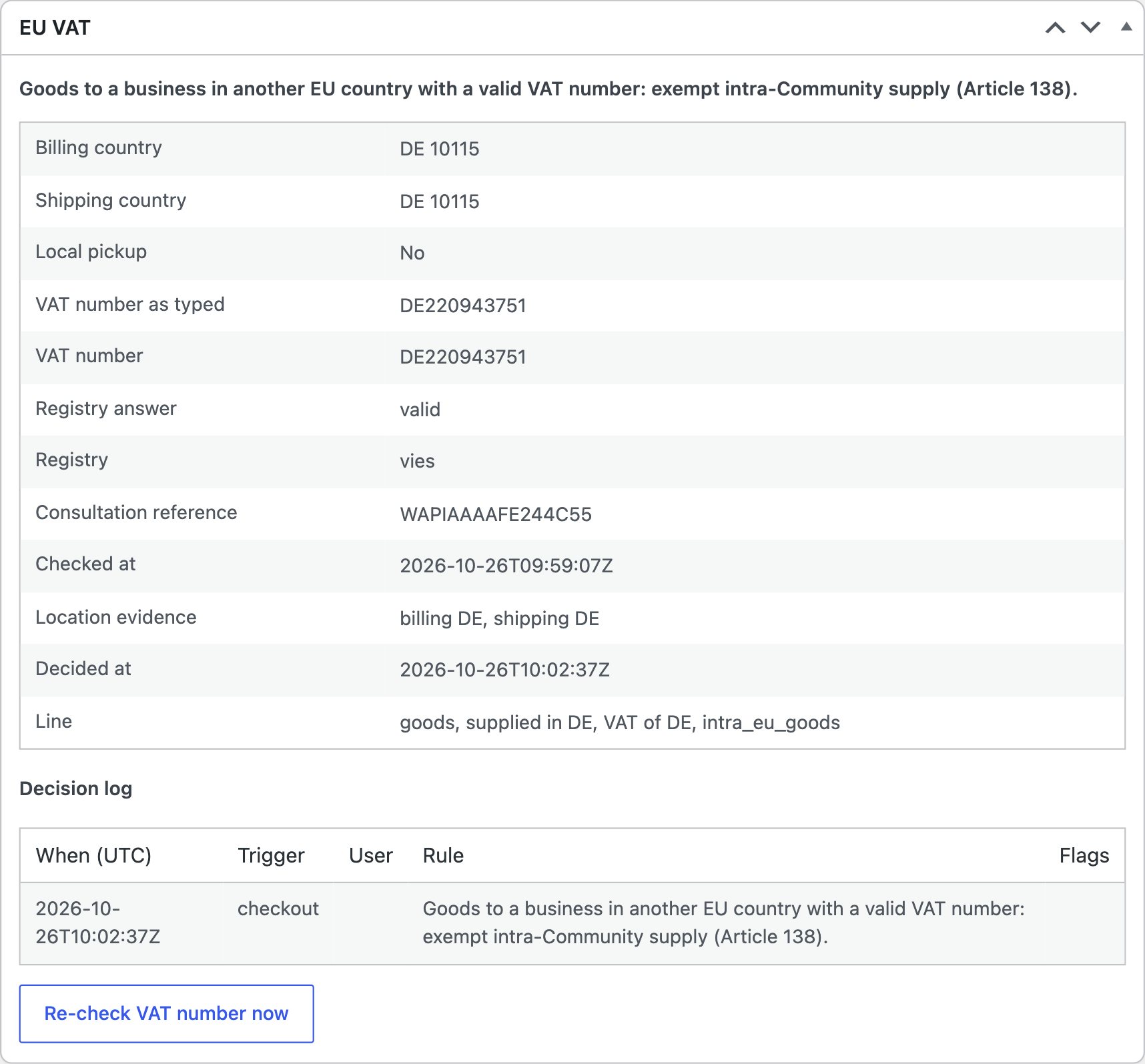
The EU VAT box on the order screen opens with the rule that applied, in plain words. Under it, a table lists the billing and shipping country, the VAT number as typed and as cleaned up, the registry and its answer, the registered name and address, the consultation reference, when it was checked, the location evidence and how each line was treated. Flags such as validation pending, prefix mismatch or single piece of evidence appear above the table.
The decision log lists every time the decision changed, with the time, what triggered it, who did it and which rule applied. Re-check VAT number now asks the registry again. If you edit the number or billing country afterwards, the box tells you to recalculate taxes so the decision catches up. Orders from the previous calendar year onward that predate the plugin get a decision worked out after the fact and flagged as backfilled.
File the OSS return and the EC Sales List
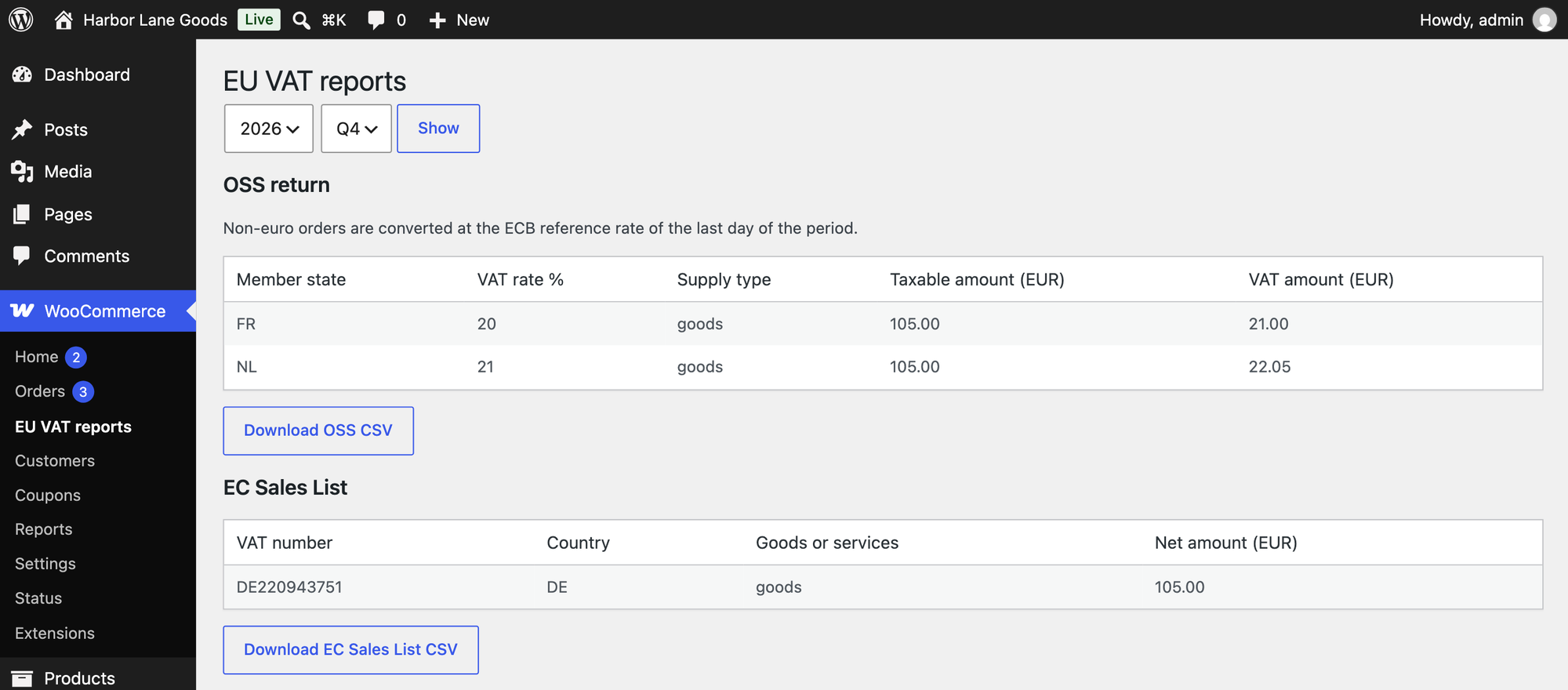
WooCommerce > EU VAT reports shows both reports for a year and quarter. It needs the view_woocommerce_reports capability.
The OSS return lists each member state, VAT rate and supply type, with the taxable amount and the VAT. Orders in another currency are converted at the ECB reference rate of the last day of the period, and the rates used are listed under the table. Refunds booked in a later period against an earlier one appear in the CSV under Corrections to earlier periods, so you can amend that return. Orders that were charged your own rate because the destination rate was missing are left out of the figures and listed separately for you to fix.
The EC Sales List lists each customer VAT number with the country, whether the sale was goods or services and the net amount in euro. When an ECB rate isn’t available for an order, the list isn’t shown until it is, and the notice names the orders. Each report has a CSV download.
Privacy and data retention
VAT Right stores the customer’s VAT number, the registry’s name, address and consultation number for it and the IP country used as evidence. They live on the order, in the plugin’s ledger table and, for logged-in customers, in their account. Keep VAT records for sets the retention period between 1 and 30 years and defaults to 10, counted from the end of the year of the sale. After it, a daily job removes the personal data from the decision record and the ledger and keeps the scheme, rule, amounts and country evidence.
Exporters and erasers appear in WordPress’s privacy tools under EU VAT records. Inside the retention period, an erasure request keeps what the VAT records need and says so. Deleting the plugin leaves all data in place unless you tick Delete all plugin data when the plugin is deleted, and even then the details stored on orders stay with the orders.
Filters and REST endpoints
Filters you can use:
vatright_supply_typesets the supply type of a productvatright_legal_textchanges the reverse charge wordingvatright_threshold_eurchanges the OSS thresholdvatright_registry_timeoutsets the registry timeout between 1 and 5 secondsvatright_client_lookup_limitandvatright_global_lookup_limitchange the lookup limits, each as an array of count and secondsvatright_client_ipchanges the address used to identify a visitor, for stores behind a proxy
The REST API has three endpoints under /wp-json/vatright/v1/. GET reports/oss takes year, quarter and an optional currency. GET reports/ec-sales-list takes year and quarter. Both need the view_woocommerce_reports capability. GET orders/<id>/vat returns an order’s decision and log to anyone who can read that order.
FAQ
Do I need to be registered for the OSS?
Not to use the plugin. Below the EUR 10,000 threshold VAT Right charges your country’s VAT to consumers in other EU countries. Once you pass the threshold, or tick OSS, it charges the destination country’s VAT, and the OSS return report gives you the figures for your filing.
What happens if VIES is down?
Checkout keeps working. By default the order is accepted, VAT is charged and the order is flagged as pending validation. VAT Right checks the number again later and emails you if it validates, so you can refund the VAT. You can change this to exempt the VAT or to refuse the order.
Does it work with WooCommerce Subscriptions?
VAT Right hooks into the Subscriptions renewal and switch hooks. A renewal is decided as a new sale. It reuses the subscription’s stored registry answer while that’s fresh and checks the number again when it isn’t. If a renewal can’t be decided, VAT is charged. I tested this against a stand-in for the Subscriptions hooks, not against the WooCommerce Subscriptions plugin itself.
Which services does it call, and what does it send?
VAT Right sends a VAT number to the registry that covers it: VIES, HMRC, the Swiss UID register or the Brønnøysund register. VIES also receives your store VAT number as requester, and HMRC receives your credentials. It asks TEDB for rates and the ECB for exchange rates. It sends none of them an order’s contents, amounts or the customer’s name, and it makes no request unless a number, a rate update or a currency conversion needs one.
Can I use it outside the EU?
This version is built for stores established in the EU, and the setup check warns you when your base country is outside it.
Does it change my prices or rates by itself?
It never changes a rate until you apply it from the rates table. Prices only change if you tick Fixed prices.
Where does VAT Right charge VAT when it can’t be sure?
It charges VAT and flags the order. These cases get VAT:
- Consulting, legal, advertising and similar services to consumers outside the EU
- Business customers in the UK, unless you add your own HMRC credentials
- Swiss and Norwegian numbers that couldn’t be checked at checkout, until they’re re-checked
- The exempt line of a cart that’s partly exempt because of a domestic exemption
On carts in a currency other than euro, the threshold figure updates at checkout and not on every cart recalculation. A valid VAT number removes VAT without checking that the buyer is that company, so a published number that belongs to someone else would pass.
VAT Right is one of the WordPress plugins I build. For the companies and projects behind them, see my projects page.