Crypto storage is one of the most important decisions you’ll make as a Bitcoin holder. The options have grown considerably, and the differences between wallets — in security, convenience, and philosophy — matter more than ever. This guide cuts through the noise and covers the wallets actually worth your attention in 2026.
A quick note on Ledger before we dive in: in January 2026, Ledger was caught up in another data breach through its third-party payment processor Global-e. No funds or private keys were exposed, but customer names, shipping addresses, and contact details were leaked — for the second time. Ledger hardware remains secure, but their track record on data handling is worth knowing.
- Ledger Nano X – Best all-round hardware wallet
- Sparrow Wallet – Best for Bitcoin power users
- Electrum – Best lightweight Bitcoin desktop wallet
- Exodus – Best for beginners
- For most people, the Ledger Nano X ($149) offers the best balance of security and usability
- Self-custody (your keys, your coins) remains the gold standard — hardware wallets keep keys offline
- Sparrow and Electrum are excellent free software wallets for Bitcoin-only users
1. Ledger Nano X
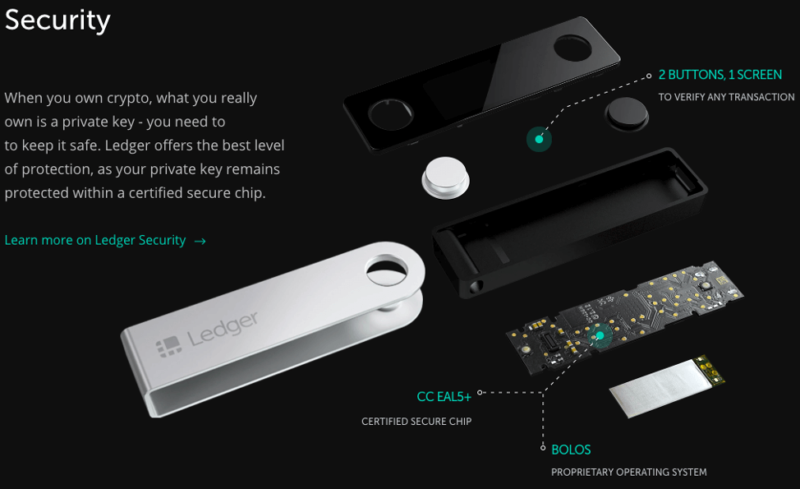
The Ledger Nano X remains the most widely used hardware wallet in 2026, and the reasons are straightforward: it supports over 5,500 cryptocurrencies, connects via Bluetooth to your phone, and comes in at $149 — a reasonable price for the security it offers.
The Full Ledger Lineup in 2026
Ledger now sells four devices. The entry-level Nano S Plus ($79) is a solid no-frills cold wallet. The Nano X ($149) adds Bluetooth and a battery for mobile use. The newer Ledger Flex ($249) features a 2.8-inch E Ink touchscreen, EAL6+ secure element certification, and a credit-card form factor with haptic feedback. At the top, the Ledger Stax ($399) offers a curved E Ink display — largely a premium aesthetic upgrade.
For most people, the Nano X hits the best balance of features and price. If you want the latest hardware and don’t mind spending more, the Flex is the better device overall.
Ledger Live Software
All Ledger devices pair with the Ledger Live app, where you can manage your portfolio, buy crypto, send and receive, and monitor transactions. It works on both desktop and mobile, making cold storage more accessible without sacrificing the core security model.
The Data Breach History
It’s worth being direct here. Ledger has had three data breaches affecting customer data — the most recent in January 2026 via payment processor Global-e. In every case, private keys and funds remained secure; the hardware architecture protects against that. But customer names, shipping addresses, and contact details have been exposed multiple times. If you buy a Ledger, use a P.O. box or similar for shipping, and be skeptical of any unsolicited contact claiming to be from Ledger.
2. Sparrow Wallet
Sparrow has become the go-to Bitcoin desktop wallet for users who want full control and don’t mind learning how to use a serious tool. It’s free, open source, and Bitcoin-only — and in 2026, it’s the strongest software wallet recommendation for anyone who takes self-custody seriously.
UTXO Control and Privacy
Most wallets abstract away the details of Bitcoin transactions. Sparrow does the opposite. You get full coin control, meaning you choose exactly which UTXOs (unspent transaction outputs) go into each transaction. This matters for privacy — it prevents unintentional linking of addresses — and for fee optimization.
Sparrow also has deep integration with privacy tools like Whirlpool (CoinJoin), and you can connect it to your own Bitcoin node or a private Electrum server instead of relying on a public server.
PSBT and Multisig Support
Sparrow is built around the PSBT standard (Partially Signed Bitcoin Transactions), making it an excellent coordinator for multisig setups and hardware wallet workflows. It works with Ledger, Coldcard, BitBox02, and others. If you’re building a serious cold storage setup, Sparrow is where you’ll manage it.
Who It’s For
Sparrow is desktop-only — no mobile app. The interface rewards attention; it shows you what’s actually happening in a transaction rather than hiding it. That’s a feature, not a bug, but it does mean the learning curve is steeper than wallets aimed at beginners.
3. Electrum
Electrum has been around since 2011 and is still actively maintained — version 4.7.1 dropped in February 2026. It’s lightweight, fast, and Bitcoin-only. For users who want a battle-tested wallet without the complexity of Sparrow, Electrum is still the right call.
Private Key Security
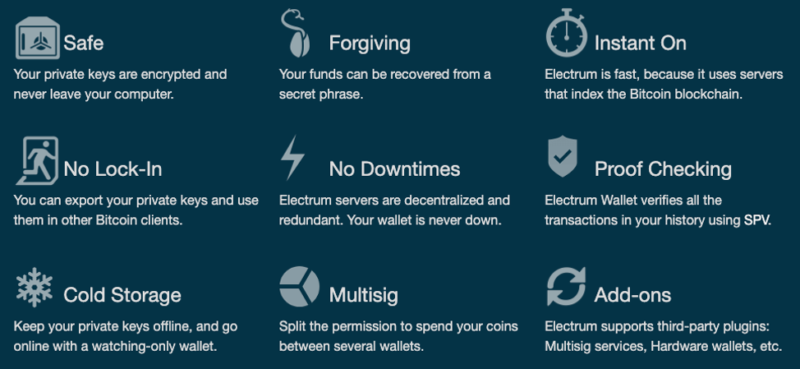
Your private keys are encrypted locally and never leave your machine. The wallet is accessed through a seed phrase, and at no point does Electrum’s server see your keys or personal information. For desktop users who want a no-nonsense self-custody setup, this architecture is close to ideal.
Lightning Network and Hardware Wallet Support
Electrum now supports the Lightning Network natively, allowing faster and cheaper Bitcoin transactions via Layer 2. It also integrates with Ledger and Coldcard, so you can use Electrum as the interface while your private keys stay on a hardware device.
The January 2026 4.7.0 release added Submarine Payments — reverse swaps that allow on-chain payments funded from a Lightning balance. It’s an active project, not abandonware.
Bitcoin-Only, by Design
Electrum supports only Bitcoin. That’s a constraint and a feature simultaneously. It limits attack surface, keeps the codebase focused, and makes Electrum the wallet for Bitcoin maximalists who don’t need anything else.
4. Exodus
For someone just getting into Bitcoin, Exodus is still one of the better starting points. The interface is clean, the built-in exchange makes buying and swapping straightforward, and the customer support is genuinely responsive.
Interface and Experience
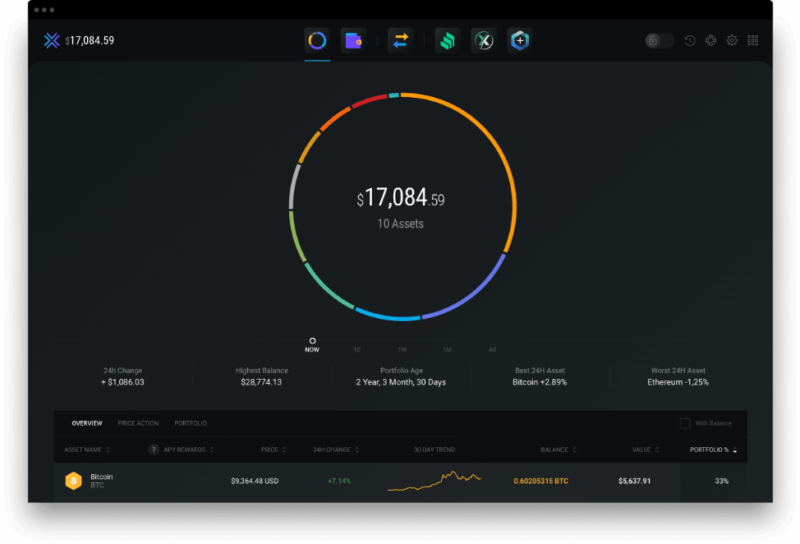
Exodus runs on desktop and mobile and manages a wide range of cryptocurrencies alongside Bitcoin. The visual portfolio view makes it easy to track holdings without needing to understand the underlying mechanics. For someone whose priority is simplicity, that matters.
The Tradeoffs
Exodus is closed source — the codebase is not publicly auditable. It’s also a hot wallet, meaning it’s always connected to the internet, which increases exposure compared to hardware wallets. Neither of these is a dealbreaker for small amounts or active spending wallets, but they’re worth understanding before you put serious holdings here.
More advanced users will find Exodus limiting. There’s no coin control, no PSBT support, and no Lightning Network integration. For those features, Sparrow or Electrum is the better fit.
Back Up Your Seed, and Consider Multisig
A hardware wallet is only as safe as its backup. Anyone who gets your 12- or 24-word seed phrase can take your coins without the device, and losing both the device and the seed means losing the coins for good. Paper backups burn, get flooded and get thrown out by accident, so for meaningful amounts stamp or engrave the seed onto a steel backup plate and keep it somewhere other than the device.
For larger holdings, one wallet is a single point of failure. A 2-of-3 multisig setup spreads the keys across separate devices and locations, so losing any one of them doesn’t lose the funds. You can coordinate it yourself in Sparrow, or use a collaborative custody service such as Casa or Unchained. They hold one key as a backup but can’t move your coins on their own, and both offer inheritance planning, which is the part of self-custody most people never sort out.
Which Bitcoin wallet should you choose?
The right wallet depends on how you’re using Bitcoin.
For long-term cold storage, pair a hardware wallet with a software interface. The Ledger Nano X is the most popular and versatile option, especially if you hold multiple cryptocurrencies. For a software layer on top, Sparrow is the strongest choice for Bitcoin-only setups.
For most users, pairing a hardware wallet for cold storage with a small hot wallet for everyday use is the right setup.
For beginners who want something that works without a learning curve, Exodus gets the job done. Just keep the amounts modest until you’re ready to move to self-custody.
The core principle hasn’t changed: if you’re holding meaningful amounts of Bitcoin, owning your private keys is worth the effort. The tools to do that properly are better in 2026 than they’ve ever been.
Related





Leave a Reply