
After years of dealing with PayPal’s high fees, poor exchange rates, and frustrating withdrawal limitations, I’ve tested every major alternative I could find. If you still need to use PayPal and want to minimise the damage, see my complete PayPal guide for online businesses. If you’re an entrepreneur, freelancer, or online seller based in Europe, here’s what actually works as a PayPal replacement — and where PayPal is still hard to avoid.

When to Replace PayPal
PayPal isn’t always the problem. For receiving automated payments from customers through an e-commerce platform, it remains one of the easiest options to set up — especially in countries where Stripe isn’t yet available. But for three specific use cases, better alternatives exist:
- Invoicing clients directly — You’re paying 2.90% + €0.35 per payment plus cross-border fees for no reason.
- Paying employees or freelancers abroad — PayPal’s fees hit both you and them.
- Transferring money internationally — PayPal’s 3-4% currency conversion markup is among the worst in the industry.
For each of these, the alternatives below will save you real money.
Wise (Formerly TransferWise)
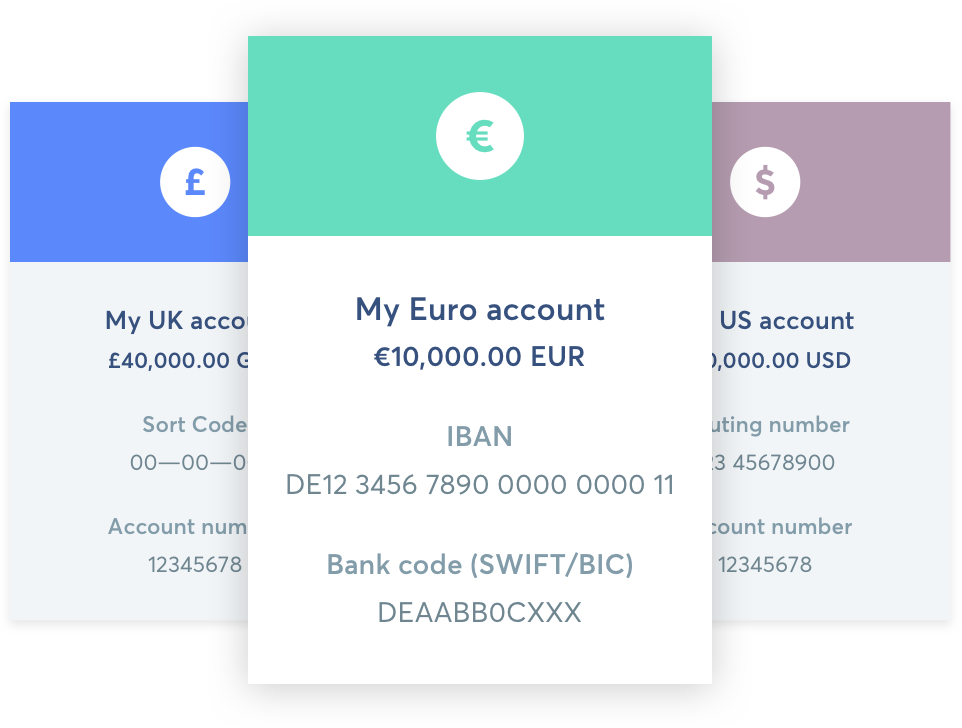
Wise is my top recommendation and the platform I use most. It provides multi-currency accounts with local bank details — meaning you get a real US routing number for USD, a UK sort code for GBP, a European IBAN for EUR, and more.
Why it’s better than PayPal:
- Zero fees to receive money — Give clients your local bank details and they pay as if making a domestic transfer. No percentage-based fees, no cross-border surcharges.
- Mid-market exchange rate — Wise charges a transparent fee (typically 0.4-0.6%) but uses the real exchange rate, no markup. Compared to PayPal’s hidden 3-4% spread, this is dramatically cheaper.
- Multi-currency balances — Hold money in 40+ currencies and convert when rates are favorable. You can set rate alerts and convert when the timing is right.
- Debit card — Spend directly from any currency balance worldwide. The card automatically spends from the matching currency balance, so no conversion happens if you’re paying in a currency you already hold.
Real-world comparison: On a $50,000 transfer, Wise gives €44,378 compared to PayPal’s €43,338 — that’s €1,040 more in your pocket. Even against my local bank, Wise was better (€44,378 vs €43,775). For smaller amounts, the savings are proportionally similar: a $5,000 invoice paid via Wise instead of PayPal saves roughly €100.
How to set it up: Sign up, verify your identity (passport + proof of address), and you’ll have local bank details within minutes. Give your USD routing number to US clients, your IBAN to European clients, and your sort code to UK clients. They pay as if sending to a local bank — most won’t even know it’s Wise. For business use, Wise Business adds features like batch payments for paying multiple freelancers at once and team member access.
Where Wise falls short:
- Not a full payment gateway — customers can’t click a “Pay” button on your website. For e-commerce checkout, you still need PayPal or Stripe.
- PayPal has historically classified Wise as a “virtual bank” and sometimes blocks withdrawals to it. Compatibility varies by country. However, you can call PayPal and ask them to add your Wise US routing number manually — it shows up as “Community Federal Savings Bank.”
PayPal withdrawal limits: With a Wise USD Visa card, I’ve been able to withdraw up to $3,000 per transaction from PayPal — higher than Revolut’s $1,999 limit. The funds arrive in USD with no conversion at either end, making Wise the best option for getting money out of PayPal.
Best for: Direct client invoicing, international money transfers, holding multi-currency balances, PayPal USD withdrawals. I’ve eliminated PayPal completely for direct invoicing and the savings are substantial.
Revolut
Revolut offers similar multi-currency functionality to Wise, with one significant advantage: it’s the most reliably compatible fintech with PayPal across Europe. If you need to keep using PayPal but want to minimize its currency conversion damage, Revolut is your best weapon.
Why it works well with PayPal:
- PayPal treats Revolut accounts as standard bank accounts in most EU countries — no compatibility headaches.
- You can withdraw PayPal balances in matching currencies (USD to Revolut USD, GBP to Revolut GBP) with no conversion.
- Supports 30+ currencies with interbank-rate exchanges.
The currency trick: The key strategy with Revolut is to always withdraw from PayPal in the same currency as your PayPal balance. If you have $5,000 in PayPal, withdraw it as USD to Revolut, not EUR. This bypasses PayPal’s terrible exchange rate entirely. Once the USD is in Revolut, convert it to EUR at the interbank rate — which is far better than what PayPal offers. This two-step approach can save you 3-4% on every transfer.
Free vs. paid plans: The free Standard plan includes interbank-rate currency exchanges up to €1,000/month, after which a 1% fair usage fee applies. If you’re converting significant amounts regularly, the Plus (€3.99/mo) or Premium (€9.99/mo) plans give you unlimited fee-free exchanges and higher ATM withdrawal limits. For most people doing occasional PayPal withdrawals, the free plan is enough.
Practical limits I’ve discovered:
- When withdrawing from PayPal to Revolut, the maximum is $1,999 per transaction. Anything beyond that and PayPal throws an error.
- You can make two withdrawals per day, so the effective daily maximum is approximately $4,000.
- In some regions, PayPal only supports Visa card withdrawals — Revolut’s Mastercard won’t work. Use your Revolut IBAN (bank account details) instead of the card.
- Weekend and holiday exchanges carry a markup since forex markets are closed: 1% on Standard, 0.5% on Plus, and 0% on Premium and above. Try to convert on weekdays if you’re on a free plan.
Best for: Pairing with PayPal to avoid conversion fees, everyday spending in multiple currencies, quick transfers. See my full Revolut review.
Payoneer

Payoneer is an established PayPal alternative that’s particularly popular in Asia (especially India and the Philippines) and for marketplace payouts. Where Wise and Revolut are fintech-first platforms, Payoneer positions itself more as a B2B payment solution — it integrates directly with marketplaces like Amazon, Fiverr, Upwork, and Airbnb as a payout method.
Key features:
- Global Bank Transfer: Local bank transfers in 50+ countries, SWIFT for the rest. Same-currency withdrawals cost $1.50 flat; cross-currency transfers are 1% (minimum $4) for amounts over $400.
- Prepaid MasterCard: Receive payments loaded directly to a USD card. ATM withdrawals cost $3.15 + up to 3% conversion.
- Request a Payment: Send a payment request link to clients (similar to a PayPal invoice). The client pays via credit card, bank transfer, or their own Payoneer account. Fees are 3% if the client pays by card, or 1% for Payoneer-to-Payoneer transfers.
- Currency conversion: 2% for the six major currencies (EUR, GBP, CAD, PHP, AUD, RON), up to 3% for others. Higher than Wise, but lower than PayPal.
- Customer support: Notably better than PayPal — phone, live chat, and support tickets available.
Annual fee: $29.95/year. The fee is waived if you maintain a minimum balance or receive regular payments above a threshold (varies by region).
Real test — paying remote workers in the Philippines: I sent approximately $1,000 to the Philippines through both PayPal and Payoneer to compare. After all fees, currency conversions, and the receiver’s bank fees, Payoneer saved the receiver $35-45 when sending in EUR, or $8-10 when sending in USD. The savings are significant for regular monthly payments to overseas team members.
Where Payoneer stands out: If you sell on multiple marketplaces or work with platforms that support Payoneer payouts, it’s hard to beat. Having marketplace earnings routed directly to Payoneer and then withdrawn to a local bank account is often cheaper than the PayPal alternative. It’s also one of the few services that works reliably in countries where Wise and Revolut have limited coverage.
Best for: Receiving marketplace payouts, paying remote workers in Asia, situations where Wise or Revolut aren’t available.
Stripe
Stripe is the developer-friendly payment gateway that’s become the standard for online businesses. If you’re selling digital products, subscriptions, or SaaS, Stripe is almost certainly better than PayPal.
Why choose Stripe over PayPal:
- Cleaner checkout experience — customers stay on your site instead of being redirected to PayPal’s pages.
- Lower base fees in many markets (1.5% + €0.25 for European cards in Europe, compared to PayPal’s 2.90% + €0.35).
- Better developer integrations and APIs — if you’re building anything custom, Stripe’s documentation and tooling are in a different league.
- More transparent pricing — no hidden currency conversion spreads or surprise cross-border fees.
Stripe’s pricing advantage: For European businesses accepting European cards, Stripe charges 1.5% + €0.25 per transaction, compared to PayPal’s standard 2.90% + €0.35. On a €100 sale, that’s €1.75 with Stripe vs. €3.25 with PayPal. At €10,000/month in sales, you’d save €150/month — €1,800/year — just by switching your payment processor.
Tip: If you receive payments in USD through Stripe but bank in EUR, you can connect a Wise USD account to Stripe and withdraw in USD with no conversion on either end. Then convert via Wise at the mid-market rate. This is much cheaper than letting Stripe handle the conversion. This Stripe + Wise combination is the most cost-effective way I’ve found to accept international payments online.
Limitation: Stripe isn’t available in all countries. If your buyers or your business is in a country Stripe doesn’t support, PayPal may still be necessary. Also, some customer demographics (particularly older buyers and those in developing markets) simply expect and prefer PayPal. For maximum conversion, many businesses run both Stripe and PayPal as checkout options.
N26
N26 is a licensed EU bank with a standard German IBAN. PayPal treats it exactly like any other bank account — no compatibility issues whatsoever. The limitation is that N26 only supports EUR, so it’s only useful for withdrawing euro balances from PayPal.
If you already use N26, it’s a perfectly clean option for EUR withdrawals. For multi-currency needs, you’ll still need Wise or Revolut alongside it. See my N26 review.
Another strong option for EUR banking is Revolut Business, which doubles as a full business account with multi-currency support. A notable bonus: Revolut Business is crypto-friendly, making it easy to move between fiat and crypto without the friction you’d get from traditional banks.
How to Combine These Services
Here’s my personal setup after years of optimization:
- Direct client invoicing: Wise — zero receiving fees, mid-market conversion rates. I give US clients my USD routing number and European clients my IBAN. They pay as if making a local transfer.
- E-commerce checkout: Stripe as the primary processor (lower fees, better UX) + PayPal as a secondary option for customers who prefer it.
- Withdrawing from PayPal: Wise USD Visa card for amounts up to $3,000. Revolut as backup (limit $1,999/tx). Local bank Visa for larger amounts ($10,000/tx). Always withdraw in the original currency to avoid PayPal’s conversion.
- Paying remote workers: Wise for most countries, Payoneer for Philippines/India where it has better local banking integration.
- EUR banking: N26 or Revolut Business (which is also crypto-friendly as a bonus).
This combination eliminates most of the fees and conversion losses that make PayPal so expensive for international sellers. The single biggest win is switching from PayPal invoicing to Wise bank details — that alone saves 3-5% on every payment received.
Quick Comparison Table
| Service | Best For | FX Rate | PayPal Withdrawal | Cost |
|---|---|---|---|---|
| Wise | Invoicing, transfers, PayPal withdrawals | Mid-market + 0.4-0.6% | Up to $3,000/tx (varies) | Free account |
| Revolut | PayPal pairing, daily spending | Interbank rate | $1,999/tx (most reliable in EU) | Free – €8/mo |
| Payoneer | Marketplace payouts, Asia | 2-3% markup | N/A | $29.95/year |
| Stripe | E-commerce, SaaS | ~1% markup | N/A (PayPal replacement) | Per-tx fees |
| N26 | EUR banking | N/A (EUR only) | Fully compatible (EUR only) | Free – €17/mo |
For more on structuring your business payment cards, see my guide on payment card strategy for online companies.
If you’ve found other approaches that work well, especially for specific countries or use cases, let me know in the comments.
Related







Leave a Reply