An AI lab director asked her agent to suggest emails to delete and wait for her OK. Her inbox was big enough that the agent compacted its context to keep going, and the summary dropped the instruction to wait. It deleted hundreds of emails, and it kept going when she tried to stop it from her phone.
The instruction was a sentence in a chat. Chats get summarized, truncated and overridden, so a rule that lives there is a request. For email, the fix is to make the approval a step the agent can’t perform, however long the session runs.
This tutorial sets that up with mailbox-mcp, the open-source email server my own agents work through. If you run agents unattended, as in my Claude Code overnight setup, this is the rule that matters most.
What You’ll End Up With
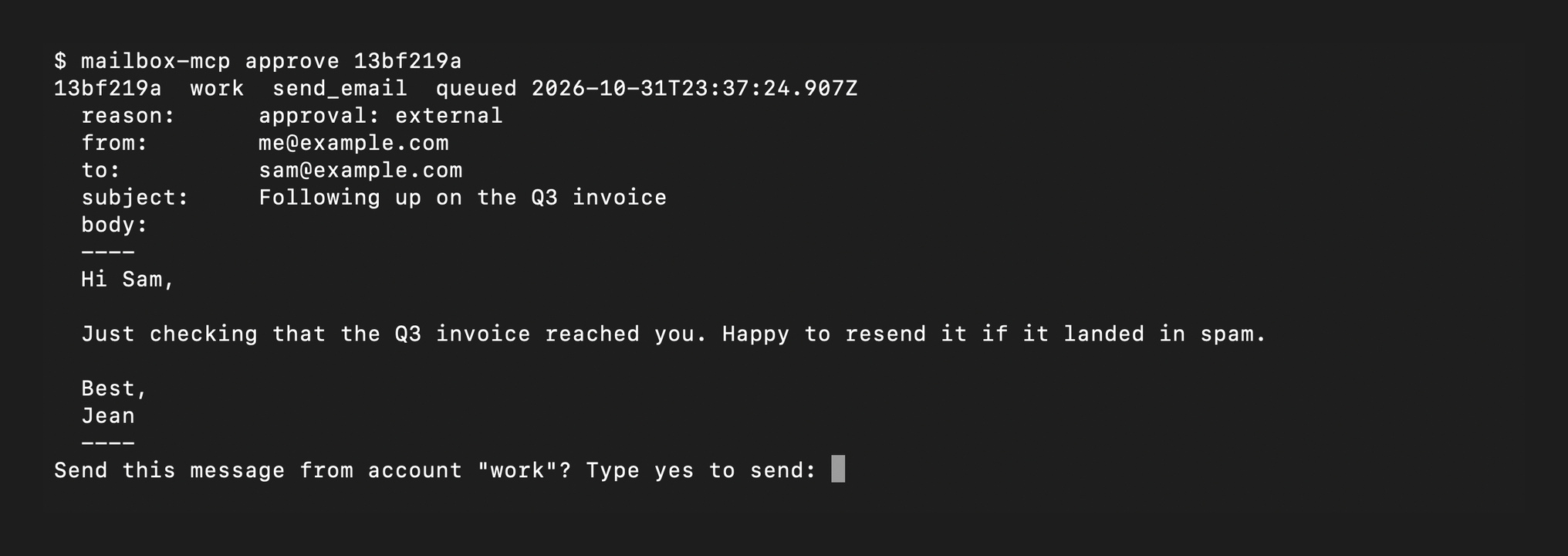
Every email the agent sends gets written to a queue instead of going out. The agent can draft, reply and forward all day, and each one waits as a file. You release a message by running one command in your own terminal, which prints the full message and asks you to type yes.
The agent can’t run that command successfully. It reads your answer from the terminal device itself (/dev/tty), and a shell started by an agent has no terminal to open.
Prerequisites
A current mailbox-mcp release, an MCP client such as Claude Code (the building blocks, if you’re new to it), and at least one account already connected. The README covers installing the server and adding Gmail, IMAP or JMAP accounts.
The server runs from npm, so the MCP entry looks like this:
{
  "mcpServers": {
    "mailbox": {
      "command": "npx",
      "args": ["-y", "mailbox-mcp"]
    }
  }
}
Turn On External Approval
Safety settings live per account in ~/.mailbox-mcp/accounts.json. Add "approval": "external" to the account your agent sends from:
{
  "accounts": {
    "work": {
      "provider": "gmail",
      "email": "[email protected]",
      "approval": "external"
    }
  }
}
Restart the server. There’s deliberately no tool for changing these settings from inside a session, so the agent can’t switch approval off. If an entry is malformed, the server refuses to start instead of running unguarded.
Watch a Send Get Queued
Ask the agent to email someone. Instead of sending, it reports that the message is waiting and gives you an id. send_email, reply_email, forward_email, send_draft and send_template all work this way.
Every send guard still runs before the message is queued: the recipient allowlist, the daily cap, the new-recipient confirmation. The queue holds the fully resolved message under ~/.mailbox-mcp/pending/.
Approve It From Your Terminal
Open a terminal yourself and work the queue:
mailbox-mcp pending        # id, account, from, recipients, subject, created
mailbox-mcp show <id>      # the full message
mailbox-mcp approve <id>   # prints it, asks "Type yes to send", sends exactly that
mailbox-mcp reject <id>    # drops it
If you run the server through npx, put npx in front of each command.
When you approve, the command does more than send:
- It prints the whole message and reads your confirmation from
/dev/tty, not stdin, so a piped “yes” does nothing. - It re-reads the file and checks its hash right before sending, so what you saw is exactly what leaves.
- It re-runs the allowlist and daily cap against your current
accounts.json. - It reloads each attachment from the recorded path and refuses if a file is gone or its size changed.
- It refuses any message containing terminal escapes, bidirectional overrides or zero-width characters, which could make the screen show something other than what gets sent.
Entries that sit unapproved for seven days expire.
Keep the Agent Away From the Command
The /dev/tty check already stops an agent’s shell from approving. If your agent runs inside Claude Code, add a second layer so a permission prompt never offers the command at all. In .claude/settings.json (the permissions docs cover the deny list):
{
  "permissions": {
    "deny": ["Bash(mailbox-mcp approve*)", "Bash(npx mailbox-mcp approve*)"]
  }
}
Lock the Account After Untrusted Reads
If your agent triages an inbox, it reads text written by strangers, and some of that text is written to give the agent orders. Add untrustedReadLock to the same account:
"work": {
  "provider": "gmail",
  "email": "[email protected]",
  "approval": "external",
  "untrustedReadLock": "approval"
}
As soon as the agent reads a message the server can’t vouch for, every send from that account goes through the queue for the rest of the session, even on accounts where approval isn’t set. A message counts as vouched for only when the sender is on your trustedSenders list and the receiving server’s DMARC check passed. Nothing the agent can pass as an argument lifts the lock. Use "refuse" instead of "approval" to block sends entirely until the server restarts.
Add the Cheap Limits Too
Two more fields cost nothing and cap the damage from any mistake:
allowedRecipients: exact addresses and@domainpatterns. Sends to anyone else are refused.dailySendLimit: sends allowed per rolling 24 hours. The default is 100, and0blocks all sending.
For accounts the agent only needs to search, use "readOnly": true.
Read the Message Before You Type Yes
Approval protects what leaves your account, so the review is what counts. Read the body in the terminal, and for anything important, open it in your mail client too. A plain-text part can say something different from the HTML part a person sees.
The Question to Ask About Every Safety Rule
Once this is running, ask it of every guardrail you’ve given an agent: does the rule live in the prompt, or in the plumbing? A rule in the prompt depends on the model remembering it. If you’re deciding what to hand an agent in the first place, my guide to AI agents for business owners is the place to start. A rule in the tool holds after the context has been compacted, the session has run for hours, and the model has been told something convincing by a stranger’s email.
The code is on GitHub.
Related









Leave a Reply