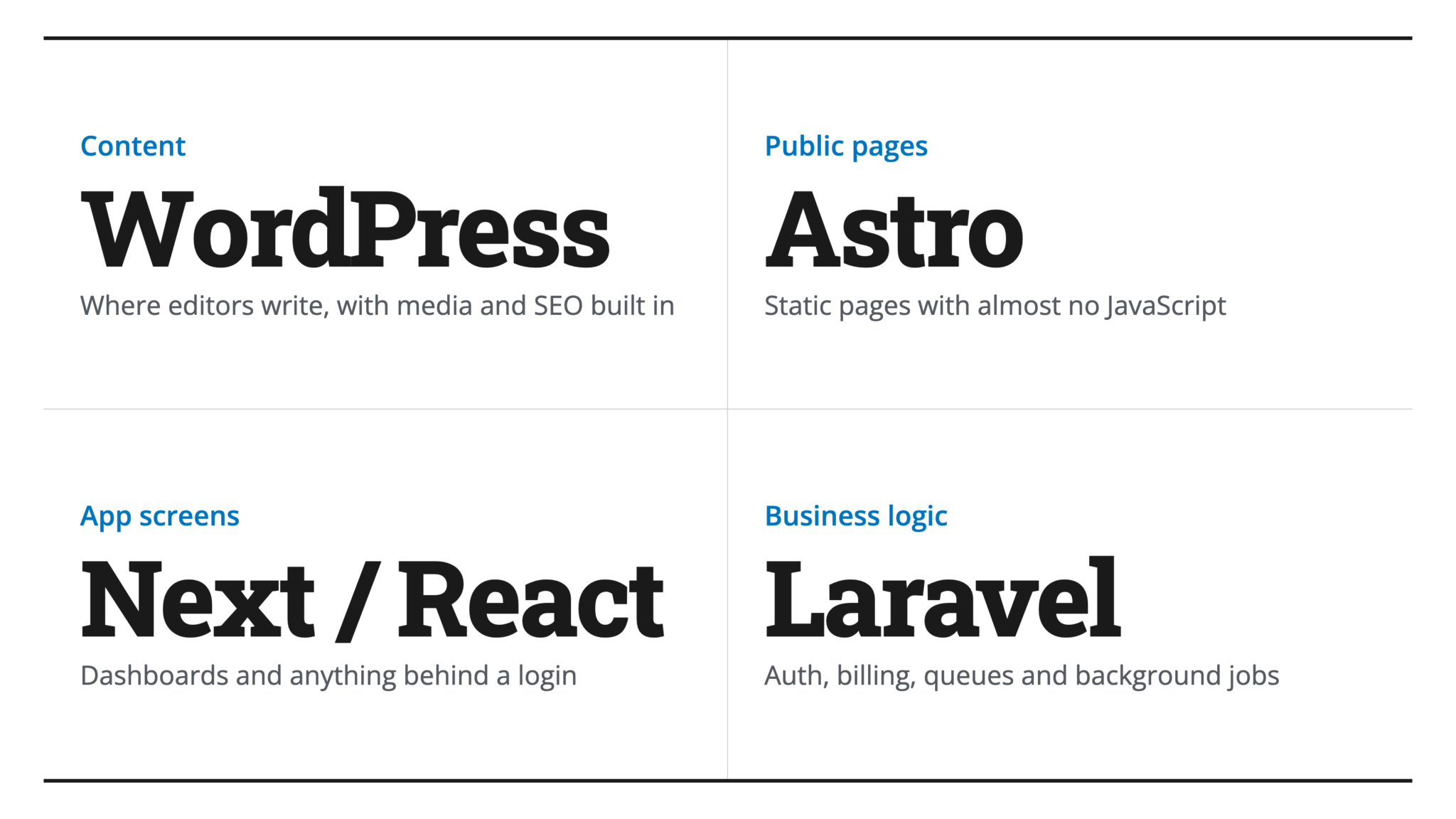
Most sites I ship now run on three of these tools at once, each doing the part it’s good at. WordPress holds the content, Astro serves the public pages, and a Worker or Laravel handles the data behind them. After twenty years of building for the web, I stopped picking a stack and started picking per layer.
So this is the map I actually use, what each tool is for, where they blur into each other, and why the real answer is usually a combination rather than a winner.
Two questions decide almost everything before you name a single tool. First, is this thing content or an app? A blog, a brochure, a docs site, a marketing site is content. A dashboard, a booking system, anything with logged-in state and real interaction is an app. Second, where does the data live and who edits it? A person typing into a CMS, files in a repo, a database behind an API. Answer those two and most of the choice falls out. The tools below are really just the answers.
WordPress
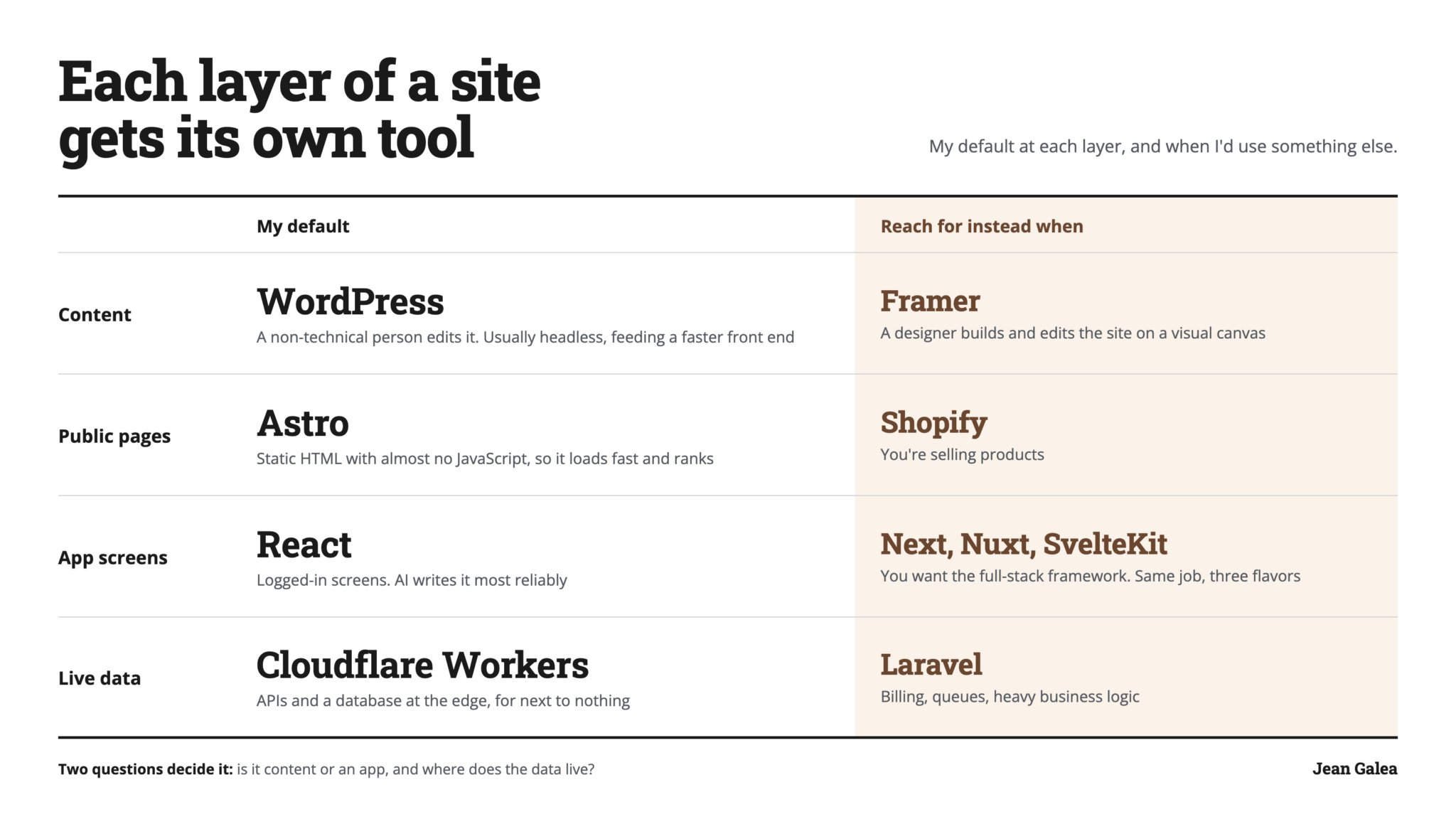
Use WordPress when content is the product and a non-technical person edits it, or when you need its plugin ecosystem and don’t want to rebuild WooCommerce, memberships, or a forms system from scratch. That ecosystem is the real reason it still wins, not the front end, a case I made separately in WordPress isn’t dying, it stopped being the default.
You can also take WordPress apart. It’s a content backend, an editing dashboard, and a front-end renderer bundled together, and you can keep just the parts you want. Used headless, WordPress becomes a pure content store that a faster front end reads from, which is how I use it most often now, and what I walked through in WordPress as an engine.
Astro
Use Astro when the site is content-first and you want it fast and static, with small islands of interactivity rather than a heavy app shell. Blogs, marketing sites, documentation, content-heavy directories. It ships almost no JavaScript by default, so the result is close to plain HTML, and that is exactly what you want for content that mostly needs to load fast and rank.
Astro is the content-leaning end of the JavaScript world. It can do server rendering and dynamic routes when you need them, but its instinct is static pages plus a sprinkle of interactivity, and it pairs beautifully with a headless CMS or a separate data API.
Next, Nuxt, and SvelteKit
Use one of Next, Nuxt, or SvelteKit when you’re building an actual application: dashboards, SaaS products, anything with a lot of logged-in, stateful interaction. They’re full-stack frameworks with server rendering, API routes, and the whole app toolkit. They’re also easy to over-reach for, which is why I wrote when not to use Next.js.
These three do the same job, just built on different foundations: React for Next, Vue for Nuxt, Svelte for SvelteKit. For years the choice came down to which JavaScript flavor your team preferred, and I’d have told you to pick one and move on. AI coding agents changed that. They’ve had far more React to learn from than Vue or Svelte, so React is what they write most reliably, with the least fixing afterwards. If agents write your front end, as they write mine, pick React.
Laravel
Use Laravel when you need a serious custom backend with real business logic, authentication, billing, queues, and a domain too specific for an off-the-shelf CMS. It’s the application-backend choice in the PHP world, and Rails and Django are the same slot for Ruby and Python. The language is mostly preference; the job is identical.
Laravel sits on a different axis from everything above. It’s a backend, not a front end. So it overlaps with Next and friends on “build a web app,” but more often it combines with a front end than competes with one, whether that’s Blade and Livewire, or Laravel serving an API to a separate JavaScript app.
The ones that aren’t frameworks
Two more belong on the map even though they aren’t frameworks. Use Shopify when you’re selling products. Building and maintaining your own store is rarely worth it, and Shopify handles the parts that actually break. For a marketing site, AI has taken most of the no-code builder’s job: you describe the site, get a static Astro build, host it for next to nothing, and nothing is locked in. The exception is Framer, when a designer wants to build and edit the site on a visual canvas instead of reviewing code. People pay for Framer’s design tool more than for avoiding code, which is why it keeps growing while the best-known no-code builder is cutting staff and pivoting to agents. You still accept their hosting and their pricing, so go in knowing that’s the trade.
Where they overlap
None of these are clean boxes. Astro and WordPress overlap on content, since both can run a blog, and they also combine, with WordPress headless behind an Astro front end. Astro overlaps the app frameworks on content-heavy apps, where either could work and the call comes down to how app-like the thing really is. Laravel overlaps the JavaScript frameworks on full-stack apps, then usually resolves into a pairing rather than a contest.
The overlap is the point, not a problem to solve. These tools were built to snap together, and the strongest stacks treat them as layers rather than as a single decision.
Composition is the real game
The padel platform we’re building at padelvida.com runs WordPress headless for the editorial articles, an Astro static front end for speed and SEO, and a small Cloudflare Worker with its own database for the live scores, rankings, and court data. Three tools people think of as competitors, in one site, each doing the job it does best. The articles come from the CMS at build time, the pages ship static, and the live data is fetched on top.
Notice that the data layer is its own decision, separate from the front-end framework. Live, changing data needs a real backend and a database, whether that’s a managed service like Supabase or an edge setup like Cloudflare Workers and D1. A blog never forces you to think about that. An app always does, and conflating “which framework” with “where does the data live” is how people end up with the wrong shape.
The short version
Stop treating these as rival religions. Ask the two questions. Is it content or an app, and where does the data live. If it’s content a non-technical person edits, WordPress, possibly headless. If it’s content you control, Astro. If it’s an app, Next or Nuxt or SvelteKit on the front, Laravel or a managed backend behind it, a real database for the dynamic data. A store is Shopify. A designer-built marketing site is Framer, and most other marketing sites are now an AI-built static site.
And the best answer is almost never one of them. It’s the two or three that fit the layers, wired together so each does only what it’s good at.
Related







Leave a Reply