
Crypto tax tools tend to fall into two camps. The global ones cover a long list of countries at shallow depth, handing you a capital gains summary you then translate into whatever your tax office wants. The specialists go deep on a handful of markets and leave everyone else out.
Blockpit sits between the two, and mostly pulls it off. It reports in over 100 countries, and in ten it applies local tax logic and hands you prefilled forms. That second list is where the product earns its keep, and it leans hardest toward German-speaking Europe, where the rules are fussiest and the tax offices least forgiving.
Here’s how it holds up in 2026, and when I’d pick it over Koinly, CoinTracking, or Divly.
- Best for: DACH and Western European filers who want local tax logic and prefilled forms
- Free plan: yes, unlimited portfolio tracking and integrations, no card required
- Paid from: €49 per tax year (up to 50 transactions), one-time
- Coverage: 100+ countries for reporting, 10 with prefilled national forms
Blockpit – An Overview
Blockpit AG is based in Linz, Austria, and has been building crypto tax software since 2017. It raised €8.4 million in 2021, and in March 2025 took a further undisclosed investment from Elevator Ventures, the venture arm of Raiffeisen Bank International. That banking connection matters more than a typical funding line, because Blockpit’s roadmap runs toward DAC8 and CARF reporting, source-of-funds documentation, and distribution through banks.
In November 2023 it bought Accointing from Glassnode and shut that platform down at the end of January 2024, absorbing its user base. That acquisition is a big part of why Blockpit is now one of the larger European players, and also the source of its worst reviews. More on that below.
The product covers the whole loop: connect your exchanges, wallets, and chains, let it classify everything, then buy a report for the tax year you need. Portfolio tracking sits in front of that as a free product with no transaction limit, so you can run it all year and pay only in the weeks when you actually file.
Blockpit Features
Country-specific tax frameworks
Blockpit reports for over 100 countries, but the tiering is what matters. Ten countries get the full treatment: Austria, Belgium, France, Germany, Italy, the Netherlands, Spain, Switzerland, the United Kingdom, and the United States. In those markets you get managed local tax logic, prefilled forms for the relevant authority as PDFs, and written explanations aimed at the tax office rather than at you. If you’ve ever tried to justify a staking classification to a skeptical official, you’ll appreciate the last one.
A second group of 27 countries, including Ireland, Portugal, Malta, Poland, and the Nordics, gets local presets for currency and cost-basis method plus fully editable tax settings, but in English only and with no prefilled forms. Everywhere else falls back to a generic international framework in USD.
Germany gets extra attention, including a holding period tracker that watches the one-year mark that decides whether a disposal is tax-free, and a WISO Steuer export. Austria, as home turf, is handled about as carefully as you’d expect. Blockpit’s Crypto Tax Agent product is also in use by the German and Austrian tax authorities themselves, which is a credibility signal none of its competitors can match in that region.
Free portfolio tracking with no transaction cap
Most competitors cap the free tier by transaction count. Blockpit doesn’t: portfolio tracking is free permanently, with unlimited transactions, unlimited integrations, CSV imports, and iOS and Android apps. Auto-labeling, transfer matching, spam-token detection, and the warnings for negative balances and missing prices all work on the free plan.
What the free plan doesn’t show you is your tax figures. Cost basis, gains, losses, and the report itself all sit behind a purchase, so you can get your data clean for free but you can’t check the answer before paying.
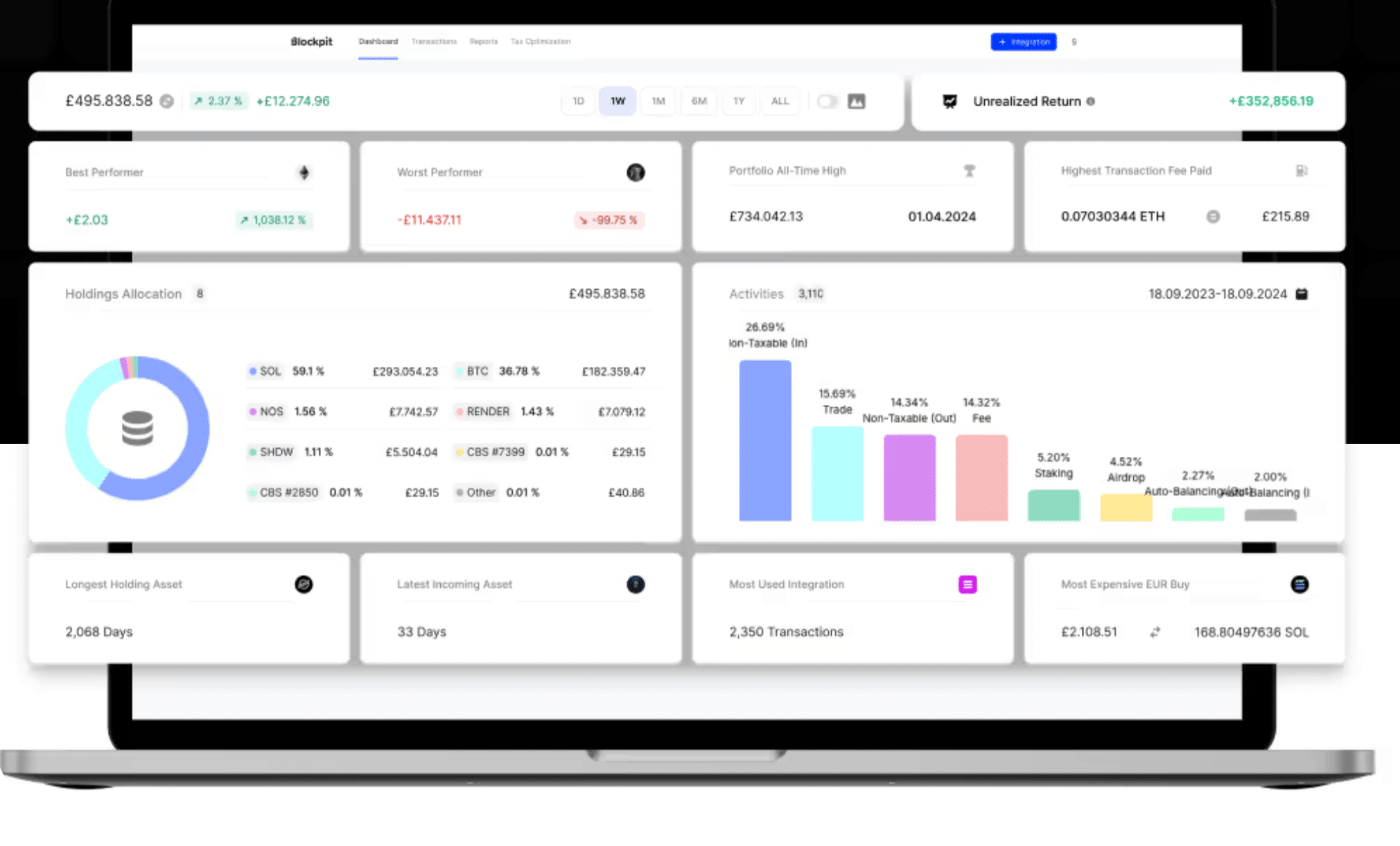
Integrations and asset coverage
The integrations page lists 780 connections as of July 2026: 159 exchanges, 200 blockchains, 70 wallets, and 351 dApps. Imports run through read-only exchange API keys, OAuth for a few platforms like Kraken, public wallet addresses, and CSV. Blockpit’s marketing copy quotes several different numbers for all of this depending on which page you land on, so treat the integrations page as the real one and check that your specific exchange is there.
Beyond spot trading it handles staking, lending, liquidity mining, yield farming, NFTs, tokenized stocks, commodities, margin, and perpetual futures, with in-house price oracles for DeFi tokens and NFTs where public pricing is thin. Historical price data goes back 15 years.
Source of Funds reports
This one is unusual and genuinely useful if a bank or an exchange has ever asked you to explain where a particular pile of coins came from. Blockpit generates a standardized document tracing a transaction back through its funding history, with a flow diagram, data sources, and issue indicators. It’s sold separately at €19.99 per report, or €79.99 for five credits that don’t expire. Koinly and CoinLedger have nothing equivalent.
Migration from other tools
There’s a dedicated CSV import path for transaction history from Accointing, CoinTracking, and Koinly. It works, but read the Accointing section below before assuming a switch will be painless.
Tax-loss harvesting and Blockpit Plus
Blockpit Plus (€47.90 a year, advertised as €3.99 a month) adds the analytical layer: per-transaction tax figures, unrealized gains and losses, tax-loss harvesting suggestions with a sales simulator, daily automatic syncing, full historical charts, AI explanations for on-chain transactions, and an NFT gallery. There’s a 14-day trial with no card required.
Worth being clear about the packaging, because it changed in early 2026: Plus does not include a tax report, and a tax report does not include Plus. Several of these features used to come bundled with the report licence, and long-time users have not been quiet about the split.
How to Get Started with Blockpit
Step 1: Create a free account
No card needed. Pick your country during setup, since that decides which tax framework and forms apply to you.
Step 2: Connect your accounts
Add exchanges via read-only API keys, wallets by public address, and anything else by CSV using Blockpit’s template. Integrations are unlimited even on the free plan.
Step 3: Clear the flags
Blockpit auto-labels transactions and matches transfers between your own accounts, then flags what it can’t resolve: negative balances, missing prices, uncategorized transactions. Clearing these determines whether your report is accurate, and the bulk editing and filters make it faster than it sounds.
Step 4: Buy the report for that tax year
Once the data is clean, purchase the licence for that year and download as many reports as you want, in PDF or CSV. Past tax years work the same way, with a separate licence for each.
Blockpit Pricing
Blockpit splits pricing into four things you buy independently, which is clearer than most competitors manage. Prices below were checked in July 2026 and include VAT; see the live pricing page for changes.
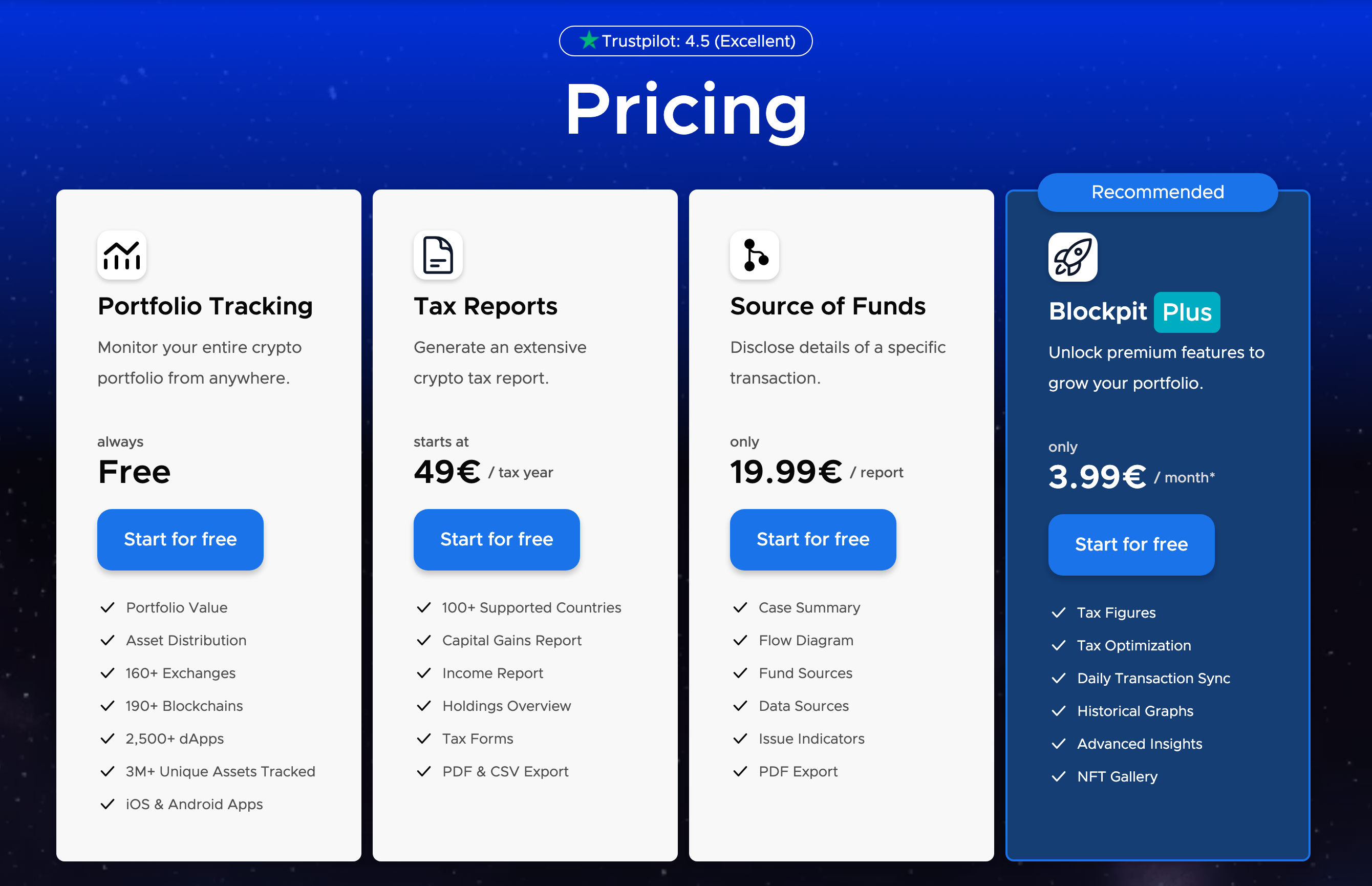
Portfolio tracking – free
Unlimited transactions, unlimited integrations, mobile apps, portfolio value and asset distribution. Permanently free, no card, and not a trial.
Tax reports – from €49 per tax year
A one-time purchase per year, priced purely on the number of transactions in that year:
- Small: 50 transactions – €49
- Medium: 1,000 transactions – €99
- Large: 3,000 transactions – €149
- X-Large: 10,000 transactions – €229
- XX-Large: above 10,000 transactions – €549
Once you’ve bought a year you can regenerate that year’s reports as often as you like. There’s no subscription and no auto-renewal on the report itself.
Source of Funds – €19.99 per report
Sold as credits that never expire: one for €19.99, three for €49.99, five for €79.99.
Blockpit Plus – €47.90 per year
Billed annually and renews automatically until you cancel. This is the only recurring charge in the lineup. There’s also a quote-based clean-up service starting at €199 for genuinely messy portfolios.
Blockpit Safety and Security
Exchange connections use read-only API keys, and Blockpit never asks for private keys or wallet access. Set your keys up with trading and withdrawal permissions disabled anyway, as you should with any tool of this kind. Keys are encrypted with AES-256-GCM at rest, passwords are bcrypt-hashed, and two-factor authentication is supported.
More interesting is the hosting: Blockpit runs on its own dedicated hardware in Europe rather than on a public cloud, which is a deliberate GDPR posture and unusual in this category. Payments go through Stripe. The company references ISO-certified server infrastructure and an EY audit for GDPR compliance in a few places on its site, though the wording attaches the certification to the hosting rather than to the company, so I’d treat it as a good sign rather than a hard credential.
One thing worth flagging that isn’t Blockpit’s fault: there’s an active scam ring cold-calling people, using the Blockpit name, and demanding payment to “release” crypto. Blockpit never holds your funds and will never call you about them.
How Blockpit Compares
- Koinly covers more countries with localized reports and has a larger integration library. It’s the better all-rounder if you trade across a long tail of platforms or file somewhere Blockpit hasn’t localized, and it lets you see your numbers before paying.
- CoinTracking is the other German-speaking heavyweight, running since 2012, and it’s cheaper per transaction at every tier with far more cost-basis methods and a lifetime licence option. It’s also the harder tool to learn.
- Divly competes on European national forms and owns the Nordics and Poland, which Blockpit doesn’t localize for. Blockpit is stronger in DACH and has many more integrations.
- Blockpit wins when your country is on its ten-country list, especially in Austria, Germany, or Switzerland, and when you want a free tracker running all year with no transaction ceiling.
Its Trustpilot score is 4.4 across roughly 950 reviews, a little below Koinly, CoinTracking, and CoinLedger, all of which sit at 4.5 or 4.6. The mobile apps rate around 4.3 in Germany, its largest app market.
Potential Downsides
- The entry tier is the stingiest in the category: €49 buys 50 transactions. Koinly and CoinLedger both give 100 at $49, and CoinTracking’s cheapest paid plan covers 200. Anyone with a moderately active year lands on the €99 tier, so compare on your real transaction count rather than the headline price.
- You can’t see your numbers before paying: tax figures are locked until you buy the licence for that year. Koinly, CoinLedger, and Divly all let you preview your computed gains first. Combined with a 14-day refund window, this is the single most common source of complaints.
- Fewer cost-basis options: FIFO, ACB, and shared pool, with no LIFO or HIFO. Blockpit argues this prevents you from producing a report your tax office would reject, which is a defensible position, but US filers who want HIFO should look elsewhere. The ten fully supported countries also can’t edit their tax settings at all.
- Staking rewards are calculated gross, with no toggle to net off platform fees. If you stake through an exchange that takes a cut, your taxable income will read higher than you expect unless you edit transactions by hand.
- The Accointing migration was rough: it ran on CSV rather than account transfer, transfers between wallets often failed to match, and cost basis had to be repaired manually. The WISO Steuer export that many German users had specifically chosen Accointing for didn’t arrive until June 2024, months after the shutdown. Blockpit has fixed most of this since, but the reviews from that period are a fair warning about how it handles a migration.
- Plus is a separate subscription: tax-loss harvesting, daily syncing, and per-transaction tax figures sit behind a recurring charge on top of the report you already bought.
Blockpit – Conclusion
Blockpit is the tool I’d point a German, Austrian, or Swiss filer to first, and a sound pick anywhere else on its ten-country list. The prefilled forms and the explanations written for tax authorities solve the part of crypto tax filing that software usually leaves you holding, and the free tracker means you can run it all year and decide later whether to buy the report.
You’re buying partly on trust, though, because the computed figures stay hidden until you pay. If that bothers you, Koinly lets you check the answer first, and CoinTracking will cost you less over several years. If you file in the Nordics, Divly is the better fit. For everyone in DACH and most of Western Europe, import a year of history into Blockpit for free, get the flags cleared, and judge it from there.
See also: How are Bitcoin and cryptocurrencies taxed in Europe?, plus my country guides for Germany and Spain.
Do your crypto taxes with Blockpit
Frequently Asked Questions
Is Blockpit free?
Portfolio tracking is free permanently, with unlimited transactions and unlimited integrations, plus the iOS and Android apps. You pay only when you want a tax report for a specific year, which starts at €49. Note that your tax figures, including cost basis and gains, stay hidden until you buy that year’s licence. Blockpit Plus, the analytics layer, is a separate annual subscription.
How much does Blockpit cost?
Tax reports are a one-time purchase per tax year, priced on transaction count: €49 for 50 transactions, €99 for 1,000, €149 for 3,000, €229 for 10,000, and €549 above that. Source of Funds reports cost €19.99 each, and Blockpit Plus is €47.90 a year.
Which countries does Blockpit support?
Blockpit generates crypto tax reports for over 100 countries. Ten get prefilled national tax forms and managed local tax logic: Austria, Belgium, France, Germany, Italy, the Netherlands, Spain, Switzerland, the United Kingdom, and the United States. Another 27, including Ireland, Portugal, Malta, Poland, and the Nordic countries, get local presets and editable tax settings in English but no prefilled forms. Everything else uses a generic international framework.
Is Blockpit better than Koinly?
It depends on where you file. Koinly has more localized countries and more integrations, and it lets you see your calculated gains before paying, which makes it the safer all-rounder. Blockpit goes deeper in its ten countries, particularly Austria, Germany, and Switzerland, where it applies local rules and produces prefilled forms. If your country is on Blockpit’s list, it gets you closer to a finished filing.
What happened to Accointing?
Blockpit acquired Accointing from Glassnode in November 2023 and shut the platform down at the end of January 2024, migrating users across by CSV import. That migration drew a lot of criticism, mainly around unmatched transfers and broken cost basis that users had to repair by hand. Blockpit still ships a dedicated importer for Accointing, CoinTracking, and Koinly exports.
Is Blockpit safe to use?
Blockpit connects to exchanges through read-only API keys and never asks for private keys, so it can read your history but cannot trade or move funds. Disable trading and withdrawal permissions on any key you create. It’s an Austrian company operating under EU data protection rules, it hosts on its own hardware in Europe rather than a public cloud, and payments run through Stripe.
Related reading: Best crypto tax software in 2026.
Related





Leave a Reply