In June I pointed Hermes, an AI agent running on my Mac, at a language model running on the same machine. No API key, no per-token bill. The change took three lines in a config file, and the model answered in under a second.
Setting it up sent me down a rabbit hole. Hermes gets sold with the same line as a dozen other tools: run AI privately, on your own machine. AnythingLLM uses it. So does Ollama, the engine Hermes was now talking to. That line stretches across about eight genuinely different tools, and people keep installing the wrong one because every homepage reads the same.
So here is the map I wish someone had handed me. The short version: to run a model on your own computer, install Ollama or LM Studio. To chat with your own documents, add AnythingLLM. For an assistant that works on its own schedule and messages you, add Hermes. Once you see why, the whole category stops being a soup of similar-sounding names and becomes two short lists.
The two layers hiding under “local AI”
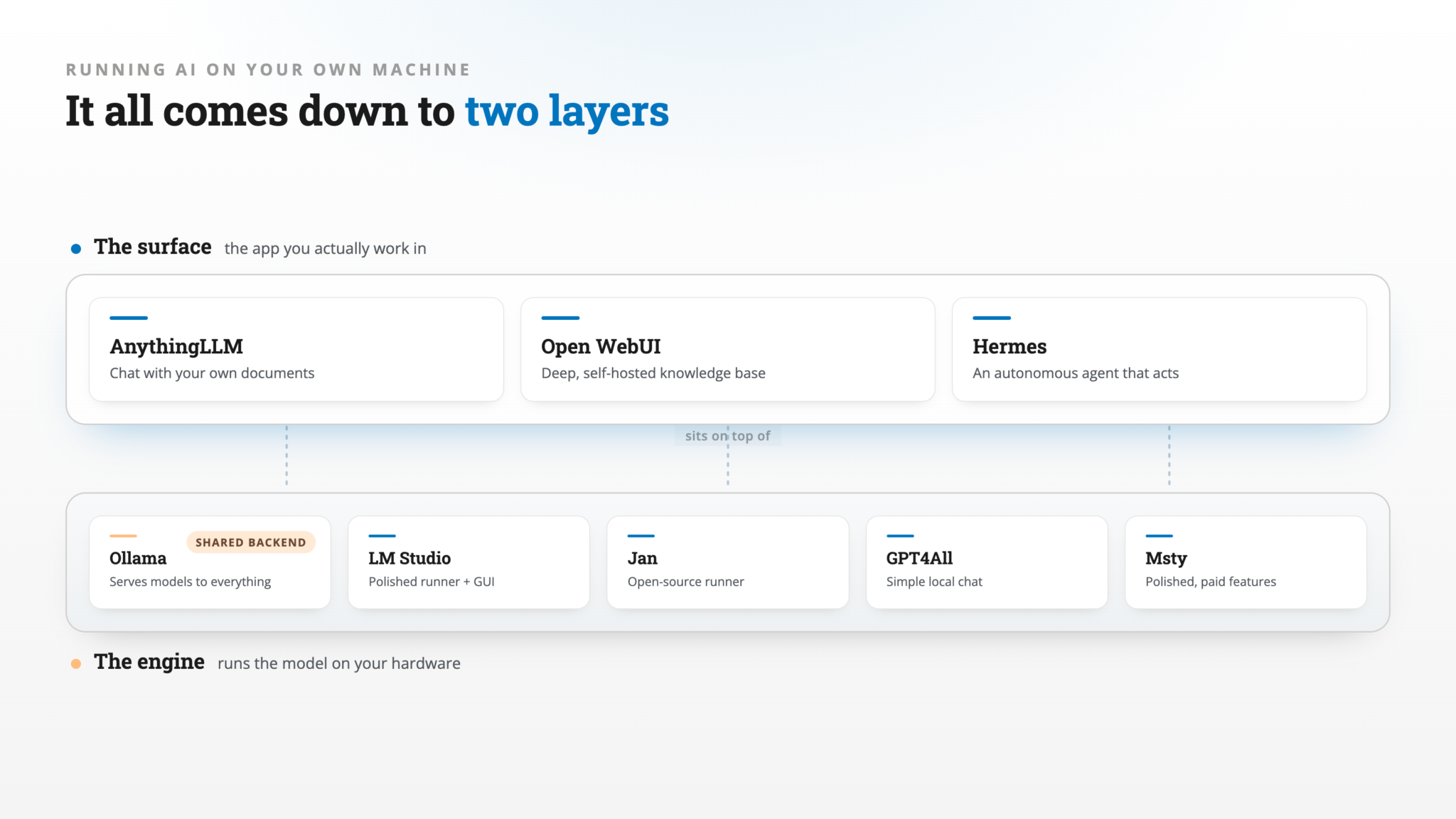
Every tool in this space sits in one of two layers.
The bottom layer is the engine: it loads the model weights and runs inference on your hardware. The top layer is the surface: the app you actually sit in and work with. Some products are only an engine. Some are only a surface. A few are both, which is exactly why the category feels confusing.
The reason this matters: you usually want to choose one engine and then choose a surface for the job in front of you. Mixing them up leads to running three apps that each bundle their own copy of the same model, or paying for a polished agent product when a free runner would have done the job.
Ollama is the clearest example of a pure engine. It pulls and serves models through a local API and a command line, with only a simple chat app on top. That minimalism is the point. It became the substrate that almost everything else points at. When AnythingLLM, Open WebUI, or Hermes connect to “a local model,” they are usually connecting to Ollama.
The engines: tools that actually run the model
These five load weights and do inference on your machine. Four of them also ship a chat window, which is why they get mistaken for surfaces.
Ollama
A headless backend with a command line and a stable local API, including an OpenAI-compatible endpoint that other apps plug into. It runs models through llama.cpp under the hood. There’s a basic desktop app for Mac and Windows, and Ollama now also rents out cloud-hosted open models for when your machine is too slow, with starter credits free and paid plans from $20 a month. Running models locally stays free and unlimited, and the identity is still the engine you share across every other tool. MIT licensed. If you only install one thing from this article, install this.
LM Studio
The most polished local runner with a real interface. It runs GGUF models and, on Apple Silicon, Apple’s MLX format, and it exposes its own OpenAI-compatible server so other apps can borrow it. It does light document chat and acts as an MCP client, so a local model can call tools mid-conversation. The company now also ships Bionic, a separate agent app that edits documents, writes code and controls your computer using local models, with optional paid cloud models from $20 a month. The drawback is the license: LM Studio is closed source. It is free for personal and internal business use, but you cannot resell it or build a hosted service on top of it.
Jan
Effectively the open-source answer to LM Studio. It runs models locally, connects out to cloud providers when you want, and ships under a permissive Apache 2.0 license. If the closed-source part of LM Studio bothers you, Jan is the swap. The desktop app covers chat, local models, MCP connectors and a local API server, and the team now ships a separate Jan Agent for running coding agents against a local model.
GPT4All and Msty
Two ends of one shelf. GPT4All from Nomic AI is the simple, zero-fuss local runner with private document chat built in, and it is MIT licensed. Its last release was in February 2025 and the code has barely moved since, so treat it as dormant. Msty, now sold as Msty Studio, is the opposite bet: closed source and slicker, with knowledge bases and an agent mode in the free tier and a paid Aurum plan ($149 a year) for the extras. You reach for Msty if you want polish and don’t mind closed source, and GPT4All if you want something that just opens and works and won’t change.
The surfaces: where you actually work
These three started as front ends that connect to an engine or a cloud API. AnythingLLM and Open WebUI can now run a model on their own too, but what separates the three is the job they’re built for.
AnythingLLM
The turnkey “private ChatGPT over my documents.” You drop in PDFs and docs, AnythingLLM embeds them into a workspace, and you chat with that knowledge base. It adds a no-code agent builder, MCP support, scheduled tasks and a local meeting note-taker on top. The desktop app can download and run a model itself, or connect to Ollama, LM Studio, or any commercial API. It runs on Mac, Windows, Linux and Docker, with an Android app as well, and the desktop app is MIT licensed and free with no account. This is the one to hand a non-technical team that wants a knowledge base without wiring anything together.
Open WebUI
The self-hosted web surface for people who want depth and control. Open WebUI is the most serious document tool of the group, with support for nine vector databases, several extraction engines, and inline document references in chat, plus Python functions you can add as tools. It started as a self-hosted web app run through Docker or Kubernetes, and now also has a native desktop app for Mac, Windows and Linux that can run models through a built-in llama.cpp engine. It pairs most naturally with Ollama. One honest note: it’s often called open source, but its license bars removing the Open WebUI branding once a deployment passes 50 users without permission or an enterprise license, so it’s source-available rather than open source in the strict sense.
Hermes Agent
The odd one out, and the most interesting. Hermes Agent from Nous Research is not a chat-with-docs tool. It is an autonomous agent: it runs persistently, schedules its own work through a built-in cron, spawns subagents for parallel tasks, keeps a memory across sessions, and reaches you through Telegram, Discord, Slack, WhatsApp, Signal, email, and a desktop app for Mac and Windows. It connects to any endpoint, including a local model on Ollama, which is the setup I ran. MIT licensed and free; Nous sells optional Nous Portal plans, from $20 a month, for hosted models and tools.
One naming trap worth clearing up: Hermes Agent the app is a different product from the Hermes language models. Nous Research makes both. If a friend who knows the Hermes model line hears you say “Hermes,” they will picture the model. The app is a separate product that happens to share the name. This piece is about the app.
The two words that cause most of the confusion
Two terms get stamped on almost every one of these tools, and both have stopped meaning anything useful on their own.
The first is RAG, the document-chat feature where the app reads your files and answers from them. Most of these tools do it now. It has become a checkbox, not a category, so “has RAG” tells you nothing. What separates them is depth. Open WebUI and AnythingLLM are built for real knowledge bases. LM Studio and GPT4All do the lighter version where you attach a file to a message. If serious document work is your goal, that distinction is the whole decision.
The second is “agentic,” which hides two very different things. One is tool-calling inside a chat: the model can reach a calculator or a web search while you talk to it. AnythingLLM, LM Studio, Jan, Open WebUI, and Msty all do versions of this. The other is a true autonomous agent that runs on its own, takes actions on your machine, and keeps working when you are not watching. Hermes was built around that from the start. LM Studio’s Bionic and Jan Agent are moving that way, and AnythingLLM can run scheduled tasks, but Hermes is still the one designed to run persistently and reach you in your messaging apps. Putting “AnythingLLM has agents” in the same bucket as Hermes overstates the first and undersells the second. They are different scales of the same word.
The whole landscape on one screen
| Tool | Layer | Built for | Runs models itself? | License |
|---|---|---|---|---|
| Ollama | Engine | Headless model backend | Yes | MIT, free (paid cloud optional) |
| LM Studio | Engine + chat + agent (Bionic) | Polished local runner | Yes | Closed, free to use (paid cloud optional) |
| Jan | Engine + chat | Open runner and chat | Yes | Apache 2.0, free |
| GPT4All | Engine + chat | Simple local chat | Yes | MIT, free |
| Msty | Engine + chat | Polished runner, paid features | Yes | Closed, freemium |
| AnythingLLM | Surface | Knowledge base over your docs | Optional, built in | MIT, free |
| Open WebUI | Surface | Deep self-hosted RAG and tools | Desktop app only | Source-available |
| Hermes Agent | Surface | Autonomous agent | No | MIT, free |
So which one do you need?
Check your machine first. LM Studio recommends an Apple Silicon Mac with 16GB of memory or more; an 8GB Mac works if you stick to small models. On Windows it recommends at least 16GB of RAM and a graphics card with 4GB or more of its own memory. Ollama’s guidance is blunter: large models are slow on a computer without a strong GPU. If yours falls short, both Ollama and LM Studio now sell cloud-hosted open models that are fast on any machine, at the price of your prompts leaving it.
Then work it as two decisions, in order.
First, pick your engine. If you want one backend that every other app can share, run Ollama and forget about it. If you would rather have a runner with a good built-in window, use LM Studio, or Jan if you want that experience under a fully open license. Choose Msty if polish matters more to you than open source. GPT4All is the path of least resistance if you just want a single app that opens and chats, with the caveat that it has stopped moving.
Then pick your surface by the job.
If the job is simply chatting with a local model, you may not need a surface at all. The runner’s own window is enough.
If the job is chatting with your own documents or building a knowledge base, install AnythingLLM for the turnkey version or Open WebUI for the deeper self-hosted one, and point either at your engine.
If the job is an agent that works on its own schedule and reaches you in your messaging apps, that is Hermes, pointed at whatever model you like. This is the local-machine cousin of the AI layer I built for myself instead of installing OpenClaw, and it is worth understanding what an AI agent actually is before you wire one up.
A word on the license column, because “open source” is doing a lot of unspoken work across these homepages. Genuinely open, in the standard sense, are AnythingLLM, Jan, Ollama, GPT4All, and Hermes. Open WebUI is source-available with a branding clause. LM Studio and Msty are closed source. If the freedom to fork, self-host without restriction, or build on top matters to you, that line is not a footnote. It is part of the decision, and it is exactly the kind of thing worth checking before you commit, the same way I evaluate any AI tool before paying for it.
One thing this article deliberately leaves out: where the models run when they are not on your machine. That is the cloud side, the hosted GPUs and model marketplaces, and I covered it separately in AI Model Hosting in 2026. Local and cloud are two halves of the same stack.
What I actually run
When I wrote this, my own setup was deliberately small. Ollama was the engine, always running, serving one model (Llama 3.1 8B) to anything that asked. Hermes was the surface, the agent layer, pointed at that local model instead of a cloud API. That was the whole stack: one engine, one surface.
Making that switch is what made all of this click. Moving Hermes from a cloud model to a local one was three lines: the model name, the provider set to Ollama, and a base URL pointing at the local server. The agent didn’t care. It kept its memory and its tools, and simply stopped sending my data anywhere. The surface and the engine are separate, swappable parts, and once you hold them apart in your head, the eight-tool soup turns into a short shopping list: one engine you like, and a surface for each job you actually have.
If you have been meaning to try local AI and bounced off the wall of identical homepages, start with Ollama today and add exactly one surface for the job you have this week. You can always add the next one when a real need shows up, which is the only good reason to add software at all. The rest of my current toolset lives in my AI tech stack if you want to see how these pieces fit alongside everything else.
Related




Your three-line switch from a cloud model to Ollama works the same way with LM Studio, with two differences: the base URL becomes http://localhost:1234/v1, and the model name has to match the identifier LM Studio returns from /v1/models rather than the name shown in its chat window. It’s also worth knowing that Hermes asks for at least 64K tokens of context for tool use, while local runtimes often default far lower, which explains a lot of “the agent seems broken” reports. For Windows readers who want Hermes with a GUI and no terminal, I’m the author of a portable MIT build that bundles an LM Studio panel and needs no admin rights: https://github.com/aivrar/portable-hermes-agent
Since only the base URL and model name change between Ollama and LM Studio, it’s worth keeping both in an env file rather than hardcoding them, so switching runtimes is a config change and not a code change.