Jean Galea

Health, Wealth, Relationships, Wisdom

  • Start Here
  • Guides
    • Beginner?s Guide to Investing
    • Cryptocurrencies
    • Stocks
    • P2P Lending
    • Real Estate
    • Forex
    • CFD Trading
    • Start and Monetize a Blog
  • My Story
  • Blog
    • Cryptoassets
    • P2P Lending
    • Real estate
  • Consultancy
    • Consult with Jean
    • Consult a Lawyer on Taxation and Corporate Setups
  • Podcast
  • Search

đź’ł Withdrawing Money From PayPal for Non-US Accounts

Last updated: July 26, 2025256 Comments

paypal_logo

PayPal is one of the most widely used payment processors in the world, especially for freelancers, e-commerce businesses, and creators. But when it comes to withdrawing money—particularly in USD from European PayPal accounts—things get complicated quickly. PayPal’s default behavior is to convert your balance into your local currency (usually EUR) before withdrawing, and their exchange rates are notoriously unfavorable. In this updated guide, I’ll show you the most efficient ways to withdraw your funds while minimizing or avoiding unnecessary fees and bad conversion rates.

🔄 2025 PayPal Withdrawal Update

  • âś… USD withdrawals to Visa cards (e.g., Wise, BOV) are now more widely supported
  • âś… Limits of $3,000–$10,000 per transaction depending on account and card
  • âś… Flat $2.50 fee, no PayPal FX — your bank converts
  • ❌ Still no USD bank withdrawals to EU-based USD accounts (unless PayPal treats them as US)

As discussed in previous posts, once you’re using PayPal to sell your stuff online, you will also want to eventually withdraw the money you make into your bank account so that you can actually use it. Here’s where things get a bit nasty, unfortunately.

If you have a US bank account and a US PayPal account, you can stop reading right here. You’re in luck. All you have to do is attach your bank account to your PayPal account and withdraw USD from your PayPal account to your bank account. There are no currency conversions to worry about, and the transfer itself is free from PayPal’s side.

If you are the owner of a non-US PayPal account and you don’t have a US bank account, things are not so pretty.

You are given two options (depending on your home country, it might even be just one option):

  1. Withdraw to a debit or credit card
  2. Withdraw to your local bank account.

If you sell online you probably use USD as the main currency on your store and hence your PayPal balance will be in USD. What happens is that since your local credit card or bank account are not in USD, an automatic currency conversion takes place on PayPal’s end as the money is on the way out. The conversion rates are bad, to put it mildly. Hence you’re going to lose a lot of money on that conversion.

Withdrawing your funds from PayPal to a debit or credit card can be annoying if you have significant funds. The reason is that you can only withdraw a limited amount ($2,500 – $10,000 depending on your account status) at one go, and every time you make a withdrawal you are charged $2,50.

So let’s say you need to withdraw $50,000. You will need to go through the withdrawal process 20 times (with a limit of $2,500 set for your account) for a total cost of $60. This sounds ridiculous; a time-wasting activity and also a money-grab by PayPal. It is, there’s no other way of looking at it.

The other way of withdrawing is to send the funds directly to your bank account. There are no limits when compared to withdrawing to a card. Sounds like we solved our problem right?

Well, not so fast.

If your bank account is in a different currency than the funds you have stored on PayPal, be prepared to lose a significant amount of money due to PayPal’s horrible exchange rates. PayPal does not let you send, say, USD directly to a EUR-denominated account. This is a limitation on their end, and I suspect an intentional one to fleece their users. There are no such limitations when using other payment gateways such as 2Checkout.

So let’s get back to the $50,000 example. Let’s see what PayPal is ready to offer us in Euros:
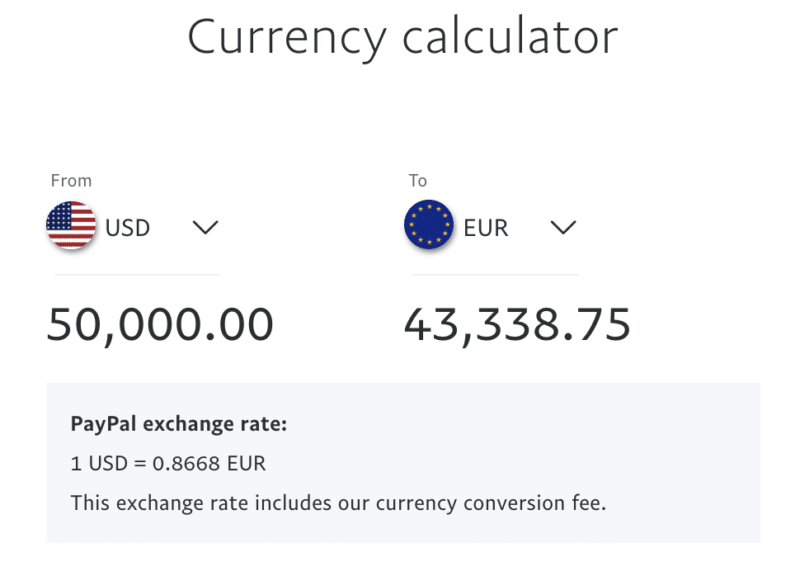
So for $50,000 PayPal will offer us €43,338. On the other hand, using the rate from a local bank, I get a significant difference: €43,775. And that’s just a local old-fashioned bank, not one of the dedicated currency conversion companies like Wise.

Wise would, in fact, give us €44,378, more than a €1,000 difference compared to PayPal, while Currencyfair would give us ¢44,332, which is also significantly better than PayPal.

I personally find it unacceptable to drop a thousand euros like that. This is why I will continue to withdraw using the silly method of withdrawing $2,500 at a time, simply because the total cost is still much lower. Using that method, as I showed you in another post, you can get PayPal to send USD directly to your credit card, whatever its currency.

Before we continue, it would be a good move on your end to check whether other services like Wise or Revolut would be an even better fit for you than PayPal. In general, I recommend trying to find an alternative to using PayPal for whatever you are trying to do, since PayPal has terrible customer support and charges high fees.

Withdrawing to Cards

In the case of cards, you can ask PayPal to switch off automatic currency conversion, and have the conversion happen on your bank’s side, which will give you a better rate. I wrote about how to do this in my earlier post on currency conversion and PayPal.

The funds arrive at your bank in USD, bypassing PayPal’s currency conversion entirely. This means your bank performs the conversion (if needed), often at a significantly better rate.

The earlier $2,500 limit no longer appears to apply universally. With my Wise USD Visa, I was able to withdraw up to $3,000 in a single transaction. With my local bank’s card, the limit was $10,000 per withdrawal. These amounts may vary depending on account age, history, and the card issuer, so your experience might differ slightly.

While there is still a $2.50 fee per card withdrawal, avoiding PayPal’s FX rate more than makes up for it if you’re moving substantial sums. This method is currently the most cost-effective way to preserve your PayPal USD earnings within the European banking ecosystem.

If your bank does not provide good conversion rates, consider using digital banks such as Revolut, Wise, and N26, which often offer much better FX rates and USD balance support. Opening an account with these platforms is free and typically very fast.

Withdrawing with no currency conversion at either end: I have lately been successfully withdrawing USD from my European PayPal account directly to my Wise USD Visa card. The funds arrived in full, in USD, with no currency conversion applied at either end. This confirms that it’s possible to preserve the original currency entirely when withdrawing to a properly configured USD card, making Wise one of the best options currently available for this use case.

Buying Crypto with PayPal

Another compelling strategy in 2025 is to buy cryptocurrency directly using your PayPal balance instead of withdrawing to a bank account or card. This approach avoids both withdrawal fees and PayPal’s unfavorable currency conversion altogether.

Several crypto platforms, including Binance, now support PayPal deposits. That means you can use your USD PayPal balance to buy Bitcoin, Ethereum, or other crypto assets instantly. This method is ideal for those looking to stack crypto over time and bypass the traditional banking layers completely.

As always, be cautious when converting large sums and use reputable exchanges. But if you’re crypto-savvy and bullish long-term, this route can be both profitable and efficient.

Binance-Banner

You can also read my full review of Binance to learn more about this crypto exchange.

Buy Bitcoin with Binance

This withdrawal method is extremely popular at the moment, as people worldwide seek to get themselves some Bitcoin or Ethereum due to their excellent future price prospects.

Withdrawing to a Local Bank Account

Withdrawing to a local bank account does not present any limits, so you can pull out that $100k without any problems at one go, however, you will be hit by PayPal’s bad exchange rate plus currency conversion charges. It is usually easy to open a USD account with your local bank, the big problem is that PayPal will not allow you to transfer USD from your PayPal balance into your local USD account if you are based in Europe, as they consider all European bank accounts as Euro-based.

Note that in April 2020 I was able to add a USD account to my PayPal business account, so there seems to be a way to get a non-Euro bank account added. I had to ask PayPal to add it manually, as the link in the dashboard did not let me do it. I will be testing a few withdrawals with this method and will update the section below if I see that it becomes more advantageous to withdraw to the USD bank account instead of the debit card.

Real Example – Withdrawing to Card vs Local Bank Account

As an example at the time of writing this article, if you transferred $10k out of PayPal via a bank transfer to a local bank in Malta (the country where my bank is account is located in), you would have ultimately received €8,839 in the bank account. My bank does not charge any fees for currency conversion.

On the other hand, if you were to withdraw that same $10k out of PayPal to a debit/credit card linked to the same account, you would get €8,911. That amount is after deducting PayPal’s card withdrawal charge ($2.50/€2 per withdrawal, up to a max of $2,500 per withdrawal; hence four withdrawals would be needed in this case to get $10k out).

The local bank was using 0.8921 as the exchange rate between USD and EUR.

PayPal, on the other hand, was using 0.8839, a significantly different rate.

PayPal includes the charges within the exchange rate, so if you accuse them of having a really bad exchange rate their excuse will be that it includes the currency conversion fees.

At the end of the day then, we would be better off when withdrawing to a card by €72. 

Not that small of an amount, especially if you start considering transferring higher amounts. The difference would be around €700 on a $100k transfer, which is ridiculous.

Other Options

The difficulties detailed above affect every country in the world except for Canada. In Canada, users have found a loophole that allows them to perform USD to USD transfers without any charges. See here and here. Once again I had this confirmed by a PayPal support agent, as can be seen in the email excerpt below:

While not being familiar with all of our 200+ countries’ user agreements, I am fairly confident saying that Canada is the only country we have with an exception that allows a local USD denominated bank to be added and used.

I believe this is also related to how the US and Canadian bank network is cooperating. Regardless, this is not something we offer to a Maltese account, other than if you had an actual bank account registered in the US to withdraw USD to.

There are some other options one could explore:

  1. Open a non-resident Canadian bank account with RBC
  2. Open a Canadian PayPal account connected with an HSBC bank account in Malta
  3. Use Etrade
  4. Open a US bank account

Opening a Canadian bank account with RBS is easier than opening a US bank account. I don’t have much experience in this area except checking if it’s possible and confirming that it is. What one would do then is use the routing number of that bank account to add it as a US bank account within PayPal and withdraw money into the RBS account. Then one would use Wise to transfer the funds to a Maltese bank account. I am still checking to confirm 100% whether PayPal would allow this setup on a Maltese bank account or not.

Opening an Etrade account and withdrawing money to it is also another option that I’ve seen being discussed, and again I need to look into it in more detail.

The last option would, of course, be to open a USD account with a US bank, something that is easier said than done. Usually, a Social Security Number (SSN) is required, however, some banks allow you to open an account without it when visiting the branch in the US. There might still be limitations though (for example, no bank transfers possible) which would limit the practicality of such an account for my particular desired usage. Some people have also asked me whether it is possible to open a US bank account for their non-US company. As far as I know this is impossible unless you are going to deposit a few million dollars into that account.

If you have found a solution I’d love to know how you managed, please go ahead and leave a comment!

  1. Are You Losing out from PayPal’s Exchange Rates?
  2. 🤔 Which PayPal Account is Best for You?
  3. đź’¸ Changing Your PayPal Withdrawal Currency
  4. đź’¸ Understanding PayPal Cross Border Fees
  5. How to Withdraw From PayPal into a Maltese Bank Account
  6. đź’ł Withdrawing Money From PayPal for Non-US Accounts
  7. Which PayPal E-Commerce Checkout Service Should You Use?
  8. 🤔 Should You Open Separate PayPal Accounts for Each of Your E-Commerce Stores?
  9. 🆚 PayPal VS Wise Borderless
  10. đź’ł Linking Virtual Bank Accounts and Cards to PayPal (Revolut, Wise etc)
  11. How to Change Ownership of a PayPal Account

Filed under: Banking, Money

How to Withdraw From PayPal into a Maltese Bank Account

Last updated: January 10, 202320 Comments

paypal_logo

Note that in April 2020 things seem to have changed on PayPal’s end and they now allow adding a USD bank account based in Malta as well as permit a higher limit on debit card transfers, although I’m not sure what the new limit is.

In a recent development PayPal has implemented bank account withdrawals to people holding a PayPal account based in Malta. Prior to this development, the only possibilities for withdrawing money were the following:

  • Withdrawing to a credit card
  • Withdrawing to a US bank account

The big problem with withdrawing to a credit card is that it is limited to $2,500 at a time so it is very inconvenient for high volume sellers. Moreover there is a charge per withdrawal, so the fees quickly escalate.

PayPal’s automatic currency conversions (at disadvantageous rates) when withdrawing are another big issue. You’ll find many sites dedicated to PayPal-bashing because of this.

Since in Malta you cannot get a credit card for an account denominated in US dollars, sellers are stuck with automatic currency conversions (either on the PayPal side, or their own bank) from USD to EUR when withdrawing money to their credit card. Of course, I’m assuming that sales are being done in USD. Since the dollar is the de facto web currency, this is the case for most online shops.

With this new development I was hoping to open a USD bank account in Malta and withdraw USD from PayPal into this bank account, thus avoiding currency conversion altogether.

In my ideal scenario I would have then been able convert the money at will and possibly even bypass the bank’s charges by using Wise. Alas, this was not to be. After further questioning, the PayPal support agent informed me that the automatic currency conversion would still happen and they do not allow non-Euro denominated bank accounts from Malta to be linked to a Maltese user’s profile:

Do bear in mind that we would only offer the option to use an EUR denominated bank account at this time.  Which means that even if you add and use an USD based account, that it would automatically have funds converted to EUR upon withdraw.

For that specific matter, I cannot really recommend the use of an USD account, as you are not able to directly withdraw into it without otherwise having a double conversion take place.

So given the situation I’ll probably stick to withdrawing money to my card as with that method I can bypass the automatic currency conversion on PayPal’s side.

[Read more…]

  1. Are You Losing out from PayPal’s Exchange Rates?
  2. 🤔 Which PayPal Account is Best for You?
  3. đź’¸ Changing Your PayPal Withdrawal Currency
  4. đź’¸ Understanding PayPal Cross Border Fees
  5. How to Withdraw From PayPal into a Maltese Bank Account
  6. đź’ł Withdrawing Money From PayPal for Non-US Accounts
  7. Which PayPal E-Commerce Checkout Service Should You Use?
  8. 🤔 Should You Open Separate PayPal Accounts for Each of Your E-Commerce Stores?
  9. 🆚 PayPal VS Wise Borderless
  10. đź’ł Linking Virtual Bank Accounts and Cards to PayPal (Revolut, Wise etc)
  11. How to Change Ownership of a PayPal Account

Filed under: Money, Payment Processors

đź’¸ Understanding PayPal Cross Border Fees

Last updated: January 10, 20236 Comments

paypal_logo
In this post I’ll explain PayPal’s cross border fee system. But first, a short recap on the fees that PayPal imposes in general.

PayPal charges fees whenever a transaction takes place. The one charge that is always present is PayPal’s own fee which goes towards paying off the processing of credit card payments.

Visa, MasterCard and American Express charge PayPal for every payment they process, and so they need to pass this fee on to sellers to cover their costs. They also need to make a profit on each transaction so part of that fee goes towards that purpose.

To recap, these are three instances that will trigger PayPal charges:

  1. When you receive money from a purchase.
  2. When you receive payments from outside your country or region.
  3. When you send personal payments using a credit card. The sender determines who pays the fee.
  4. When you withdraw money to your debit/credit card.

I am mostly concerned about the accepting payments for your business with PayPal, so I won’t be discussing the third scenario. I’ve also discussed the fourth scenario in previous articles on this site.

We’ve already talked briefly about the first scenario above, and to give you an idea here’s what you would be paying if you were based in the following countries:

  • US: 2.9% plus $0.30 USD per transaction
  • UK: 3.4% + 20p per transaction
  • Spain: 3,4 % + 0,35 EUR per transaction
  • Malta: also a Eurozone country, so fees are identical to those of Spain

As a side note, note that is very advantageous to have your PayPal account based in the US from a fee perspective, you get to pay 0.5% less than your European counterparts on the value of the transaction and also a lower fixed fee per transaction.

Moreover, if you are based in Europe but the bulk of your customers are based outside Europe, you will also be paying the cross border fee on top of paying more in basic fees.

On top of that, if you are charging everyone in Euros, you would also be hit by a currency conversion fee from, for example, USD to EUR. More on that later in this article.

It is also worth noting that there are discounts based on volume, so lets take Spain as an example. The screenshot below shows the sales ranges and corresponding tariffs per transaction. It clearly pays to pass more transactions through PayPal every month.

As far as I remember, the bulk transaction discount won’t be automatically applied, you need to ask for it buy opening a support ticket with Paypal.

spain paypal volume discounts

The above assumes that the sales were made within the same country that you have your PayPal account set up in. So for example a US seller selling to a US customer or a UK seller selling to a UK customer.

Cross border transactions, for example a UK seller selling to a US customer, trigger cross border fees, which is what I want to talk about in this article.

[Read more…]

  1. Are You Losing out from PayPal’s Exchange Rates?
  2. 🤔 Which PayPal Account is Best for You?
  3. đź’¸ Changing Your PayPal Withdrawal Currency
  4. đź’¸ Understanding PayPal Cross Border Fees
  5. How to Withdraw From PayPal into a Maltese Bank Account
  6. đź’ł Withdrawing Money From PayPal for Non-US Accounts
  7. Which PayPal E-Commerce Checkout Service Should You Use?
  8. 🤔 Should You Open Separate PayPal Accounts for Each of Your E-Commerce Stores?
  9. 🆚 PayPal VS Wise Borderless
  10. đź’ł Linking Virtual Bank Accounts and Cards to PayPal (Revolut, Wise etc)
  11. How to Change Ownership of a PayPal Account

Filed under: Money, Payment Processors

đź’¸ Changing Your PayPal Withdrawal Currency

Last updated: March 21, 202489 Comments

paypal_logo

I’ve already written about how to avoid losing money from PayPal’s disadvantageous exchange rates when withdrawing money from your PayPal account to your local bank account, but in this post, I will be showing the exact process that is used at this point in time (June 2014) for anyone who wants to do the same. Unfortunately, you won’t find this information anywhere on PayPal’s website, so I had to figure things out myself by contacting their support staff.

First of all, a quick explanation of why I wanted to change my withdrawal currency. My local bank accounts are in Euro and since my business is based in Malta I am only allowed to withdraw money to the credit card issued by my bank or to a Euro bank account.

Sadly there is no option to have a credit card account in USD. Therefore what was happening was that whenever I withdraw from PayPal (where most of my funds are in USD), the PayPal system would automatically convert from USD to EUR to match my local bank account. The problem is that the rates PayPal uses are much worse than the conversion rates at my local bank. So I wanted the conversion to happen on the bank’s side rather than PayPal’s.

Luckily it turns out to be easy to do. All you need to do is notify PayPal manually that you want that particular credit card to receive USD rather than EUR, and you can do this by opening a support ticket from PayPal’s website. Below I am reproducing the reply I got from PayPal when I asked them to change my withdrawal currency:

Thank you for contacting PayPal regarding questions about the withdrawal options for your Business account in Malta.

For bank withdrawals, you can only add a US bank account to your Business account, and then withdraw your PayPal USD balance to there.

For credit card withdrawals into USD, we can change the currency for your cards added to your account into USD on your request. If you wish to do this, please confirm the last 4 digits of the card that you want to be changed to USD and we will then update this in our system. This will also resolve any currency conversion loss for you when making withdrawals.

Another annoying thing for me is the $2,500 limit for every withdrawal. There is a charge for every transaction, so it is not only inconvenient to be limited in this way, but I am also getting charged for multiple transactions when I could have more easily done one. Sadly there isn’t a solution to this latter issue. This is what the PayPal support rep had to say about my query in this regard:

Regarding your question about the 2500 USD withdrawal limit per transaction, I confirm that all withdrawal limits are overridden on your account from PayPal´s side. The 2500 USD withdrawal limit is a worldwide regulation on VISA´s side, so I regret that we cannot lift this limit. However, you can make as many withdrawals per day as you want, as long as they don´t exceed 2500 USD per transaction.

I hope this post helps clear things further for those of you who have asked me how to perform this little trick and save money on your withdrawals.

Note: If you have any questions after reading this and the several other articles relating to PayPal on this site, please leave a comment or contact PayPal directly. Unfortunately, due to time constraints, I am unable to offer any advice over email so all emails related to PayPal will remain unanswered.

  1. Are You Losing out from PayPal’s Exchange Rates?
  2. 🤔 Which PayPal Account is Best for You?
  3. đź’¸ Changing Your PayPal Withdrawal Currency
  4. đź’¸ Understanding PayPal Cross Border Fees
  5. How to Withdraw From PayPal into a Maltese Bank Account
  6. đź’ł Withdrawing Money From PayPal for Non-US Accounts
  7. Which PayPal E-Commerce Checkout Service Should You Use?
  8. 🤔 Should You Open Separate PayPal Accounts for Each of Your E-Commerce Stores?
  9. 🆚 PayPal VS Wise Borderless
  10. đź’ł Linking Virtual Bank Accounts and Cards to PayPal (Revolut, Wise etc)
  11. How to Change Ownership of a PayPal Account

Filed under: Money, Payment Processors

How to Save Money on Currency Conversions and Overseas Transfers in 2026

Last updated: January 15, 202654 Comments

There are alternatives to using high street banks for converting and sending money abroad.

High street banks are being threatened by leaner fintech companies with better technology that provide a better service at a lower cost. That’s a statement that most of us have heard from one source or another over the past few years.

The two most well-known services are Wise and Currencyfair. Of the two, Wise is my favorite.

Wise

transferwise currency conversion

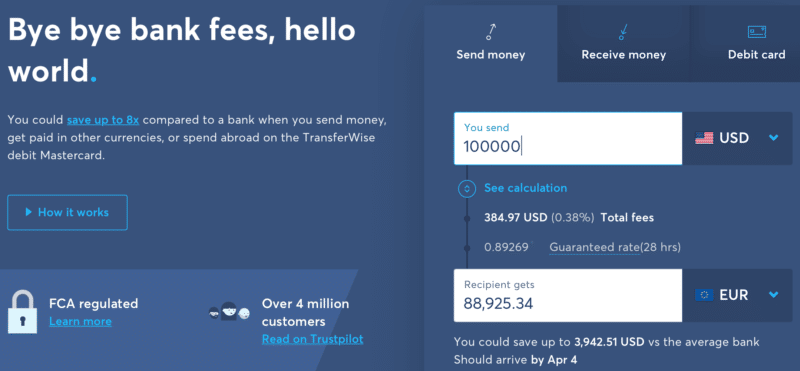
Sending money abroad is deceptively expensive, thanks to the hidden fees we’ve all been forced to pay. Now Wise lets expats, foreign students and businesses transfer money wherever it’s needed, at the lowest possible cost. No hidden fees, no headache.

Sign up to Wise

Let’s see how that translates into a real-life example.

Converting $100,000 to Euros

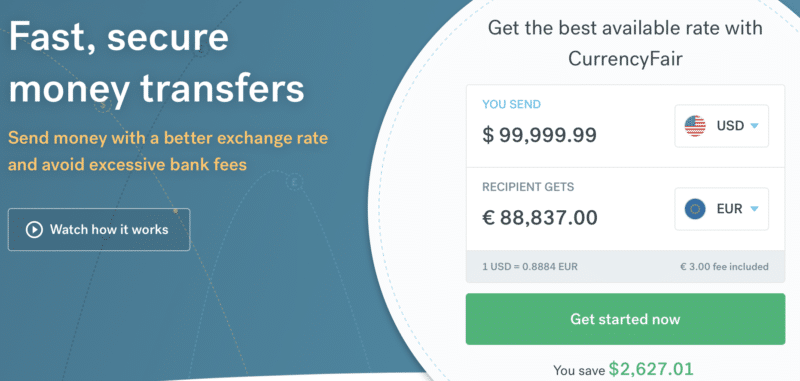
Let’s say we need to convert $100,000 into euros. We’ll pitch a typical high street bank against two well-known currency conversion services: Currencyfair and Wise.

I recently did some research about exchange rates offered by Maltese banks, when making a USD transfer, which automatically gets converted to Euro upon arrival in your bank account.

Interestingly enough, almost all banks offered a rate 0.745 Euro for every 1 USD. Only HSBC offered a worse rate, giving out 0.741 Euro for every 1 USD. I’ve also included the PayPal conversion rate for reference.

Bank buys USD
HSBC1.3504
BOV1.3426
APS1.3402
Banif1.3409
Lombard1.3402
PayPal1.3636

This might not make much difference on small amounts, but when we deal with a few thousand dollars the difference quickly adds up. I monitored the rates over a few weeks and HSBC consistently offered worse rates. I’m not entirely sure why there is this discrepancy and will try to investigate further.

1000 USD5000 USD
HSBC7403702.60
BOV7443724.12
APS7463730.79
Banif7453728.84
Lombard7463730.79
PayPal7333666.67

Here are some handy links to the exchange rates offered by the main banks in Malta:

  • HSBC Exchange Rates
  • Bank of Valletta Exchange Rates
  • Banif Exchange Rates
  • Lombard Exchange Rates
  • APS Bank Exchange Rates

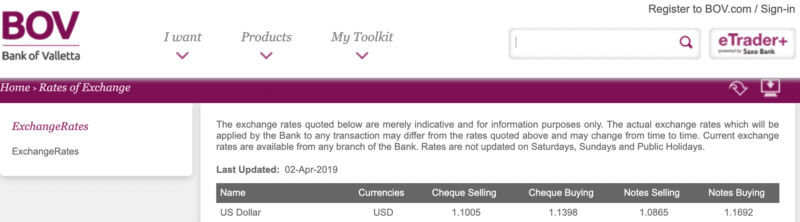
I picked two Maltese banks, HSBC and BOV. Here are their advertised rates:

BOV exchange rates

HSBC exchange rates

Currencyfair

Wise

Having checked all the rates, let’s have a look at the final results.

Here’s what each Maltese bank will give us in return for our USD:

  • BOV: €87,734
  • HSBC: €87,039

Amazingly, between the two leading banks in Malta, we see a difference of €700 for the same simple service. Pretty bewildering if you ask me. I believe that both banks also charge a fee, although I was unable to locate the pricing for currency conversions on their website.

Let’s move on to the online currency conversion giants:

  • Currencyfair: €88,837
  • Wise: €88,925

Note that Currencyfair improves on the BOV’s rate by €1,100, and Wise by €1,200. You must also keep in mind that I’ve seen banks that provide much worse conversion rates and extra fees for conversion. Even so, the differences between the fintechs and the Maltese banks are pretty impressive, and I, therefore, see it as a no-brainer to go for either Wise or Currencyfair for currency conversions.

Convert currency with Wise

And now let’s look at some more exotic options that can give you even better results with some extra work on your end.

Bonus tip: Negotiate a Better Rate with Your Bank

If you are processing a significant volume of currency conversions every year (I’d say $50,000 and above) it would make sense to reach out to your bank and ask if they are open to negotiating a better rate for you. This is a win-win situation and most banks will be happy to give you a favorable rate.

As an example, I was able to negotiate a special rate with my bank to convert from USD to EUR.

By way of example, for today they quoted a Preferential Rate of 1.0998 when the Official Buying Rate was 1.1138 (Reference or Average Rate was 1.0946).

Just to give you an example of the effect of this concession, let’s take an example transfer of US$ 66,000. The conversion of this amount would work out as follows:

Interbank rateUS$ 66,000 @ the average rate of 1.0946
= Eur 60,296
Conversion at the
Quoted Buying Rate
US$ 66,000 @ the buying rate of 1.1138
= Eur 59,256
Conversion at the
Preferential Rate
US$ 66,000 @ the preferential rate of 1.0998
= 60,011

This means that I gain the difference between Eur 59,256 and Eur 60,011 or Eur 1,040 and Eur 285 = Eur 755.

How do you manage your currency exchanges?

How to Time PayPal Withdrawals to Get the Best Currency Exchange Rate

This is for all those of you who don’t have a US-based bank account but work online and receive payments via PayPal.

At some point, you will want to transfer your PayPal funds to your local bank account so you can withdraw and use your hard-earned money.

However, you could be making a fundamental mistake during the process of withdrawal. Actually, I’ve been doing it myself for many years. I felt really dumb when I realized.

As you know, exchange rates are always fluctuating, so your aim is to get the best deal when transferring money from PayPal to your bank account.

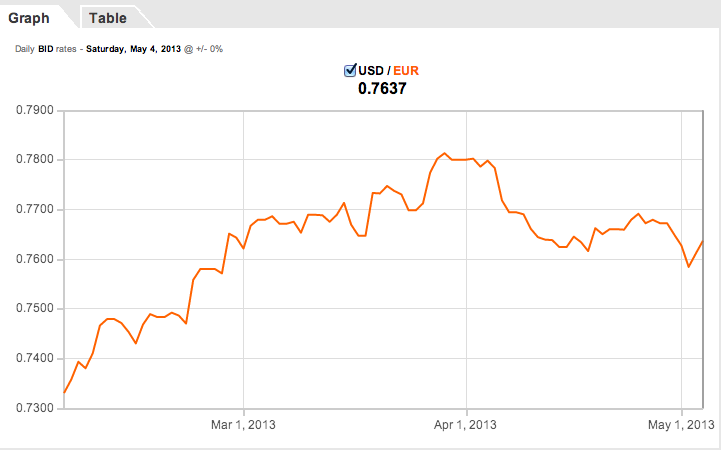
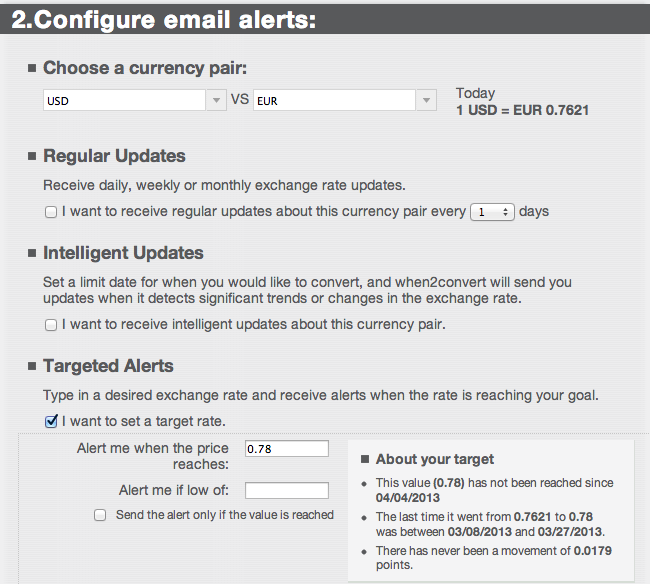
Let’s say we want to transfer US dollars to Euro, which is what I do every so often. What I do nowadays is to first check the exchange rate, and also historical rates via this website. That gives me an idea if today is a good day to make the transfer or not. Looking back at the historical rates of the past 3 months, I then decide on a target rate I want to aim for. At present my target rate is 1 USD = 0.78 EUR.

Historical Exchange Rates OANDA

Historical exchange rates

With that figure in mind, I then head over to XE and set up email alerts. Now as soon as the exchange rate climbs to 0.78 I will immediately get an email and that’s when I will make my withdrawal from my PayPal account to my local bank account.

When2Convert Currency converter and email alerts

Setting up email alerts for my desired conversion rate

When2convert is an excellent service in my opinion, because it automates the whole thing and makes it very easy for me. Before I used to check the exchange rates every couple of days (every day is just too tedious), and sometimes I used to miss a good day. So I knew I need an automated shortcut of doing this checking. Luckily I found this site, and I hope you find it useful too.

Update: I found a similar tool (also free) at https://www.specificfeeds.com/Free-Forex-Signal-and-Exchange-Rate-Tracker and there you can not only define strike prices, but you can select to get updated every time the EUR/USD rate changes by 0.02 points or so, so that it’s not a one-time notification, but you always know if there have been significant changes without spending too much time to checking it every couple of days.

Another option is to just withdraw every month on a specific day, and in this way you eliminate the hassle of trying to time the forex market to your benefit. You might lose out sometimes, but it might be more important for you to have money coming in on a regular basis, so you have to factor in the pros and cons.

Do you have any other related tips you’d like to share? Let me know in the comments section below!

Note: If you have any questions after reading this and the several other articles relating to PayPal on this site, please leave a comment or contact PayPal directly. Unfortunately, due to time constraints, I am unable to offer any advice over email so all emails related to PayPal will remain unanswered.

Bitcoin – the Cheapest Way to do International Currency Exchanges and Remittances

bitcoin-gold

Crypto stablecoins as well as Bitcoin can be an ideal way of bypassing the banks entirely for your currency conversions.

Let’s review briefly what is needed in an international currency conversion/money transfer. Suppose my friend/relative/client wants to send me $1,000 from the US. Being in Europe, my bank account is denominated in Euro, so at some point that $1,000 needs to change into Euro. The big question is how many Euro will end up hitting my bank account.

The traditional and most common way of doing international money transfers is to let the banks handle the conversion. This is called an international wire transfer.

Of course, other ways of sending money exist:

  • PayPal
  • Wise

International wire transfers are expensive, and PayPal is just as expensive or slightly cheaper. Wise have made it their mission to offer cheaper transfers, but they are not as easy to initiate as a bank transfer of PayPal transfer. PayPal is probably the easiest method out of all the ones we’re considering.

Once I was made aware of the possibility of using Bitcoin I decided to try it out. Therefore, I opened an account at the Bitcoin exchange Coinbase, and got myself verified. Coinbase has several levels of verification and I did the Tier 3 verification. You need to do Tier 1 and 2 before you are allowed to get Tier 3 verified. Verification is important due to KYC rules that exchanges need to abide with. Once you are Tier 3 verified you can deposit and withdraw up to $25,000 on a daily basis. The monthly limit for withdrawals/deposits is $200,000. That’s plenty of fiat currency to play with right there.

Opening an account with Coinbase is free. Once the account was open and I was verified (all this was done in a day), I obtained a Bitcoin deposit address and sent it to my friend. He proceeded to send me the equivalent amount of USD in Bitcoin. I received the Bitcoins just a few minutes later. I then converted to EUR and initiated a transfer of the full amount to my local bank account. The Euro amount arrived in my bank account the very next day.

I had checked the spot rate before making the USD to EUR transfer and the money that I got in my bank account was actually higher than the result given at that day’s spot rate, so I ended up making a slight profit of a few euros on the exchange. The most important thing however was that I managed to do away with all the hefty charges that Paypal and the banks charge.

Here are all the fees I incurred:

  • Coinbase: Bitcoin deposit – FREE
  • Coinbase: Exchanging Bitcoin to EUR – 0.26%
  • Coinbase: EUR SEPA Withdrawal to my bank account – €0.09
  • Bank: EUR deposit – FREE

Note: If you want to buy Bitcoin from Coinbase there is a commission of 0.16%. So if you convert $1,000 to Bitcoin you will get charged $1.60.

That’s an absolute steal comparing to what banks or PayPal charge. One of the main reasons I wanted to try this out was to verify that this really worked as described and that there would be no hidden charges. I’m pleased to report that it worked exactly as promised.

Coinbase’s fee schedules are tier-based: the higher the volume you trade in your account, the lower your fee on subsequent trades (once the next volume tier for the currency pair is reached). Other fee considerations:

  • Fees are charged on a per-trade basis.
  • Fees are calculated as a percentage of the trade’s quote currency volume (by default). Certain pairs allow the fee to be calculated based on the trade’s base currency, which can be specified when ordering using the Fee Currency option.
  • User fee volume levels are measured using the equivalent market value of the listed “Fee Volume Currency” at the time of the trade. Note that this currency may be different from the pair’s base or quote currency.
  • User fee volume levels are measured and applicable for trades occurring in the last 30 days only.

One thing you need to be aware of is the possibility of making a loss/profit due to the volatility of Bitcoin. The few seconds/minutes it takes you to make the conversion from Bitcoin to EUR and to ask for a withdrawal to your bank can be enough for significant changes to take place.

If volatility is an issue for you, you can use stablecoins instead. Most exchanges have stablecoins in the major currencies that are trustworthy enough especially for quick currency conversions.

Filed under: Banking, Money

  • « Previous Page
  • 1
  • …
  • 30
  • 31
  • 32
  • 33
  • Next Page »

Latest Padel Match

Jean Galea

Investor | Dad | Global Citizen | Athlete

Follow @jeangalea

  • My Padel Experience
  • Affiliate Disclaimer
  • Cookies
  • Contact

Copyright © 2006 - 2026 · Hosted at Kinsta · Built on the Genesis Framework